
Day One Journal Review 2026: Free Plan, Silver and Gold
Day One is a long-running journal app for iPhone, iPad, Android, Mac, Windows and the web, owned by Automattic. In March 2026 it renamed its Premium plan to Silver and added a Gold plan with AI tools. Here is what the free plan gives you, what each paid plan adds, and who it suits.
Day One is a polished, private journal app with end-to-end encryption on every plan and a generous free Basic plan: unlimited text entries and journals, one photo per entry, on one device plus the web app. Silver ($49.99 a year) adds every device, more photos, video and audio. Gold ($74.99 a year) adds AI chat and summaries. If you mostly write text and want a diary beside your to-do list in any browser, RytePad is a lighter option.
 By RytePad StaffPublished

This Day One journal review looks at the app the way most people meet it: as a free diary on their phone, with an upgrade prompt waiting. In 2026 Day One renamed Premium to Silver and added a Gold plan built around AI. If you already know you want something else, our list of Day One alternatives compares other journal apps.
The question here is simpler: how far does the free plan go, and which paid plan is worth it? Everything below comes from Day One's own plans page, help guides, release notes and App Store listing, checked on 25 Nov 2026.
Day One at a glance: the free Basic plan vs Silver and Gold
Day One Basic
Best if you write mostly text on one phone and want it private.
- Unlimited text entries and journals
- 1 photo per entry
- End-to-end encryption, templates, prompts and streaks
- Shared journals, PDF and JSON export
Silver and GoldPaid
Best if you journal in the app on two or more devices, or keep a photo and video record.
- Unlimited devices
- 30 photos or videos per entry, audio and transcription
- Drawings, scanning, email and SMS entries
- Gold only: Daily Chat and AI summaries
Day One features: what works and what to watch
Five areas decide whether Day One fits you. Each ends with a one-line verdict.
1Writing and media
Every plan has unlimited text entries, unlimited journals and Markdown formatting. Scan to text and location tagging are free too. Day One's help guide says there is no limit on the total number of entries, journals or media you keep, on any plan.
The latest iPhone update, version 2026.24, saves your writing every few seconds.
Basic allows 1 photo per entry. Video, audio recording and transcription, drawings and scanning documents to PDF need Silver or Gold, which allow 30 photos or videos per entry.
If your journal is mostly pictures, you will feel the free limit quickly.
2Prompts, templates and streaks
The habit tools are all free: a daily prompt, a prompt gallery, journal templates, reminders, journal streaks and On This Day memories. The latest iPhone update also added a Thanksgiving prompt pack.
The App Store listing says reminders can come as phone notifications or by text message.
Writing an entry by email or SMS is a paid feature. Prompts help you start, but they cannot make you write. New to the habit? Our guide on how to start a daily journal covers the first two weeks.
3Devices and the web
Day One runs on iPhone, iPad, Apple Watch, Android and Mac, with a Windows app and browser extensions for Chrome and Firefox. The web app at dayone.me is free on every plan.
Its web app FAQ says the web app does not count toward Basic's one-device limit, so a free user can write on one phone and in a browser.
Basic covers one device plus the web app. Using two apps at once, such as an iPhone and a Mac, needs Silver or Gold.
The web app has no Map view, audio transcription or entry duration. The Windows app loads the web app, so it has the same gaps.
4AI features
Gold, added on 30 March 2026, brings Daily Chat: a guided AI conversation about your day that becomes a journal entry. It also adds "go deeper" prompts, entry summaries, title suggestions, image generation and Apple Intelligence features.
Every AI tool is Gold only, and Day One says they have daily usage limits without stating the numbers. If you journal to think on paper rather than to chat, you can skip Gold entirely.
5Sharing, export and printing
Shared journals, for family or a small group, are on every plan. So are export to PDF and data export as CSV or JSON, which means your entries are never locked in.
Day One can also print your journal as a hardcover or paperback book.
Printed books are full price on Basic, 25% off on Silver and 35% off on Gold. Collections and the Zapier, IFTTT and Strava connections are paid.
Day One Basic vs Silver vs Gold: plans table
| Feature | Basic | Silver | Gold |
|---|---|---|---|
| Price | $0 | $49.99 a year | $74.99 a year |
| Devices | 1, plus the web | Unlimited | Unlimited |
| Text entries and journals | ✓Unlimited | ✓Unlimited | ✓Unlimited |
| Photos per entry | 1 | 30 | 30 |
| Video, audio and transcription | ✗ | ✓ | ✓ |
| End-to-end encryption | ✓ | ✓ | ✓ |
| Prompts, templates, streaks, reminders | ✓ | ✓ | ✓ |
| Shared journals | ✓ | ✓ | ✓ |
| Email and SMS entries | ✗ | ✓ | ✓ |
| Drawings and PDF scanning | ✗ | ✓ | ✓ |
| Daily Chat and AI tools | ✗ | ✗ | ✓ |
| Export to PDF, CSV or JSON | ✓ | ✓ | ✓ |
| Printed book discount | None | 25% off | 35% off |
From Day One's plans page and help guides, checked 25 Nov 2026.
Day One pricing: is Silver worth $49.99 a year?
Day One's plans page lists Silver at $49.99 a year and Gold at $74.99 a year, with a one-month free trial started inside the app. Day One Premium became Silver on 30 March 2026, and Day One said existing features and pricing did not change.
Silver is worth it if you write in the app on more than one device, or if photos, video and voice notes are part of your journal. If you write text on one phone, Basic is enough, and the free web app covers the times you are at a computer.
Two practical points from the plans FAQ. Upgrades and billing changes happen on the platform where you first subscribed, such as Apple or Google. And if you cancel, you go back to Basic and keep your entries.
Privacy and security: end-to-end encrypted, with one catch
Day One's encryption FAQ says end-to-end encryption is on by default for journals created after version 4.2. Entries, photos and other media are encrypted on your device with a key that Day One never sees, so its staff and servers cannot read them.
The catch is the key. If you lose your encryption key, Day One cannot recover your synced journals. The key can be backed up to iCloud, and you can also save a copy yourself. Text backups and JSON exports are not encrypted, and older journals made with standard encryption cannot be converted in place.
Day One also offers a passcode and a biometric lock, such as Face ID or Touch ID, on every plan.
Day One pros and cons
- Unlimited text entries and journals on the free plan
- End-to-end encryption on every plan
- Prompts, templates, streaks and reminders all free
- Free web app alongside your one device
- Shared journals and full data export on every plan
- Rated 4.8 from about 119,000 ratings on the US App Store
- Basic allows one device (plus the web app) and 1 photo per entry
- Video and audio need Silver
- AI tools need Gold, with unstated daily limits
- A lost encryption key means lost synced entries
- The web app lacks Map view and transcription
A simpler, private option: RytePadAlternative
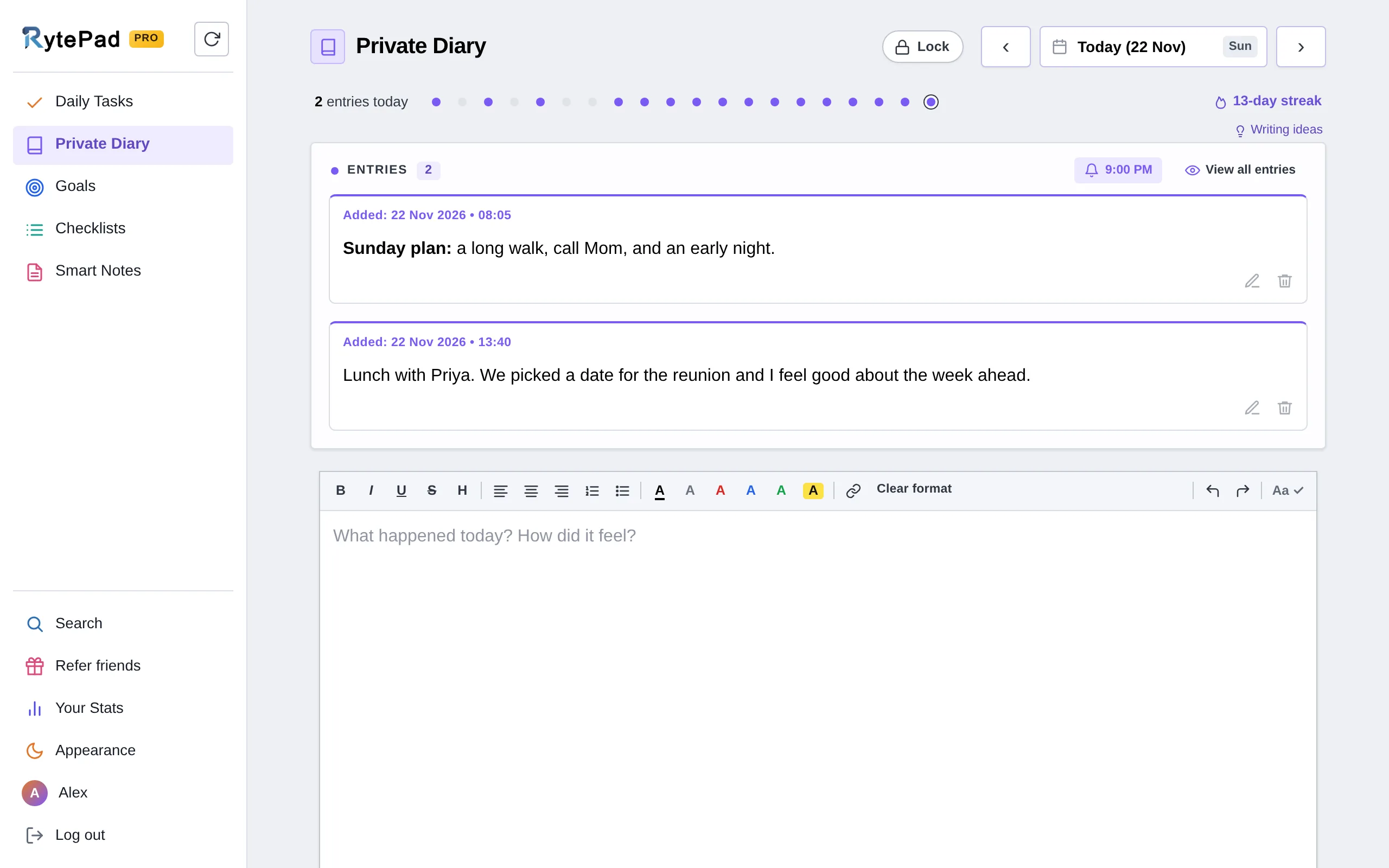
Day One is built for a rich record of your life, with photos, places and audio. If you mainly want to write a few lines each evening, RytePad's online journal is a lighter place to do it, in the same account as Daily Tasks, Goals, Checklists and Notes.
The free plan has no time limit and allows 4 diary entries a day, each up to 25,000 characters, with a formatting toolbar. A streak counts your days in a row, Remind me nudges you at the time you choose, and Writing ideas offers a question when you do not know where to start.
Entries are encrypted with AES-256 before they are stored, and there is no admin view. Pro, at $14.97 a year, removes the daily limit and adds a PIN lock on the Diary.
Being honest about the limits: RytePad is a web app with no native apps, though you can install it from your browser so it opens in its own window. It has no templates, no shared journals and no AI tools, and its entries are text only, with no photos or audio. If you want those, Day One does more.
Prefer a calm diary in your browser?
A private diary, daily tasks, goals and notes in one encrypted account. Nothing to install.
Day One strengths and weak spots
- PrivacyEnd-to-end encryption on every plan.Strength
- Free planUnlimited text, prompts, templates and streaks.Strength
- PlatformsPhone, tablet, watch, Mac, Windows and the web.Strength
- Media on free1 photo per entry, no video or audio.Mixed
- Value$49.99 a year for every device and full media.Mixed
- Key recoveryLose the key and synced entries cannot be read.Weak spot
Who should use Day One, and who should not
Choose Day One if…
you want a polished, private journal on your phone, like prompts and templates, and value end-to-end encryption. Pay for Silver if you write in the app on two devices or keep photos and voice notes; Gold only if you want to talk through your day with AI.
Visit Day OneLook elsewhere if…
you want the app on two devices, such as a phone and a Mac, for free, keep a diary beside your to-do list, or would rather not manage an encryption key. Our roundup of the best free journal apps covers more options.
Day One journal review: your questions answered
Is Day One free?
Yes. The Basic plan is free and includes unlimited text entries and journals, 1 photo per entry, end-to-end encryption, prompts, templates and streaks. It works on one device plus the Day One web app.
How much does Day One cost in 2026?
Day One's plans page lists Silver at $49.99 a year and Gold at $74.99 a year, checked on 25 Nov 2026. You can start a one-month free trial inside the app.
What happened to Day One Premium?
On 30 March 2026 Day One renamed Premium to Silver and said existing features and pricing did not change. At the same time it added Gold, a higher plan with Daily Chat and other AI tools.
Is Day One private?
Day One uses end-to-end encryption by default for journals created after version 4.2, on every plan. Your key stays on your device, and Day One cannot read your entries. If you lose the key, synced encrypted journals cannot be recovered, and text backups and JSON exports are not encrypted.
Can I use Day One on Windows or in a browser?
Yes. The web app at dayone.me is free on every plan and does not count toward the one-device limit on Basic. The Windows app loads the web app. The web app has no Map view or audio transcription.
Is there a simpler alternative to Day One?
If you mostly write text and also want a daily to-do list, RytePad keeps a private diary, tasks, goals and notes in one encrypted web app, with a free plan of 4 diary entries a day. It has no native apps, no templates and no shared journals.
Final verdict: the free plan is enough for most writers
Day One is a strong journal app. Basic gives you unlimited writing, end-to-end encryption and the habit tools for nothing, and the web app fills the gap when you are at a computer. Silver is fair value once you need a second device or a photo and video record. Gold is for people who want AI in their journal.
If you mainly want a quiet place to write each evening next to your daily list, RytePad is the lighter choice. For a short daily practice, our guide to keeping a gratitude journal is a good place to begin.
A private diary, a daily list and notes, without the clutter
One encrypted account that is ready the moment you sign in. Free to start.
Try RytePad free →Free plan with no time limit · No card · Works in any browserSources
- Day One. Choose a Day One Plan (plans, prices and FAQ). Checked 25 Nov 2026.
- Day One Help Guides. Web App FAQ and End-to-End Encryption FAQ. Checked 25 Nov 2026.
- Day One. Release Notes Archive, including "Introducing Day One Gold with Daily Chat and AI Features" (30 March 2026). Checked 25 Nov 2026.
- Apple. Day One: Daily Journal & Diary, App Store listing (US), version 2026.24. Checked 25 Nov 2026.
- RytePad. Pricing, Features, User guide and Encryption, privacy and security. Checked 25 Nov 2026.