
Journey Cloud vs Premium (2026): Which Journey Plan to Buy
Journey sells two very different paid plans. Premium is a one-time purchase for a single platform. Membership, sold as Journey.Cloud Membership, is a subscription for every device, the web app and 10GB of cloud storage. Here is what each one gets you, and which one fits the way you write.
Buy Premium if you journal on one kind of device, such as only an Android phone, and want to pay once. Buy the Journey Cloud Membership if you write on more than one platform, want the web or desktop app, or will keep more than 60 entries in Journey Cloud Sync. If you mostly write text and want a private diary in any browser, RytePad is a lighter third option.
 By RytePad StaffPublished

Journey Cloud vs Premium is the question most people hit when Journey asks them to upgrade. The two names sound like tiers of one plan, but they work in different ways. Premium is a licence you buy once for one platform. Membership, which Journey's App Store listing calls Journey.Cloud Membership, is a subscription that covers every platform and Journey's cloud services.
Everything below comes from Journey's own website, help centre and App Store listing, checked on 22 Nov 2026. If you are still deciding whether Journey is the right app at all, our Diarium vs Journey comparison sets it against a pay-once rival.
Journey Cloud vs Premium at a glance: one device or every device
PremiumPay once
Best if you journal on one kind of device and do not want a subscription.
- Rich text, themes, Throwback and audio on that platform
- Covers every device on that platform, such as two Android phones
- Journey Cloud Sync stays at the free 70MB and 60 entries
Journey Cloud MembershipEvery device
Best if you write on more than one platform or want the web and desktop apps.
- 10GB of Journey Cloud Sync and 5,000 entries
- Video, custom templates, email entries and Zapier
- 50 Odyssey AI questions a day and every coaching program
Five differences that decide which Journey plan to buy
Each area below ends with a one-line winner. Jump to the one you care about most:
1How you pay
A one-time purchase made inside the Journey app on Android or iOS. Journey's help pages do not print a Premium price; the US App Store lists it at $17.99, and prices vary by country.
The licence cannot be moved to another platform or another account, so switching from Android to iPhone means buying again.
A subscription: US$6.99 a month or US$49.99 a year on the US App Store, which notes that prices vary by country. The journey.cloud Membership page shows $4.17 a month billed annually.
The US App Store also lists a lifetime Membership for $199, paid once. Each Membership belongs to one Journey account and cannot be shared.
2Devices and the web
One licence covers one platform. A single Android licence works on several Android devices, but not on an iPhone, a computer or the web.
Journey's help pages disagree about computers. Its Premium licence article says the desktop app and the web app do not support Premium, while its plan comparison still lists a licence per platform for Mac, PC and Linux. Check inside the desktop app before you count on it.
Journey runs on Android, iOS, iPadOS, macOS, Windows, Linux, the web, Android Wear and Apple Watch, and Membership covers all of them, web services included.
It also includes the Premium features in the Android, iOS, Mac, PC and Linux apps, so members never need a separate licence.
3Cloud storage and sync
Premium does not raise the Journey Cloud Sync limit. Like the free plan, it allows 70MB of storage and 60 journal entries there, according to Journey's comparison of free and paid plans.
Sync to Google Drive is the way around it, and it is on every plan, the free one included.
Members get 10GB of Journey Cloud Sync and 5,000 entries. That is enough for more than 13 years of one entry a day.
If you outgrow it, Journey sells a separate Signature subscription with 200GB and 50,000 entries. Its help page does not list a price.
4Writing and media
On Android and iOS, Premium adds the rich text editor, themes and lock screen wallpaper, Throwback to past entries, audio files and voice recording. The iOS licence also connects to Apple Health.
You can export several entries at once to PDF or DOCX, saved to Google Drive.
Everything in Premium, plus video uploads, up to 20 photo, video or audio files per entry, 13 coloured themes and custom templates you upload to the cloud.
Members can also write an entry by sending an email, get a daily reminder by email, and export up to 1,000 entries a month to ePub or DOCX.
5AI, coaching and extras
The same as the free plan here: Odyssey AI answers 10 questions a day, coaching programs and templates are limited, and you can create 2 shared web links.
Support replies in 3 to 5 days, against limited support on the free plan.
Odyssey AI answers 50 questions a day, every coaching program is open, and you can make 50 shared web links. Zapier automation and Cloud Print are for members only.
Members also get priority support, which Journey puts at 1 to 2 days.
Journey Cloud vs Premium: comparison table
| Feature | Premium | Membership |
|---|---|---|
| Price | ✓One-time, per platform ($17.99 on the US App Store) | US$6.99 a month, US$49.99 a year or $199 lifetime |
| Platforms covered | The one you bought it on | ✓All, including the web |
| Web services | ✗ | ✓ |
| Journey Cloud Sync | 70MB and 60 entries | ✓10GB and 5,000 entries |
| Google Drive sync | ✓ | ✓ |
| End-to-end encryption | ✓On Journey Cloud Sync | ✓On Journey Cloud Sync |
| Text formatting | ✓Limited on the web app | ✓ |
| Photos and audio | ✓ | ✓Up to 20 files per entry |
| Video uploads | Not listed | ✓ |
| Throwback | ✓ | ✓ |
| Custom templates | ✗ | ✓ |
| Odyssey AI questions | 10 a day | ✓50 a day |
| Shared web links | 2 | ✓50 |
| Entries by email, Zapier | ✗ | ✓ |
| Support | 3 to 5 days | ✓Priority, 1 to 2 days |
From Journey's own pages, checked 22 Nov 2026. "Not listed" means Journey's pages do not mention it for that plan.
Pricing: Premium is paid once, Membership is about $50 a year
Premium is the cheaper route only while you stay on one platform. Add a second platform and you buy a second licence, and neither licence gives you the web app or more Journey Cloud storage.
Membership is US$49.99 a year on the US App Store, so three years come to about $150. The $199 lifetime plan on the US App Store costs about as much as four years of the yearly plan, so it only saves money from the fifth year on.
Before you buy, note Journey's refund policy: it says purchases are non-refundable, and if you cancel a subscription you keep access until the paid period ends. Moving down from Membership to a smaller plan is not offered at the moment.
Only need a private place to write?Third option
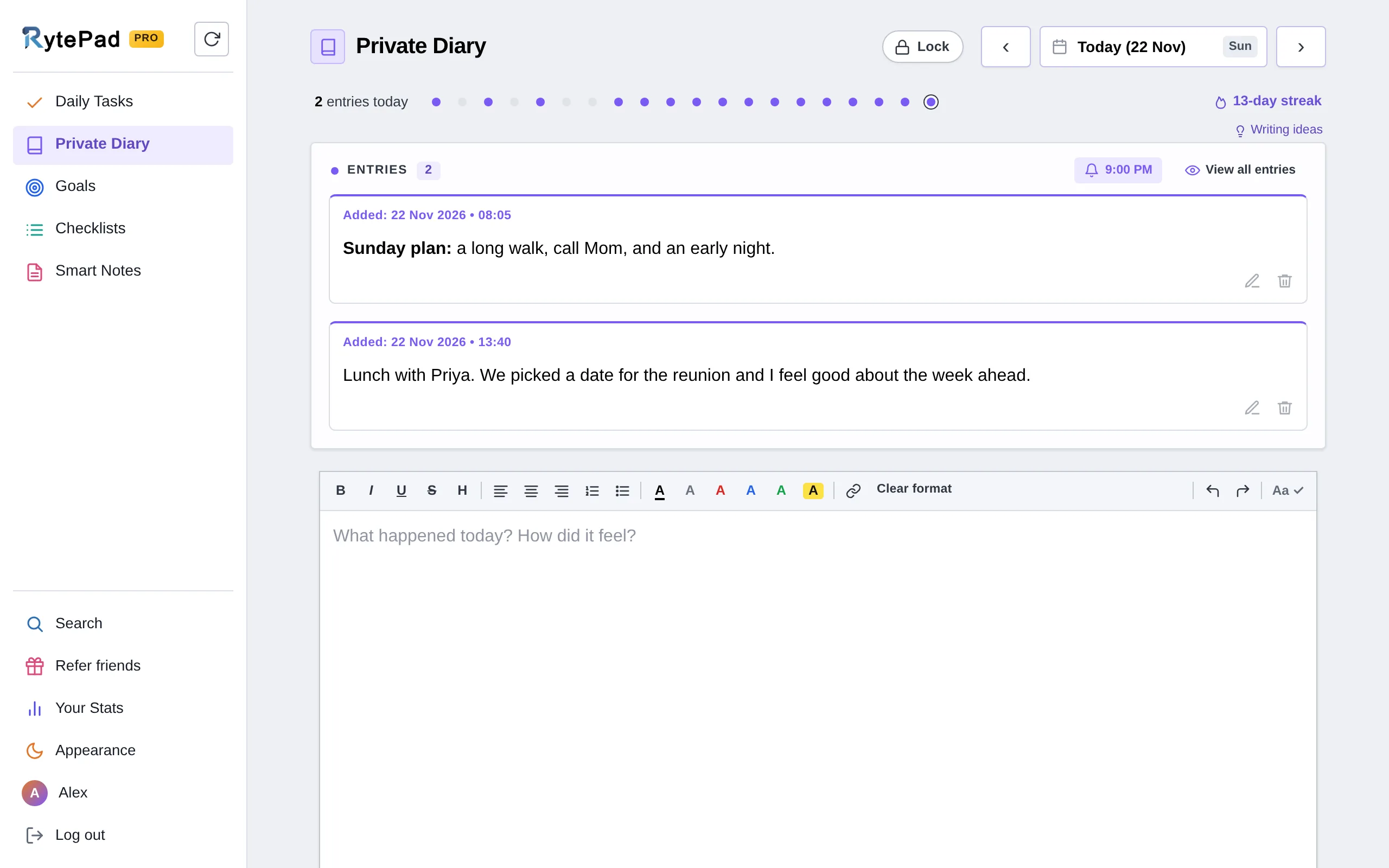
If the reason you are looking at Journey's paid plans is simply to write every day on your phone and your computer, you may not need either. RytePad keeps a Private Diary in the same account as Daily Tasks, Goals, Checklists and Notes, and the same account works in any browser.
The free plan has no time limit and allows 4 diary entries a day, each up to 25,000 characters, with light formatting. A diary streak shows your days in a row, Remind me can nudge you to write, and search finds old entries by word or date range.
Entries are encrypted with AES-256 before they reach the database, and there is no admin view. Pro, at $14.97 a year, removes the daily limit and lets you put a PIN lock on the Diary.
Being honest about the limits: RytePad runs in the browser with no native apps, though you can install it from the browser so it opens in its own window. It has no templates and no shared journals, and its pages do not list photo or audio attachments. More on how it works on the online journal page.
Prefer a calm diary in your browser?
A private diary, daily tasks, goals and notes in one encrypted account. Nothing to install.
Pros and cons of each Journey plan
Premium
- Paid once, nothing renews
- Rich text, Throwback, themes and audio
- Works on every device of that platform
- Google Drive sync and encryption still included
- One platform only, not transferable
- No web services; desktop support unclear
- Journey Cloud Sync stays at 60 entries
Membership
- Every platform, the web included
- 10GB of cloud storage and 5,000 entries
- Video, templates, email entries and Zapier
- More AI questions and all coaching programs
- About $50 a year, or $199 up front
- Cannot be shared with another account
- Purchases are non-refundable
Category scorecard: where each plan wins
- Cost on one platformA single purchase versus a yearly fee.Premium wins
- No renewalsNothing to cancel or remember.Premium wins
- Phone plus computerDesktop and web apps under one plan.Membership wins
- Journey Cloud storage5,000 entries against 60.Membership wins
- Media and templatesVideo, 20 files an entry and your own templates.Membership wins
- AI and coaching50 AI questions a day and every program.Membership wins
Who should buy Premium and who should buy Membership
Choose Premium if…
you write on one phone or tablet platform, sync through Google Drive, and want the editor, themes and Throwback without a subscription. It is also a fair way to pay for the app you use daily without committing to a yearly fee.
Visit JourneyChoose Membership if…
you switch between a phone and a computer, want the web app, store photos and video in Journey Cloud, or use the AI Pal and coaching. If the yearly fee is what puts you off, our list of Journey alternatives includes apps you pay for once.
See MembershipKeep reading: If neither plan feels right, our roundup of the best free journal apps compares more options.
Journey Cloud vs Premium: your questions answered
What is the difference between Journey Cloud and Premium?
Premium is a one-time licence for paid features on the one platform you bought it on, without the web services. Journey Cloud Membership is a subscription that covers every platform, the web app and 10GB of Journey Cloud Sync storage with up to 5,000 entries.
How much does Journey Membership cost?
On the US App Store it is US$6.99 a month or US$49.99 a year, and prices vary by country. The US App Store also lists a lifetime Membership for $199.
Does Journey Premium work on a computer?
Journey's help pages disagree. The Premium licence article says the desktop app and the web app do not support Premium, while the plan comparison lists a licence per platform for Mac, PC and Linux. Membership covers the desktop and web apps either way.
Does Premium give more Journey Cloud storage?
No. Premium keeps the free allowance of 70MB and 60 entries in Journey Cloud Sync. Membership raises it to 10GB and 5,000 entries. Google Drive sync is available on every plan.
Is the free version of Journey end-to-end encrypted?
Yes. End-to-end encryption for Journey Cloud Sync is on every plan, the free one included. You set a passphrase, search stops working once it is on, it cannot be turned off again, and a forgotten passphrase means the entries are lost.
Is there a simpler option than both plans?
If you mostly write text and also want a daily to-do list, RytePad keeps a private diary, tasks, goals and notes in one encrypted web app, with a free plan of 4 diary entries a day. It has no native apps, no templates and no shared journals.
Final verdict: Premium for one device, Membership for everything else
Premium is good value if Journey lives on one phone platform and Google Drive holds your entries. The moment you want a computer, the web app or Journey's own cloud past 60 entries, Membership is the plan that does what you expect, at about $50 a year.
If you mainly want a quiet place to write each evening, RytePad keeps a private diary beside your daily list. New to the habit? Start with our guide on how to start a daily journal.
A private diary, a daily list and notes, without the clutter
One encrypted account that is ready the moment you sign in. Free to start.
Try RytePad free →Free plan with no time limit · No card · Works in any browserSources
- Journey Support. Comparison of Free and Paid Plans, Premium license, Membership license and Signature license. Checked 22 Nov 2026.
- Journey Support. Refund & Cancellation Policy and How does Encryption Work in Journey. Checked 22 Nov 2026.
- Journey. Home page and Membership. Checked 22 Nov 2026.
- Apple. Journey: Diary, Journal, App Store listing (US). Checked 22 Nov 2026.
- RytePad. Pricing, Features and User guide. Checked 22 Nov 2026.