RytePad is a private web app for the things most people spread across three or four apps: today's to-do list, a diary, goals, checklists and notes. One login, one search, one design. Below is what each part does, what the free plan includes, and where Pro picks up.
5 toolsTasks, diary, goals, checklists, notes, one search
Free, no cardNo time limit on the free plan
$14.97 a yearPro: no limits, plus the extras
EncryptedAES-256, no admin view of your content
Daily Tasks
Free: 25 tasks a dayPro: unlimited
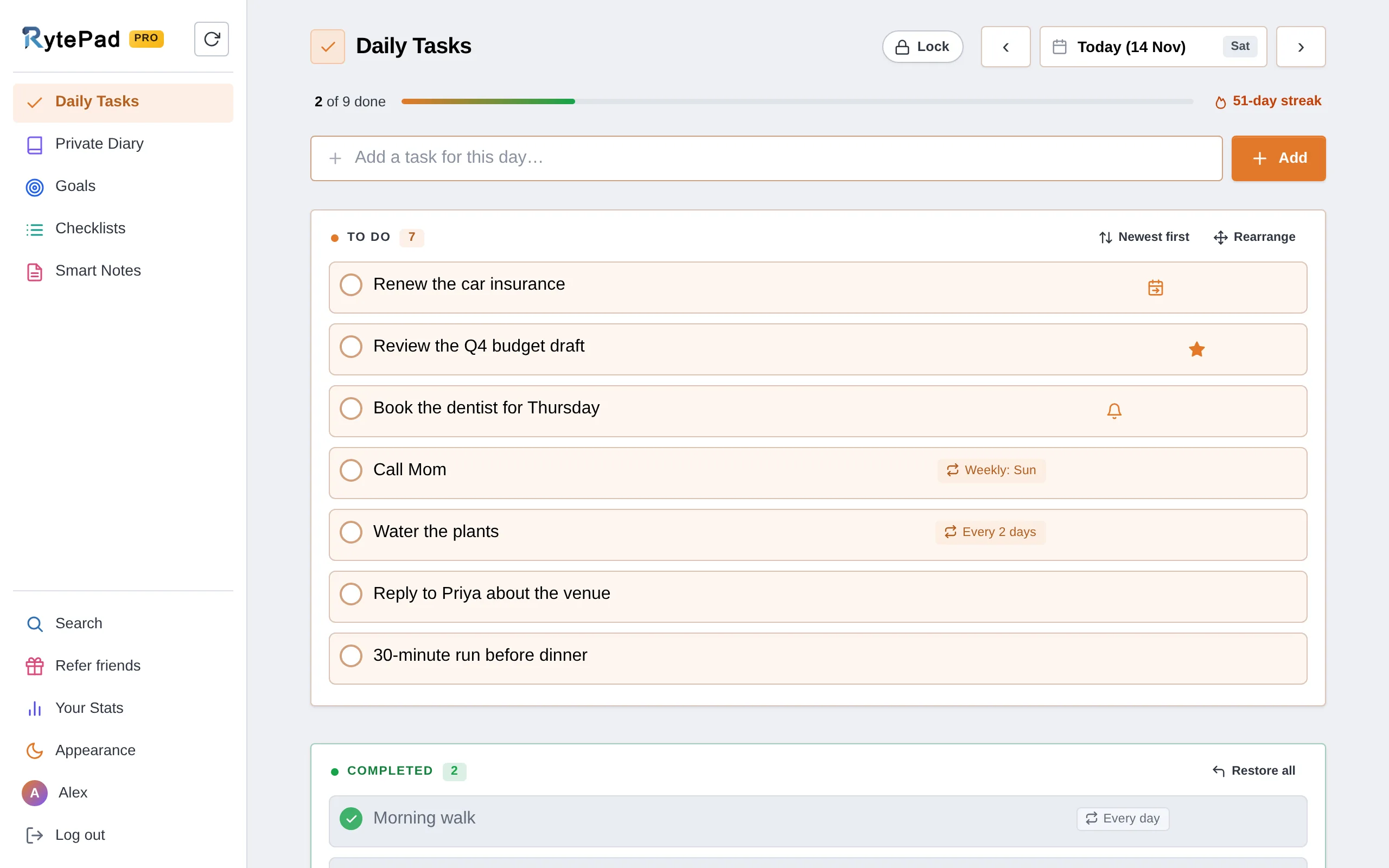
A to-do list for each day. Write today's list, plan a few days ahead, or open any past date from the calendar. Dots on the calendar show which days have tasks: orange while something is still to do, blue once the day is done.
Progress and a streak. "4 of 6 done" sits above the list, and the streak counts the days in a row you finished at least one task.
Complete, edit, restore, delete. Finished tasks drop into their own box. You can still edit them there, bring one back, or bring them all back with Restore all. Every delete comes with Undo.
Newest first or oldest first. New tasks go on top, or at the bottom in the order you add them. Goals and checklists have their own choice.
Repeating tasks. Every day, every 2 days, weekdays, weekly, every 2 weeks, monthly, yearly or dates you pick, until the date you choose. Each day gets its own copy, and coming days show what will repeat. 5 at a time on the free plan, unlimited on Pro.
Mark what matters. A star makes a task important; it fills in, and the task keeps it once completed. Rearrange mode lets you drag the order and save it.
Carry-over.Pro At midnight in your time zone, anything still pending is copied to the next day with a prefix that shows how long it has waited: D2|: on the second day, D3|: on the third, up to D10.
Reminders and notifications. The bell on a task sets a reminder: on the day, some days before, or later if it is still open. It comes as a notification on your phone or computer, as an email, or both. Two summaries come by themselves, tasks for today in the morning and tasks still open in the evening, at times you choose (6:30 AM and 6:30 PM to begin with). How notifications work
Move a task to another day. From its row, to tomorrow, next week or any day you pick. It keeps its reminder and a history of where it has been. How moving works
Timestamped entries for each day, with a roomy editor underneath them. An entry can run to 25,000 characters on either plan, so a long evening is fine.
Light formatting. Bold, italics, headings, lists, text colours, a highlighter and links, with undo and redo.
Any date. Step back a day at a time or jump with the calendar. Days with entries are marked.
A writing streak. Days in a row with an entry, and your recent days shown as dots (click one to open that day), so a missed day is easy to spot.
Encrypted. Entries are encrypted with AES-256 before they reach the database. There is no admin view, and nobody at RytePad reads them.
Findable. Search old entries by a word or a date range. "View all entries" opens the whole diary in Search.
Behind a PIN if you want. On Pro, the Lock button in the Diary's title row sets a 4-digit PIN, so the diary stays closed to anyone who picks up your phone or shares your computer.
Kept while you write. Text you haven't added yet is saved as a draft.
Free: 40 long-term goalsPro: unlimited, plus monthly goals
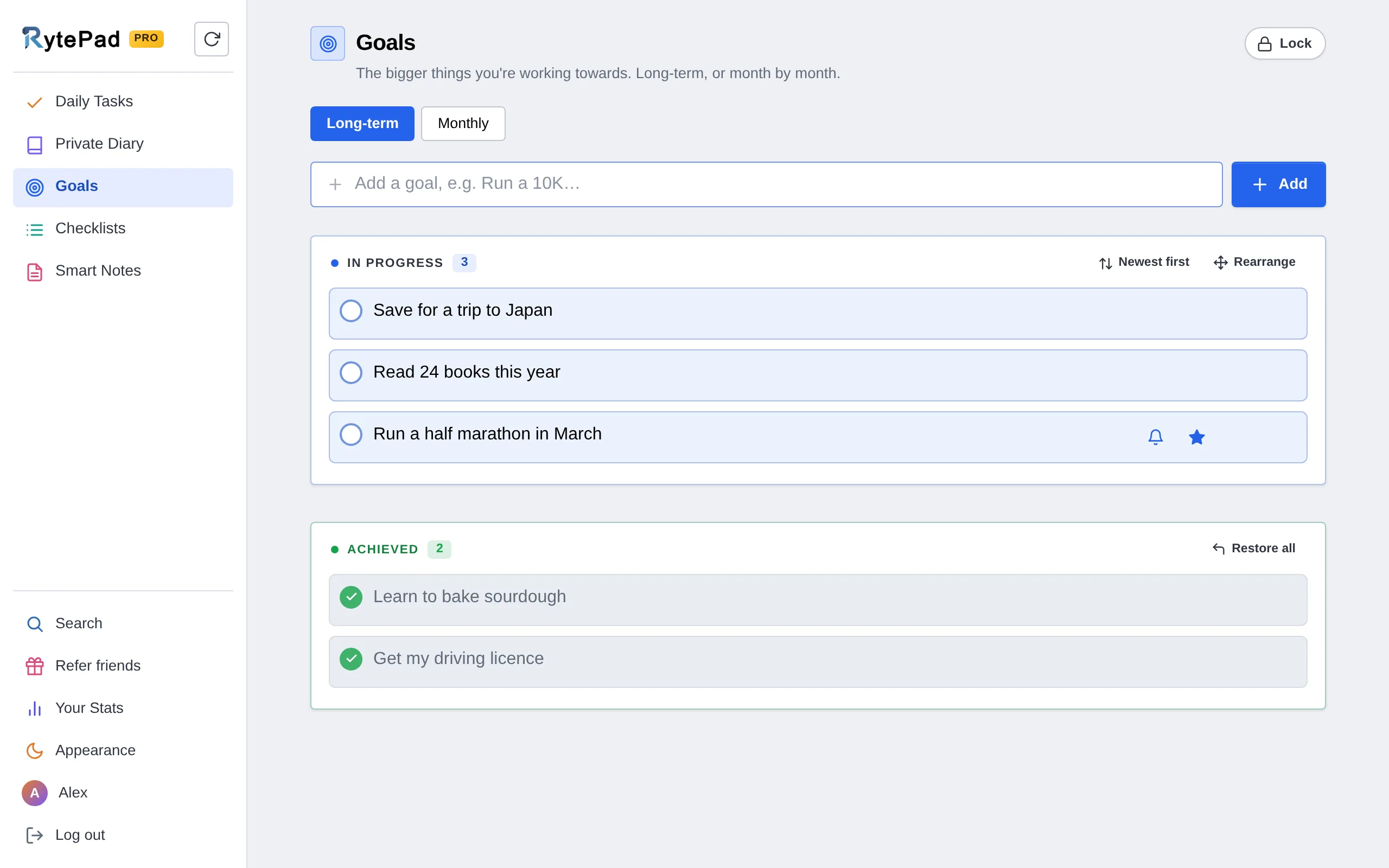
The bigger things you're working towards, kept where you'll see them every day instead of in a document you open twice a year.
Long-term goals. In progress at the top, Achieved below it, as a record you can look back on.
Monthly goals.Pro Targets for one month, on their own tab, with a month and year picker that marks the months with goals: orange while some are still to do, blue once all are achieved.
Handled like tasks. Complete with the circle, edit, restore or delete, star the important ones, rearrange the order.
Lists that aren't tied to a date: groceries, packing, the steps of a project, books to read.
Works like a to-do list. Each checklist has its own To do and Completed sections, with counts.
Reusable. Restore all puts the completed items back, and the same list is ready for next week.
Easy to find. Lists show as cards, with a search box for when there are many.
Share with a link. A snapshot shows the list as it is now, a live link always shows the latest version. Read-only for the reader, and no account needed.
Rename or delete a list whenever you like, and drag its items into the order you want in Rearrange mode. List names can be up to 40 characters.
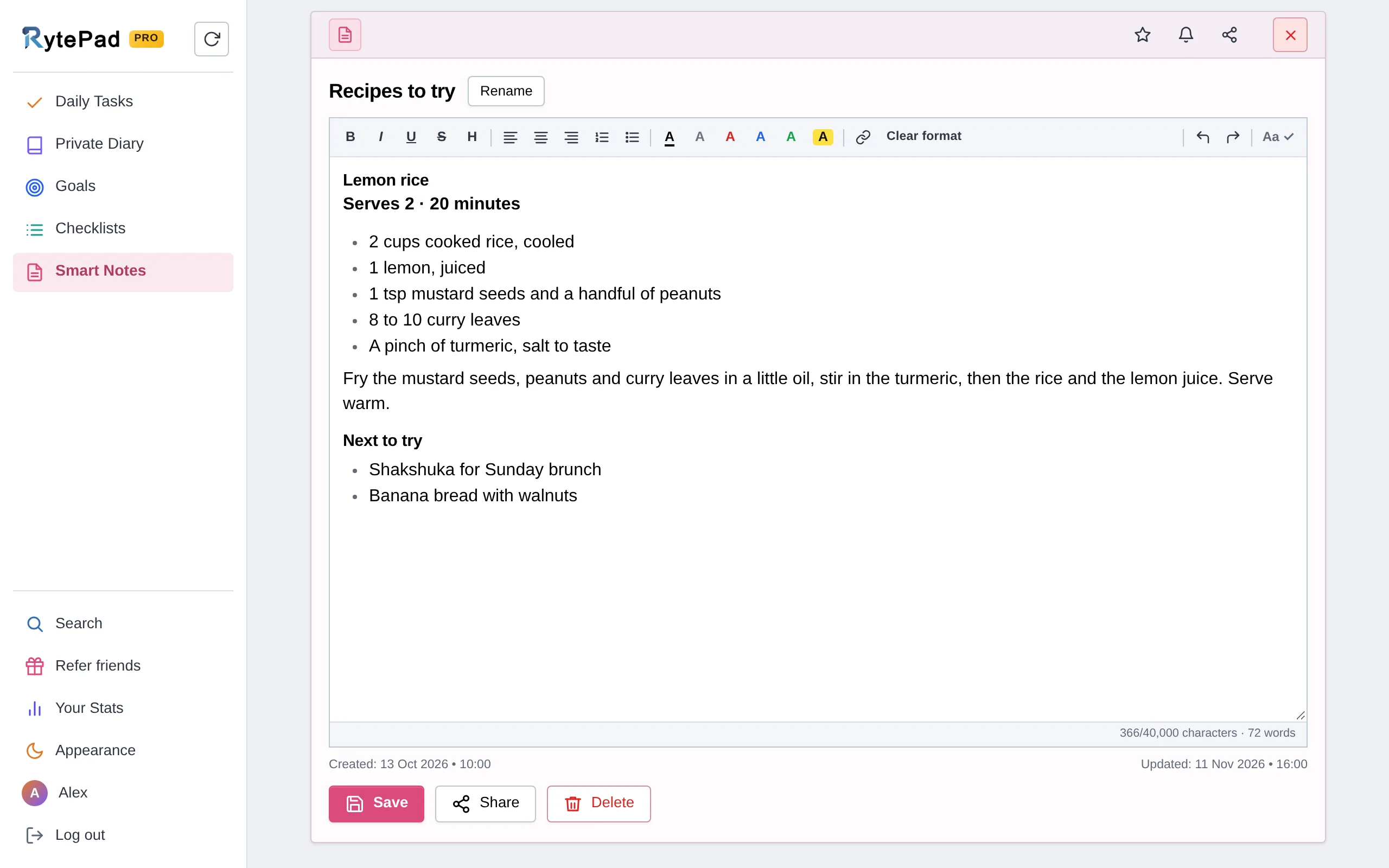
A clean notepad for recipes, references, meeting notes and plans. Each note has a title and a tall editor that holds 40,000 characters.
Saves as you work. Every 10 seconds while you type, again when you leave the note, and there is a Save button if you like pressing one.
Share two ways. A snapshot link shows the note as it is right now; a live link always shows the latest saved version. Both are view-only and need no account. Checklists can be shared the same way.
Same toolbar as the diary, plus a character count.
Stop sharing turns a shared link off at any time. Deleting the note stops all its links.
One search page with a tab for each area. Type a word, pick a date range (Tasks and Diary), or both.
Grouped results. Tasks by day, list items by list, goals by type, with To do and Completed tabs (In progress and Achieved for goals) that show how many were found.
Click to open. A task result opens that day, a list item opens its list, a diary result opens that entry.
Export.Pro Save any set of results, from any tab, as a .txt file.
The small things that make RytePad pleasant to open every day.
Focus timer1 to 999 minutes from the Set timer button at the bottom right, which shows the time left in a small ring while it runs. The alarm rings for a minute, on time even with the tab in the background. Five timers a day on the free plan, unlimited on Pro.
Reminders and notificationsA reminder on a task, goal, checklist or note, as a notification on your phone or computer or as an email. Tasks for today in the morning and what is still open in the evening, at times you choose.
Dark modeAppearance in the sidebar flips the whole app, or choose Light or Dark on the Account page. RytePad remembers the choice on that device.
Made for phonesThe navigation moves to the bottom and the controls get bigger. Add it to your home screen for one-tap access.
Account pageSix tabs: Account (profile, appearance, plan, password, sounds, your data and "Log out everywhere"), Section Lock, Your Stats, Repeating Tasks, Notifications and Recently Deleted. Refer friends, with your affiliate link, opens from the gift.
Quick by habitEnter adds whatever you're typing, Esc cancels, one click completes. On a computer, hovering over a task shows when you added or finished it. Small chimes on add, complete and delete, which you can turn off.
Section LockA 4-digit PIN in front of a section, from the Lock button in its title row: Daily Tasks on the free plan, every section on Pro, one by one or with one lock for everything. It locks again when the page is opened, and, if you switch the auto-lock on, after 5 to 120 minutes without activity.
Your data as one zipAccount → Your data downloads everything in your account: CSV files for tasks, goals and checklists, a text file per diary day and per note, and one JSON with it all. On every plan, with a password on the zip if you want one.
Kept while you writeWhat you have typed in the diary and not added yet is saved as a draft, so a reload, a closed tab or another device shows it again.
Undo and Recently DeletedEvery delete comes with Undo. Account → Recently Deleted keeps what you delete for 1 hour (48 hours on Pro), with Restore and Delete now.
Your StatsTasks done this week, your streaks, the last 30 days, an activity calendar and the days and hours you get the most done. Counts only, never your words.
Private on every plan
Tasks, diary entries, goals, list items and notes are encrypted with AES-256 before they are stored, and travel only over HTTPS. There is no admin view of your content, no ads (none on the free plan for now, never on Pro), and your data is never sold. A 4-digit PIN can lock a section, and everything you wrote can be downloaded as one zip. The same is true on the free plan.
Paid through Paddle. Every charge can be refunded within 14 days, by email. Details on the pricing page.
Quick answers
Questions people ask before they sign up
Is RytePad free?
Yes. The free plan has no time limit and asks for no card. It includes 25 tasks a day, 4 diary entries a day, 40 long-term goals, 10 checklists of 25 items, 10 notes, 5 focus timers a day, and 5 repeating tasks and 5 reminders at a time, with search and notifications.
Pro costs $14.97 a year and removes those limits. It also adds monthly goals, carry-over of unfinished tasks, 1,000 characters per task, search exports and priority support.
Is there a mobile app?
RytePad is a web app, so it runs in the browser on a phone, a tablet or a computer with nothing to install. On a phone the navigation moves to the bottom of the screen. Add rytepad.com/app to your home screen and it opens with one tap, like an app.
Does anyone at RytePad read my diary?
No. Diary entries, tasks, goals, list items and notes are encrypted with AES-256 before they are stored, and there is no admin view of your content. The privacy policy spells out what we do store.
What is the difference between daily tasks and checklists?
A daily task belongs to a date: it is something you mean to do today, or on a day you picked. A checklist has no date and lives as a card of its own, which suits groceries, packing lists or the steps of a project. Items in both can be completed, restored, starred and rearranged, and both show up in search.
Can I get my data out?
Yes, all of it, on every plan: Account → Your data downloads everything in your account as one zip (CSV, text and JSON), protected with a password you choose if you like. On Pro, every search tab (tasks, diary, goals, lists and notes) also has an export button that saves the results as a .txt file, and every account can export its referral list as a CSV file from the Refer friends tab.
Ready when you are
Try all of it, free
An account takes under a minute. If you're new to RytePad, the user guide walks through every screen, and the pricing page has the full Free vs Pro table.