
Diarium vs Journey (2026): Which Journal App Fits You?
One is a diary you buy once that keeps your entries on your own devices. The other is a membership journal with its own cloud, end-to-end encryption and an AI companion. Here is how they compare on the things that matter when you write every day.
Choose Diarium if you want to pay once, skip creating an account and keep your journal on your devices or in your own cloud storage. Choose Journey if you want one membership for every platform, including the web and Linux, with end-to-end encrypted sync. If you mainly want a private, text-first diary in your browser next to your daily list, RytePad is a lighter third option.
 By RytePad StaffPublished

Diarium vs Journey is a choice between two long-running journal apps with different ideas about where a diary should live. Diarium works without an account and keeps your journal on your device by default. Journey runs its own cloud service and sells one membership that covers every platform.
Everything below comes from each app's own website, help pages and App Store listings, checked on 20 Nov 2026. If you already use Journey and want to see more choices, our list of Journey alternatives covers other apps too.
At a glance: Diarium is a one-time buy, Journey is a membership
DiariumPay once
Best if you want a rich diary with no account and no subscription.
- Photos, video, audio and any file in an entry
- Sync through your own OneDrive, Google Drive, Dropbox, iCloud or WebDAV
- Imports from Day One, Journey, Daylio and more
Journey
Best if you write on many devices, a browser included, and want end-to-end encrypted sync.
- End-to-end encryption on Journey Cloud Sync
- Mood tracking, Throwback and an AI journaling Pal
- Shared journals and shareable web links
Feature by feature: five areas that decide it
Each area below ends with a one-line winner. Jump to the one you care about most:
1Writing and media
Entries take rich text: bold, colours, highlights, lists and links to websites or other entries. You can add photos, videos, audio recordings, PDFs and other files, plus tags, locations and dictation, and write several entries a day.
Formatting is part of the free version. Unlimited attachments per entry and custom fonts come with Pro.
The editor has paragraph styles, bold, italics, tables, checklists and text colour, and members can attach up to 20 photo, video or audio files to an entry.
On the free plan, text formatting is not included, photo uploads are limited and audio and video uploads are off, according to Journey's own comparison of free and paid plans.
2Looking back: maps, calendars and memories
Calendar, timeline, map and attachment views, plus "On this day" notifications. Tags can double as trackers for mood, weight or other numbers, and a statistics page shows your writing habits.
With Pro, integrations add context to each day: photos from your camera roll, calendar appointments, weather, finished Microsoft To Do tasks, and fitness data from Strava, Apple Health or Health Connect.
Calendar, media and Atlas map views, plus mood tracking that shows how your mood shifts across 30 days. Throwback brings back entries from weeks or years ago, but it needs a paid plan.
Journey also has Barry and Sherry, an AI journaling Pal you can chat with by text or voice, and you can talk to Journey on WhatsApp. Its Odyssey AI answers 10 questions a day for free accounts and 50 for members.
3Privacy and where your journal lives
No account is needed. By default the journal is stored only on your device, and sync uploads it to your own cloud storage rather than a Diarium server, as the Diarium privacy policy explains.
A password, PIN or biometrics can lock the app. Diarium's pages describe the lock and the storage, but not end-to-end encryption of the journal itself. The app sends anonymised analytics and crash reports.
Journey Cloud Sync offers end-to-end encryption with a passphrase you choose, and it is included on the free plan. Entries are encrypted on your device with RSA and AES before upload.
Two trade-offs: search stops working once encryption is on, and a lost passphrase means lost entries. You can sync to Google Drive instead, where Journey does not keep your entries on its own servers.
4Devices and sync
Apps for Windows, Android, iPhone, iPad, Mac and Chromebooks. No web version or Linux app is listed.
Cloud Sync needs Pro on each platform you use it on, because Pro is bought separately per platform. Someone with an iPhone and a Windows laptop pays twice.
Android, iOS, iPadOS, macOS, Windows, Linux, the web, Android Wear and Apple Watch. One membership covers all of them.
Free accounts get limited access on mobile and the web and no desktop app. A one-time Premium license opens paid features on a single platform, without the web services.
5Free plans and price
Free on Android, iPhone, iPad and Mac, with Pro features to try for 7 days after installing on iPhone and iPad. Pro is a one-time purchase, and Diarium says current prices are shown in the app.
On Windows, Diarium is a paid app with Pro included. The developer's own Gumroad listing for Windows is US$30.
Free covers Google Drive sync and a small Journey Cloud Sync allowance of 70MB and 60 entries.
Membership is US$49.99 a year or $6.99 a month on the US App Store, and the US App Store also lists lifetime membership for $199. Members get 10GB of cloud storage and 5,000 entries.
Diarium vs Journey: comparison table
| Feature | Diarium | Journey |
|---|---|---|
| Price | ✓Free, Pro bought once per platform (Windows app US$30) | Free, or Membership US$49.99 a year or $199 lifetime |
| Works without an account | ✓ | Not stated |
| Text formatting on the free plan | ✓ | ✗Paid plans |
| Photos, video and audio | ✓Unlimited attachments with Pro | ✓Video and audio on paid plans |
| Map view | ✓ | ✓Atlas |
| Mood tracking | With tags and ratings | ✓30-day mood view |
| Memories from past years | ✓On this day | ✓Throwback, paid plans |
| AI companion | ✗Not listed | ✓10 questions a day free, 50 for members |
| End-to-end encryption | Not described | ✓On Journey Cloud Sync |
| Sync | Your own OneDrive, Google Drive, Dropbox, iCloud or WebDAV (Pro) | Journey Cloud Sync or Google Drive |
| Shared journals | ✗Not listed | ✓ |
| Platforms | Windows, Android, iPhone, iPad, Mac, Chromebook | iOS, Android, Mac, Windows, Linux, web, Apple Watch, Android Wear |
| Export | PDF, Word, text, HTML, JSON | PDF, DOCX and ePub for members |
From each app's own pages, checked 20 Nov 2026. "Not listed" and "Not stated" mean the maker's pages do not mention it.
Pricing: Diarium is a one-time buy, Journey is about $50 a year
Diarium charges once per platform, so two devices on different systems mean two purchases, but nothing renews. Journey's Membership covers every platform and its cloud storage for a yearly fee.
Over three years, Journey Membership comes to about $150 at the App Store's yearly price, while a Diarium Pro purchase is paid once. Journey also sells a one-time Premium license per platform, but it leaves out the web services and the larger cloud quota. Our Journey Cloud vs Premium comparison sets the two plans side by side.
Want a private diary without the photo albums?Third option
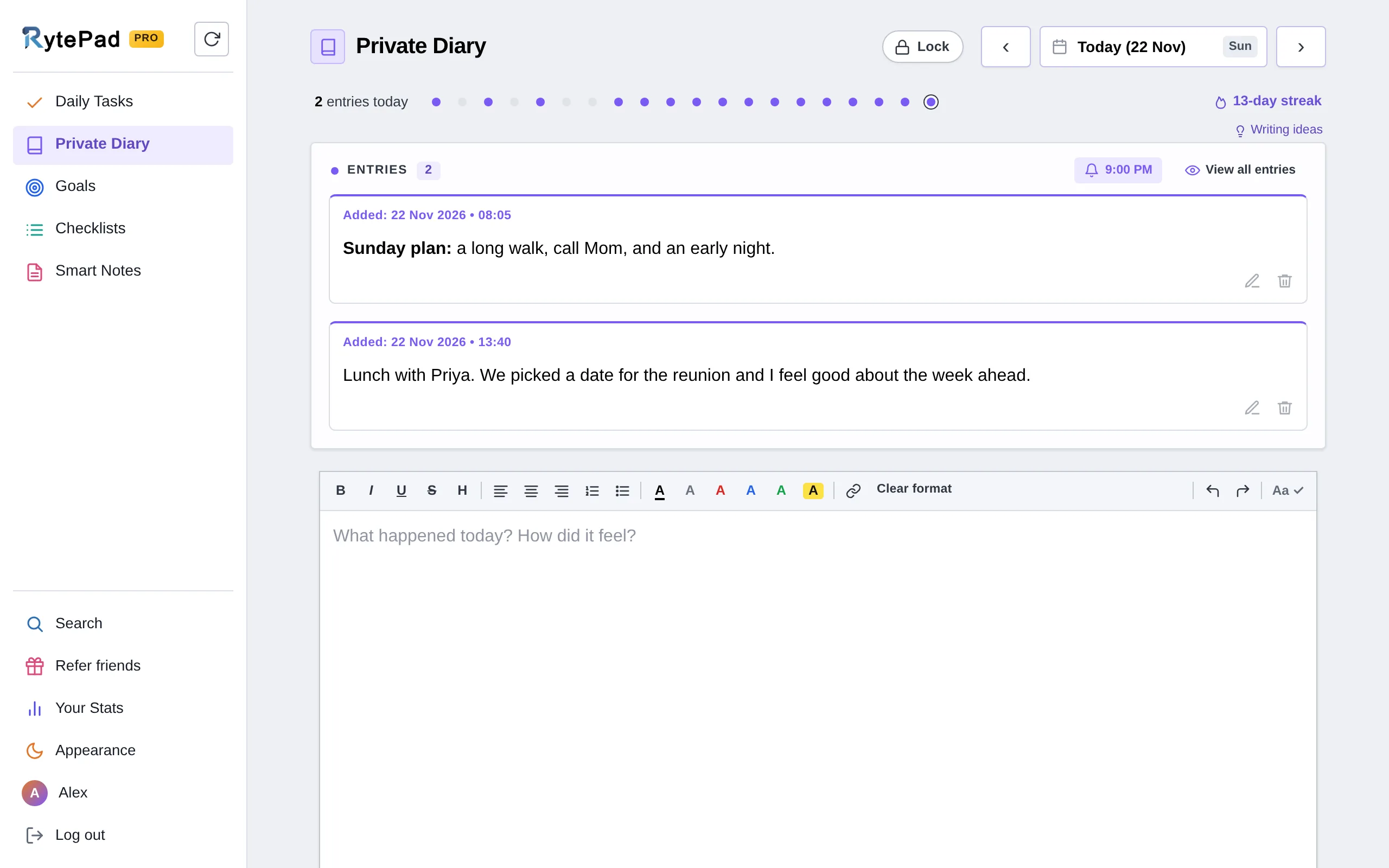
Diarium and Journey are built around photos, places and memories. If you mostly write, RytePad keeps a Private Diary in the same account as Daily Tasks, Goals, Checklists and Notes, so you can plan your day and write about it in one place.
The free plan has no time limit and allows 4 diary entries a day, each up to 25,000 characters, with light formatting. A diary streak shows your days in a row, Remind me can nudge you on days you have not written, and search finds old entries by word or date range.
Entries are encrypted with AES-256 before they are stored, and there is no admin view. Pro, at $14.97 a year, removes the daily limit and lets you put a PIN lock on the Diary.
Being honest about the limits: RytePad runs in the browser with no native apps, though you can install it from the browser so it opens in its own window. It has no templates and no shared journals, and its pages do not list photo or audio attachments. More on how it works on the online journal page.
Prefer a calm diary in your browser?
A private diary, daily tasks, goals and notes in one encrypted account. Nothing to install.
Pros and cons of each app
Diarium
- No account and no subscription
- Rich text formatting in the free version
- Sync through cloud storage you already own
- Imports from many other journal apps
- Pro is bought again on each platform
- No web version or Linux app listed
- End-to-end encryption not described
Journey
- Apps on almost every platform, plus the web
- End-to-end encrypted sync, even when free
- Mood tracking, Throwback and shared journals
- One membership covers every device
- Free plan has no formatting or desktop app
- Search is off with end-to-end encryption
- About $50 a year for the full app
Category scorecard: who wins what
- Cost over timeOne purchase versus a yearly membership.Diarium wins
- Writing on the free planRich text and attachments without paying.Diarium wins
- No-account privacyJournal on your device, sync to your own cloud.Diarium wins
- Devices and webLinux, the web and watches under one membership.Journey wins
- Encrypted cloud syncEnd-to-end encryption with your own passphrase.Journey wins
- Mood and sharingA 30-day mood view and shared journals.Journey wins
Who should choose each
Choose Diarium if…
you write on one or two devices, want to pay once, prefer no account, and like your journal sitting in your own OneDrive, iCloud or Google Drive. It imports from Day One, Journey and Daylio, which helps if you are leaving one of them; see our Day One alternatives too.
Visit DiariumChoose Journey if…
you switch between a phone, a Windows or Linux computer and a browser, want end-to-end encrypted sync, track your mood, or share a journal with family. Budget for a paid plan if you want formatting and the desktop apps.
Visit JourneyKeep reading: If neither fits, our roundup of the best free journal apps compares more options.
Diarium vs Journey: your questions answered
Is Diarium better than Journey?
Diarium is better if you want to pay once, skip the account and keep entries on your own devices or cloud storage. Journey is better if you want apps on every platform including the web, end-to-end encrypted sync, mood tracking and shared journals.
Is Diarium free?
Yes on Android, iPhone, iPad and Mac. There, Pro is an optional one-time purchase per platform that adds sync, unlimited attachments, PDF and Word export, widgets, weather and integrations. On Windows, Diarium is a paid app with Pro included.
What is the difference between Journey Premium and Membership?
Premium is a one-time license for paid features on the one platform you bought it on, without the web services. Membership is a subscription that covers every platform with 10GB of Journey Cloud Sync storage: US$49.99 a year, $6.99 a month or $199 for lifetime on the US App Store.
Is Journey end-to-end encrypted?
Yes, if you turn it on for Journey Cloud Sync and set a passphrase. Entries are then encrypted on your device before upload. Search no longer works with it switched on, the date and time of entries stay unencrypted, and a forgotten passphrase means the entries are lost.
Can I move my journal from Journey to Diarium?
Yes. Diarium lists Journey among the apps it can import from, along with Day One, Diaro, Daylio, Diarly, Daybook, Evernote and Apple Journal.
Is there a simpler option than both?
If you mostly write text and also want a daily to-do list, RytePad keeps a private diary, tasks, goals and notes in one encrypted web app, with a free plan of 4 diary entries a day. It has no native apps, no templates and no shared journals.
Final verdict: Diarium to pay once, Journey to write everywhere
Diarium is the better value for most people who journal alone: rich entries, maps and integrations, with no account and no subscription. Journey earns its yearly fee if you write across many devices, including a browser or Linux, and want end-to-end encrypted sync.
If you mostly want a private place to write each evening, RytePad keeps a diary beside your daily list. New to the habit? Start with our guide on how to start a daily journal.
A private diary, a daily list and notes, without the clutter
One encrypted account that is ready the moment you sign in. Free to start.
Try RytePad free →Free plan with no time limit · No card · Works in any browserSources
- Diarium. Home page, feature overview and FAQ and Privacy policy. Checked 20 Nov 2026.
- Apple. Diarium Journal: Private Diary, App Store listing (US). Checked 20 Nov 2026.
- Timo Partl. Diarium for Windows, Gumroad listing. Checked 20 Nov 2026.
- Journey. Home page and Membership. Checked 20 Nov 2026.
- Journey Support. Comparison of Free and Paid Plans, Membership license and How does Encryption Work in Journey. Checked 20 Nov 2026.
- Apple. Journey: Diary, Journal, App Store listing (US). Checked 20 Nov 2026.
- RytePad. Pricing, Features and User guide. Checked 20 Nov 2026.