TickTick Review 2026: Features, Free Plan and Premium Price
TickTick packs a to-do list, calendar, habit tracker and Pomodoro timer into one app. Here is what the free plan really covers, what Premium adds for $49.99 a year, and who should look elsewhere.
TickTick is one of the most complete personal to-do apps you can get, with native apps on every major platform, a usable free plan and a fair Premium price of US$49.99 a year. The free plan caps you at 9 lists and 5 habits, and the full calendar, timeline view and AI tools need Premium. If you want something simpler and private that also holds a diary and notes, RytePad is a lighter option.
 By RytePad StaffPublished

This TickTick review looks at the app the way most people meet it: as a free to-do list that keeps offering more. TickTick adds a calendar, a habit tracker, a Pomodoro timer, countdowns and, since this year, an AI assistant. The question is how much of that you get without paying, and whether the rest is worth $49.99 a year.
Everything below comes from TickTick's own pricing page, help centre and App Store listing, checked on 6 Nov 2026. If you are deciding between the two big names, our Todoist vs TickTick comparison puts them side by side.
TickTick at a glance: free plan vs Premium
TickTick Free
Best if you want a capable to-do list with a few habits and a basic calendar.
- 9 lists, 99 tasks or notes per list
- 2 reminders per task, 5 habits, 5 countdowns
- Recurring tasks, subtasks, tags and templates
- Basic calendar and Eisenhower Matrix
TickTick PremiumFull app
Best if you plan your week on a calendar and want timeline, filters and AI.
- 299 lists, 999 tasks per list
- 5 reminders per task, 299 habits
- Full calendar views, timeline and filters
- AI Assistant, AI voice capture and recording summaries
TickTick features: what works and what to watch
Five areas decide whether TickTick fits you. Each ends with a one-line verdict.
1Tasks, lists and reminders
The basics are strong on every plan. You get priority levels, tags, subtasks, recurring tasks, comments and templates for free, and TickTick reads dates as you type, so "call the dentist Friday 3pm" becomes a dated task with a reminder.
Free accounts get 9 lists, 99 tasks per list and 2 reminders per task. Constant reminders (which keep ringing until you act), task duration, checklist-item reminders and custom filters are Premium only.
2Calendar and planning views
TickTick offers yearly, monthly, weekly, daily and agenda calendar views, plus Kanban, a timeline and split view. It also has an Eisenhower Matrix that sorts tasks into urgent and important boxes; a 2 Nov update lets you save several matrix views with their own rules.
On free, the calendar and the matrix are marked "Basic", and the timeline view is Premium only. Subscribing to outside calendars inside TickTick is also listed as a Premium feature in the App Store description.
3Habits and Pomodoro focus
A habit tracker and a Pomodoro timer are built in, so you do not need separate apps. The timer uses the classic 25-minute intervals, and statistics show tasks done, focus time and habit logs together.
The free plan allows 5 habits; Premium raises that to 299. Statistics, widgets and themes are "Basic" on free. For dedicated habit apps, see our list of the best habit tracker apps.
4AI features
TickTick added an AI Assistant on 8 Oct 2026 that creates tasks, organises lists and breaks down projects from a plain sentence. AI voice capture turns spoken notes into several dated tasks, and audio attachments can be transcribed and summarised.
All three AI tools are Premium only, and AI voice capture works on mobile only. Connecting TickTick to AI chat tools through its MCP server is listed for both plans.
5Sharing and platforms
TickTick has apps for iOS and iPadOS, Android, Windows, macOS and Linux, a browser extension, a web app and watch support, all synced. You can share a list, assign tasks and add comments, which suits a household or a small group. If you are weighing it against Microsoft's free app, see TickTick vs Microsoft To Do.
A shared list holds 2 members on free and 29 on Premium.
TickTick free vs Premium: comparison table
| Feature | Free | Premium |
|---|---|---|
| Lists | 9 | 299 |
| Tasks and notes per list | 99 | 999 |
| Checklist items per task | 19 | 199 |
| Reminders per task | 2 | 5 |
| Attachments | 1 a day | 199 a day |
| Members per shared list | 2 | 29 |
| Habits and countdowns | 5 each | 299 each |
| Recurring tasks, tags, subtasks, templates | ✓ | ✓ |
| Calendar views and Eisenhower Matrix | Basic | ✓Unlimited |
| Timeline view | ✗ | ✓ |
| Task duration, filters, constant reminder | ✗ | ✓ |
| AI Assistant and AI voice capture | ✗ | ✓ |
| Integrations | ✗ | ✓ |
From TickTick's upgrade page. Prices checked 6 Nov 2026.
TickTick pricing: is Premium worth $49.99?
TickTick's upgrade page lists one paid plan, Premium, at US$49.99 a year, which it describes as less than $4.17 a month. In the US App Store you can also pay $4.99 a month, so the yearly plan saves about $10 a year over monthly billing.
If you buy through Google Play, PayPal or Stripe, TickTick refunds within 14 days of purchase; App Store purchases go through Apple. If Premium lapses, TickTick says your data is kept and you carry on as a free user.
Privacy and security: encrypted at rest on US servers
According to its security page, TickTick stores its databases on Amazon Web Services in the United States, and task details, account information and payment details are encrypted at rest. Data is backed up automatically, and you can make a manual backup from the web app.
The security page does not describe end-to-end encryption. TickTick's App Store privacy label lists contact info, user content, identifiers and diagnostics as data that may be linked to you. That is normal for a synced task app, but worth knowing if you plan to store private notes in it.
TickTick pros and cons
- To-do list, calendar, habits and Pomodoro in one app
- Native apps on iOS, Android, Windows, Mac and Linux
- Free plan includes recurring tasks and templates
- Fair Premium price at $49.99 a year
- Natural-language dates as you type
- Regular updates, including AI tools in 2026
- Free plan: 9 lists and 2 reminders per task
- Full calendar and timeline need Premium
- All AI features are Premium only
- Many features can feel busy at first
- No end-to-end encryption described
- No dedicated diary or journal
A simpler, private option: RytePadAlternative
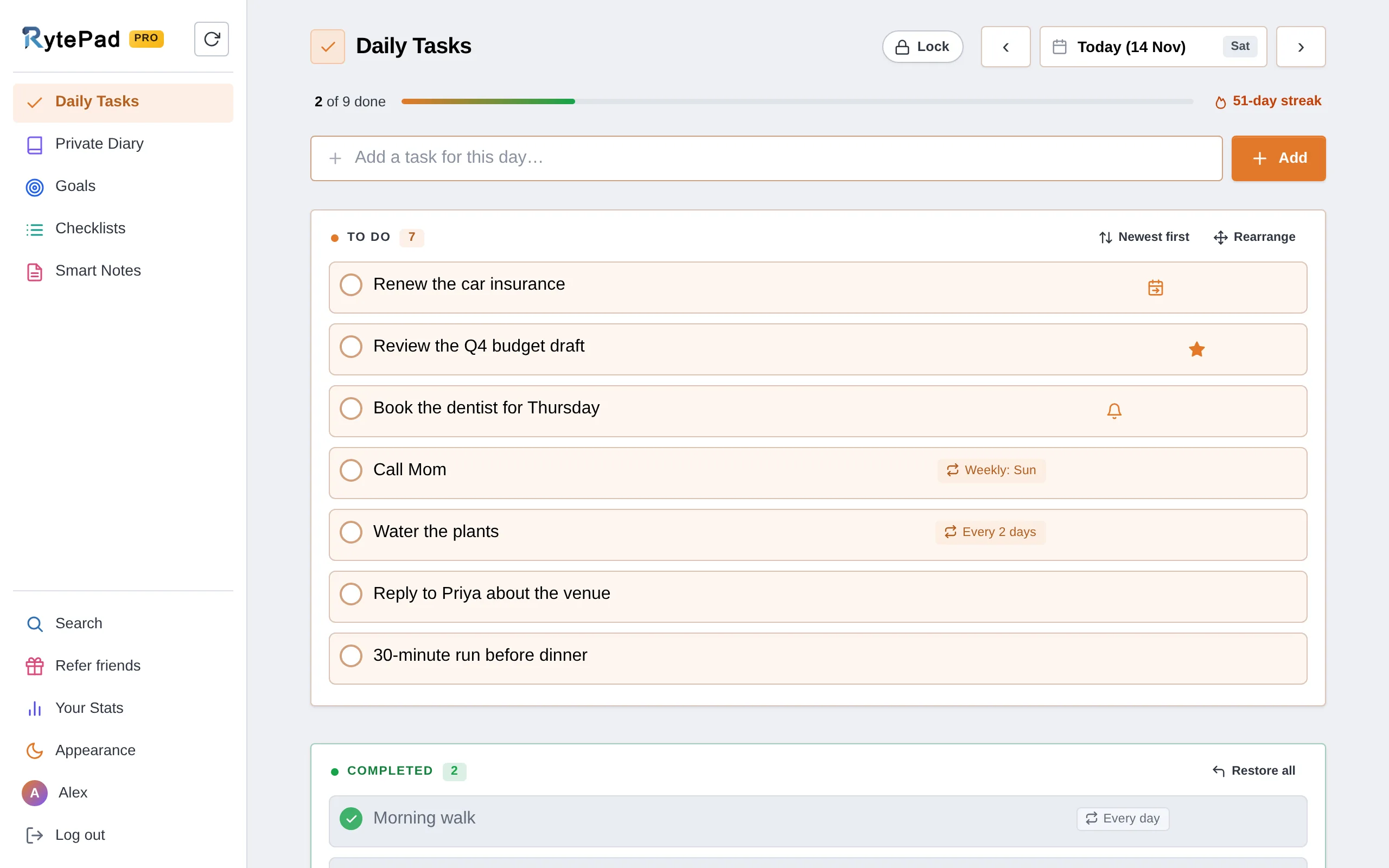
TickTick is a power tool. If you mostly want to write today's tasks, tick them off and keep a few private notes, RytePad is the lighter choice. Its daily to-do list sits next to a private Diary, Goals, Checklists and Notes, all encrypted with AES-256.
The free plan allows 25 tasks a day, 5 repeating tasks and 5 reminders at a time, and 5 focus timers a day. Pro costs $14.97 a year and removes the limits.
Being honest about the limits: RytePad is a web app with no native apps. It has no week or timeline views, no AI tools, no templates and no shared task lists or team workspaces. If you need those, TickTick does more.
Want a simpler daily list?
Tasks, a private diary, goals, checklists and notes in one encrypted account. Nothing to install.
TickTick strengths and weak spots
- Task featuresPriorities, tags, subtasks, recurring tasks and templates, free.Strength
- PlatformsNative apps on five systems plus web and watch.Strength
- Value$49.99 a year for calendar, habits, focus and AI.Strength
- Free planUsable, but 9 lists and a basic calendar.Mixed
- Ease of useMany views and options to learn.Mixed
- PrivacyEncrypted at rest, no end-to-end encryption described.Weak spot
Who should use TickTick, and who should not
Choose TickTick if…
you want one app for tasks, calendar, habits and focus sessions, use several devices including a Mac, PC or Linux machine, share a shopping list with one other person, and are happy to pay $49.99 a year for the full calendar.
Visit TickTickLook elsewhere if…
you find feature-rich apps distracting, want your to-do list next to a private journal, or need a team workspace. Todoist's free plan gives 5 personal projects, and Microsoft To Do is free across web, iOS, Android and Windows. Our guide to the best free to-do list apps covers more.
TickTick review: your questions answered
Is TickTick free?
Yes. TickTick has a free plan you can keep using without paying. It allows 9 lists, 99 tasks per list, 2 reminders per task and 5 habits, and includes recurring tasks, tags, subtasks and templates. Premium removes most limits for US$49.99 a year.
How much is TickTick Premium?
TickTick Premium costs US$49.99 a year, which TickTick describes as less than $4.17 a month. On the US App Store there is also a monthly plan at $4.99. Prices were checked on 6 Nov 2026.
Is TickTick better than Todoist?
It depends on what you need. TickTick includes a habit tracker, Pomodoro timer and calendar views in one app, while Todoist focuses on tasks and projects. Our Todoist vs TickTick comparison covers the details.
Does TickTick have AI features?
Yes. TickTick added an AI Assistant in October 2026, along with AI voice capture and recording summaries. All three are Premium features, and AI voice capture works on mobile only.
Is TickTick private and secure?
TickTick says its data is hosted on Amazon Web Services in the United States and encrypted at rest. Its security page does not describe end-to-end encryption.
What happens to my tasks if Premium ends?
TickTick says all your data is kept after Premium expires. You carry on as a free user, but Premium features stop working until you renew.
Final verdict: a strong all-rounder, best with Premium
TickTick is one of the most complete personal planners available: tasks, calendar, habits and focus sessions on almost every device. The free plan is enough to learn the app, and if you plan on a calendar, $49.99 a year is a fair price for the rest. If you want fewer features, a private diary beside your list and a lower price, RytePad is the simpler route.
A daily list, a private diary and notes, without the clutter
One encrypted account that is ready the moment you sign in. Free to start.
Try RytePad free →Free plan with no time limit · No card · Works in any browserSources
- TickTick. Upgrade: Free and Premium plans. Checked 6 Nov 2026.
- TickTick. Home page and feature overview and downloads. Checked 6 Nov 2026.
- TickTick Help Center. What's New. Checked 6 Nov 2026.
- TickTick. Security. Checked 6 Nov 2026.
- Apple. TickTick: To-Do List and Calendar, App Store listing (US). Checked 6 Nov 2026.
- Doist. Todoist plans and pricing. Checked 6 Nov 2026.
- Microsoft. Microsoft To Do. Checked 6 Nov 2026.
- RytePad. Pricing, Features and User guide. Checked 6 Nov 2026.