
10 Best Microsoft To Do Alternatives in 2026 (Free & Paid)
Microsoft To Do is free and simple, but you need a Microsoft account, getting your data out means exporting your Outlook.com mailbox, and in 2026 Microsoft brought Planner into the new Outlook. Here are ten alternatives, from free and private to pay-once.
RytePad is the best Microsoft To Do alternative for planning your day privately: a to-do list for each date, repeating tasks, free reminders, and a diary, goals and notes in the same encrypted account. TickTick is the best free cross-platform swap, Todoist the most powerful, and Superlist, from Wunderlist's founder, can sync with Microsoft To Do while you try it.
 By RytePad StaffUpdated
Microsoft To Do took over from Wunderlist in 2020 and has stayed free and simple: My Day, lists, steps, recurring reminders and shared lists, synced with Outlook. Microsoft still updates it and has not announced any plan to retire it, while Planner, its team task app, arrived in Outlook on the web and the new Outlook for Windows in 2026.
People look elsewhere for things To Do does not try to be, like deeper projects and filters, habits, or one place for the whole day, or simply to leave the Microsoft account behind. Getting data out is the awkward part: To Do has no export button, and Microsoft's route is exporting your Outlook.com mailbox.
The short version
The 10 best Microsoft To Do alternatives compared
| App | Best for | Free plan | Paid from |
|---|---|---|---|
| 1. RytePad↓ | Your day in one private place | 25 tasks a day, repeating tasks, reminders | $14.97/yr (optional) |
| 2. TickTick↓ | Free and cross-platform | 9 lists of 99 tasks | $49.99/yr |
| 3. Todoist↓ | Power users and projects | 5 projects, 3 filters | $60/yr |
| 4. Superlist↓ | A modern Wunderlist successor | 5 lists, unlimited tasks | $59/yr |
| 5. Any.do↓ | Daily planning with a calendar | Personal tasks, basic reminders | $4.99/mo (yearly) |
| 6. Things 3↓ | Apple users who pay once | No free plan (Mac trial) | $49.99 once (Mac) |
| 7. Apple Reminders↓ | Free on Apple devices | Free | No paid plan |
| 8. Google Tasks↓ | Gmail and Calendar users | Free | No paid plan |
| 9. Remember The Milk↓ | Flexible reminders | Sharing with 2 people | $49.99/yr |
| 10. Habitica↓ | Gamified habits and tasks | Free | $4.99/mo (optional) |
US prices as published on 20 October 2026. App-store prices vary by region, and several apps charge more in the app stores than on their websites.
Pick in 10 seconds
Tap what matters most to you.
The 10 best Microsoft To Do alternatives
Ranked by how well each replaces Microsoft To Do for everyday tasks, and by the free plan, platforms, privacy and price.
RytePadOur #1 pick
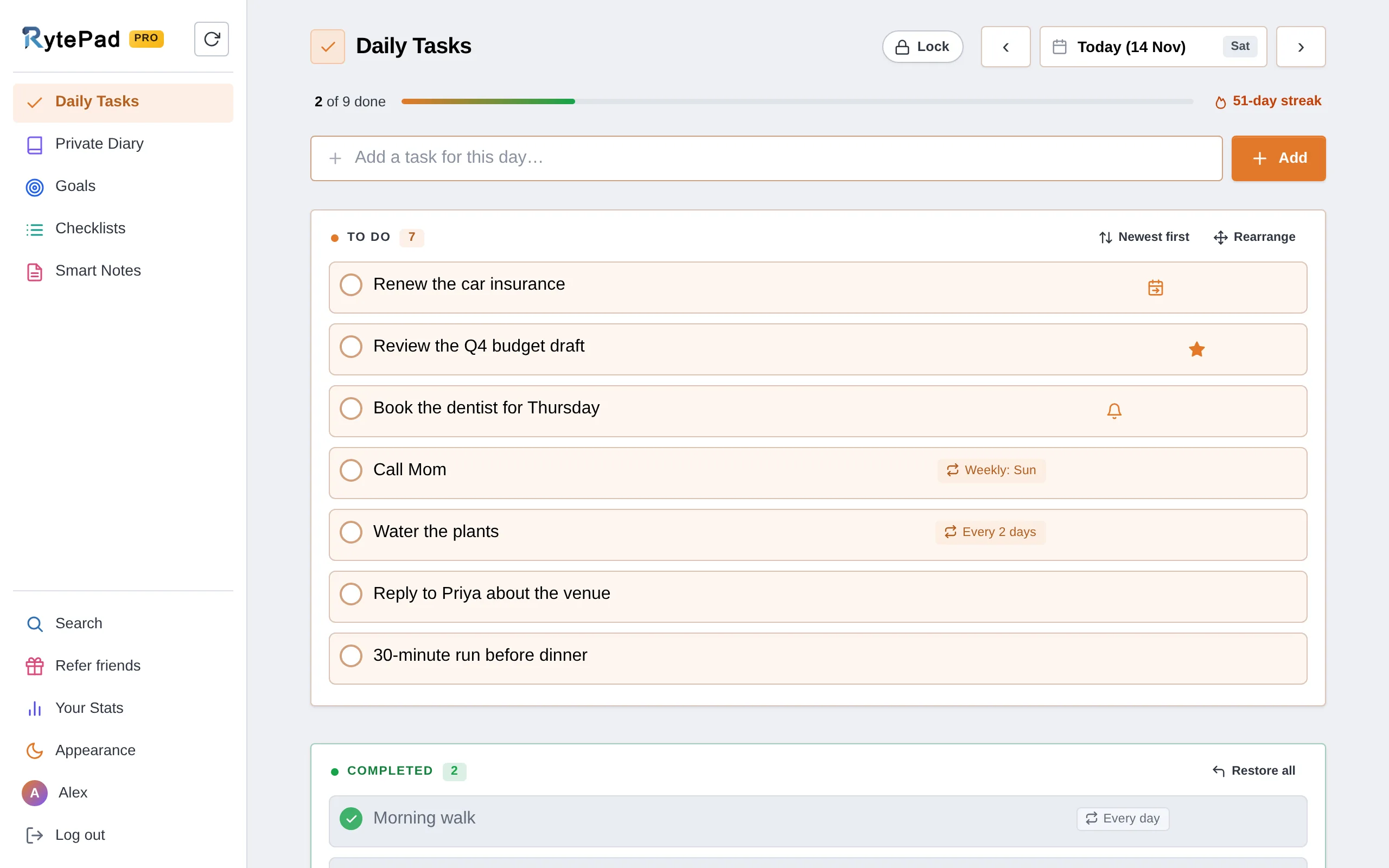
If you use Microsoft To Do mainly for My Day, RytePad is built around the same idea: a to-do list for each day. Open today, type a task, press Enter. The free plan gives you 25 tasks a day (unlimited on Pro), separate to-do and completed sections, a star for what matters, drag-to-reorder with Rearrange, and a progress bar and streak for the day. Plan days ahead or open any past date from the calendar. Tasks can repeat every day, on weekdays, on the days of the week you pick, monthly, yearly or on dates you choose, with 5 repeating tasks at a time on the free plan and no limit on Pro.
Reminders are free on every plan: one of your own at a set time on any task (5 at a time on the free plan), and a morning and an evening summary of your tasks at times you choose, each as a notification on your phone or computer, an email, or both. On Pro, unfinished tasks carry over to the next day at midnight, marked D2, D3 and so on up to D10, so you can see what keeps slipping. Delete something by mistake and Undo brings it back; it also waits in Recently Deleted for 1 hour on the free plan (48 hours on Pro).
Around the tasks sit a private diary, long-term and monthly goals, reusable checklists and notes, all encrypted with AES-256 on every plan and found with one search. The daily planner guide shows how they fit into one day.
Honest caveat: RytePad's tasks are simpler than Microsoft To Do's. There are no subtasks, no shared editing of lists and no Microsoft To Do importer. It is a web app with no native apps or offline mode.
- Easiest to learn: type a task, press Enter
- 25 tasks a day free, unlimited on Pro
- Free reminders, as notifications or emails
- Repeating tasks on the free plan, 5 at a time
- Diary, goals, checklists and notes in the same app
- AES-256 encryption on every plan
- A free PIN lock and CSV export for your tasks
- Undo, and 1 hour to bring back what you delete (48 hours on Pro)
- Pro is a flat $14.97 a year
- No subtasks
- No shared editing of lists
- No Microsoft To Do importer
- Web app, no native apps or offline mode
Disclosure: RytePad is our own product. We rank it where we believe it belongs and the caveats above are real; the other nine entries are included on their merits, and no app paid to be listed.
Plan your day privately, free
A to-do list for every date with reminders, plus a diary and goals. No card.
TickTick runs on the web, Windows, Mac, iPhone, Android and Wear OS, and its free plan is generous: recurring tasks, checklists, tags, list sharing with two people and basic calendar views, with up to 9 lists of 99 tasks and two reminders per task. It also tracks up to five habits.
Premium costs $49.99 a year (or $4.99 a month in the US App Store) and raises the limits to 299 lists, 999 tasks per list and five reminders per task, with more calendar views. TickTick does not advertise end-to-end encryption. Our TickTick vs Microsoft To Do comparison sets the two side by side.
- Generous free plan with recurring tasks
- Calendar views and habit tracking
- Apps on every platform, plus the web
- Free plan caps lists, tasks and reminders
- Full calendar views need Premium
- No end-to-end encryption advertised
Todoist is the most capable task manager here, on the web, Windows, Mac, Linux, iPhone, iPad, Android and watches. The free Beginner plan includes recurring dates, sub-tasks, sections, labels, shared projects and comments, with up to 5 personal projects, 5 collaborators per project and 3 filters.
Pro costs $7 a month or $60 a year since December 2025, and adds the calendar layout, custom and location reminders, deadlines and backups. Moving in is by CSV, one project at a time (up to 300 tasks), and data is encrypted at rest but not end-to-end.
- Sub-tasks, labels and filters
- Recurring dates on the free plan
- Apps everywhere, including Linux
- Free plan limited to 5 projects
- Calendar layout and custom reminders need Pro
- Pro rose to $60 a year in December 2025
Superlist comes from Christian Reber, who founded Wunderlist, the app Microsoft bought and replaced with To Do. It runs on Mac, iPhone, iPad, Android and the web, and the free plan has unlimited tasks and notes in up to five private or shared lists (up to five people each), with reminders and repeating tasks.
Its Microsoft To Do integration keeps lists in sync both ways (titles, completion and due dates), so you can try it without moving everything at once. Basic costs $59 a year and adds Google Calendar integration and shared lists of up to 25 people. Superlist does not offer end-to-end encryption.
- Two-way sync with Microsoft To Do
- Unlimited tasks and notes free
- Reminders and repeating tasks free
- Free plan limited to 5 lists
- No Google Calendar on the free plan
- No end-to-end encryption
Any.do combines a task list with a daily planner: My Day, a calendar, grocery lists and reminders, on the web, Windows, Mac, iPhone, Android and watches. The free plan covers personal tasks and lists, one-time and basic recurring reminders, calendar integration and email-to-task.
Premium adds advanced recurring and location reminders, Focus Mode, unlimited tags, notes and files, and AI features, at $7.99 a month or $4.99 a month billed yearly on Any.do's website (app-store prices are higher). Shared boards need the Family or Teams plan.
- My Day and a calendar in one
- Free basic recurring reminders
- Apps on every platform
- Location and advanced reminders need Premium
- App-store prices higher than the website
- Sharing needs Family or Teams
Things 3 is a polished task manager for Mac, iPhone, iPad, Apple Watch and Vision Pro, bought once per device type: $49.99 on Mac, $9.99 on iPhone and $19.99 on iPad, with free Things Cloud sync. It has Today and Upcoming views alongside your calendar events, repeating to-dos, checklists, tags and reminders.
There is no Windows, Android or web version and no collaboration. Things imports from Todoist and Apple Reminders, and Microsoft To Do tasks can come across one at a time through Apple Reminders. Data is encrypted in transit and at rest, but not end-to-end.
- Pay once, no subscription
- Beautiful, fast design
- Free sync between your Apple devices
- Apple devices only
- Each device type bought separately
- No sharing or collaboration
Apple Reminders is free on iPhone, iPad and Mac, and on iCloud.com. It has dates and times, early reminders, repeats from hourly to yearly, location alerts when you arrive or leave, subtasks, tags, and shared lists where you can assign reminders.
If you add your Microsoft account to it as an Exchange account, Reminders can show your To Do lists. There are no Android or Windows apps, and reminders are end-to-end encrypted only with Advanced Data Protection turned on.
- Free and built in
- Location and repeating reminders
- Shared lists with assignments
- No Android or Windows apps
- Basic project features
- End-to-end encrypted only with Advanced Data Protection
Google Tasks is free and lives inside Gmail, Google Calendar, Drive and Docs on the web, with apps for Android and iPhone. Tasks can have subtasks, due dates and repeats, and dated tasks appear in Google Calendar.
It is deliberately simple: there is no desktop app or import feature, shared tasks and subtasks cannot repeat, and recurring tasks cannot be moved between lists.
- Free and built into Google apps
- Tasks show in Google Calendar
- Subtasks and repeating tasks
- No desktop app
- No import from other apps
- Very basic
Remember The Milk runs on the web, iPhone, iPad, Mac, Apple Watch and Android, and says it will always have free accounts. It can remind you by email, text, instant message or notification, and free accounts can share lists with two other people.
Pro costs $49.99 a year and adds subtasks and unlimited sharing. It imports from Todoist, Toodledo and Wunderlist, but not from Microsoft To Do or Any.do, and a beta AI assistant integration works with Claude and ChatGPT.
- Free accounts for good
- Reminders by email, text or notification
- Imports from Todoist and Wunderlist
- Subtasks need Pro
- Free sharing limited to 2 people
- No Windows app
Habitica is a free, gamified task manager: habits, daily routines and to-dos earn rewards for your game character. It runs on the web, iPhone and Android, with checklists, repeating dailies and reminders.
An optional subscription ($4.99 a month or $47.99 a year in the US App Store) adds extras. Teamwork happens in game-style parties and challenges rather than shared lists, and moving from Microsoft To Do means re-entering your tasks.
- Free and genuinely motivating
- Habits, dailies and to-dos in one
- Parties and challenges with friends
- The game style is not for everyone
- No shared task lists
- Tasks must be re-entered
How we chose these alternatives
Every app was compared on what Microsoft To Do users most often want from a new home:
- A plan for today. Something like My Day, so each day starts with a short list.
- Reminders. Time, repeating and location reminders, and which plan they need.
- The free plan. What you can do before paying, since To Do is free.
- Platforms. Windows, Mac, phones and the web.
- Moving in. Whether it can sync with or import from Microsoft To Do.
- Price. What a full unlock costs per year, or once.
Keep reading: how RytePad's to-do list works, the daily planner guide, the best free to-do list apps, the best Todoist alternatives, and the best Any.do alternatives.
Microsoft To Do alternatives: your questions answered
What is the best alternative to Microsoft To Do?
For planning each day privately, RytePad: a to-do list for every date with repeating tasks and free reminders, plus a diary, goals and notes in one encrypted account. TickTick is the best free like-for-like swap, Todoist the most powerful, and Superlist can sync with Microsoft To Do while you try it.
Is Microsoft To Do being discontinued?
No retirement has been announced. To Do still gets app updates, and Planner tasks assigned to you show up in it. In 2026 Microsoft brought Planner into Outlook on the web and the new Outlook for Windows.
How do I export my tasks from Microsoft To Do?
To Do has no export button. Microsoft's route is to sign in to Outlook.com with the same account and export your mailbox, which includes your lists and tasks; classic Outlook for Windows can also export tasks to a CSV file.
Which alternatives can bring in my Microsoft To Do tasks?
Superlist syncs with Microsoft To Do (titles, completion and due dates). Apple Reminders can show your To Do lists if you add your Microsoft account to it, and Things can then bring tasks in one at a time. For most other apps, including RytePad, you re-enter the tasks you want to keep.
Is there a free alternative to Microsoft To Do?
Yes. TickTick, Todoist and Superlist have free plans, Google Tasks and Apple Reminders are free, Remember The Milk keeps free accounts, and RytePad's free plan gives you 25 tasks a day, 5 repeating tasks and reminders, with no time limit.
The bottom line
If you want a free like-for-like swap, TickTick is the closest, and Todoist suits people who want projects, labels and filters. To keep To Do running while you decide, Superlist syncs with it both ways; on Apple devices only, Things 3 is a one-time purchase.
If To Do was really your plan for the day, RytePad keeps it private: a to-do list for each date, repeating tasks, free reminders, and a diary, goals and notes in the same encrypted account, with everything unlocked for $14.97 a year.
Plan your day in one private place
A to-do list for every date, free reminders, and a diary and goals beside it. Free to start.
Try RytePad free →Free plan with no time limit · No card · Works in any browser