
The Eisenhower Matrix: How to Decide What to Do First
Two questions, four boxes, and a clearer morning. Here is how the Eisenhower Matrix works, where it came from, and why the urgent jobs keep winning unless you plan for the important ones.
The Eisenhower Matrix sorts every task by two questions: is it urgent, and is it important? That gives four boxes: do it now, schedule it, hand it off, or drop it. Its real value is the second box, the important work with no deadline, which a 2018 set of experiments suggests people tend to pass over in favour of urgent tasks.
 By RytePad StaffPublished

You sit down with a list of fifteen things and an hour to spare. The Eisenhower Matrix is a simple way to decide which of them deserves that hour. You ask two questions about each task, sort it into one of four boxes, and the box tells you what to do with it.
This guide shows how the matrix works, where the idea really came from, and what research says about why urgent tasks crowd out important ones. If you keep your list on paper or in an online to-do list, you can try it today in about fifteen minutes.
- The matrix sorts tasks by two questions, urgent or not and important or not, into four boxes: do, schedule, delegate, drop.
- It is named after Dwight D. Eisenhower, who quoted the urgent-versus-important idea in a 1954 speech, crediting a former college president.
- A 2018 paper of five experiments found people often choose urgent tasks over more important ones with bigger payoffs.
- The box that matters most is important but not urgent. Give those tasks a date, or they wait for ever.
- Keep it light: a weekly sort takes about fifteen minutes and works on paper or in any app.
What is the Eisenhower Matrix? Four boxes for urgent and important
The Eisenhower Matrix is a two-by-two grid. One side asks whether a task is urgent: does it need doing soon, or does something go wrong? The other asks whether it is important: does it move a goal, a duty or a person you care about forward?
Every task lands in one of four boxes:
- Urgent and important: do it now. A bill due tomorrow, a sick child, a work deadline today.Example: submit the tax form that is due on Friday.
- Important, not urgent: schedule it. Planning, learning, health, relationships, the project with no fixed date.Example: book a time to start the course you keep meaning to take.
- Urgent, not important: delegate, shrink or batch it. Many messages, some meetings and other people's small requests.Example: reply to the group chat about the venue in two lines, not twenty.
- Neither: drop it. Busywork and habits that fill time without paying anything back.Example: re-sorting folders that nobody opens.
That is the whole tool. The thinking happens when you decide which box a task belongs in.
Where the Eisenhower Matrix comes from: a 1954 speech
On 19 August 1954, President Dwight D. Eisenhower spoke to the Second Assembly of the World Council of Churches in Evanston, Illinois. In the transcript of that address, he quoted a former college president:
"I have two kinds of problems, the urgent and the important. The urgent are not important, and the important are never urgent."
Eisenhower called this "a dilemma of modern man". Note what the record shows: the line was not his own, and the speech contains no grid. It gave the idea a famous name; the four boxes came later.
The four-box version is widely taught today through Stephen R. Covey's The 7 Habits of Highly Effective People. FranklinCovey teaches it under Habit 3, Put First Things First, where time falls into four quadrants by urgency and importance. Its examples of important but not urgent work are planning, creative thinking, and learning and renewal.
Why urgent tasks win: the mere urgency effect
If the important work is so valuable, why does it lose? A 2018 paper in the Journal of Consumer Research by Meng Zhu, Yang Yang and Christopher K. Hsee gave the pull of deadlines a name: the mere urgency effect.
Across five experiments, a short time window made people focus on deadlines rather than payoffs, so they often picked the urgent task even when another was more important and paid more. In a Johns Hopkins summary of the work, Zhu put it plainly: people were "choosing objectively worse options over objectively better options."
Two further findings are useful for anyone with a long list:
- Feeling busy made it worse. The effect was stronger in people who saw themselves as generally busy.
- Seeing the payoff helped. In one experiment, reminding people of what each task was worth at the moment of choice weakened the effect.
That second point is what the matrix does. Asking "is this important?" before you start puts the payoff in front of you, so a deadline alone stops deciding your day.
How to use the Eisenhower Matrix: five steps
You need your task list, a pen or an app, and about fifteen minutes. Do this once a week, then glance at it each morning.
Write every task on one list
Get everything out of your head and onto one page: work, home, errands, the things you keep half-remembering. Word each one as a clear first action. Our guide on how to write a to-do list you will actually finish shows how.
Ask the two questions
Go down the list and ask of each task:
- Urgent? Is there a real deadline in the next day or two, or a cost if it waits?
- Important? Would it matter in a month that I did this?
Sort each task into a box
Mark each task 1, 2, 3 or 4, or draw the grid and copy the tasks in. Be strict with box 1. If more than a handful of tasks sit there, some of them are really box 2 tasks that have been left too long.
Act on each box differently
- Box 1, do: put these at the top of today's list.
- Box 2, schedule: give each one a day and a time this week.
- Box 3, delegate or shrink: hand it to someone, batch it into one slot, or do a smaller version.
- Box 4, drop: cross it out. That is a decision, not a failure.
Scheduling box 2 is the step that changes your week. Writing tomorrow's tasks down the evening before is one easy moment to do it; a sleep study found that writing a to-do list before bed helped people fall asleep faster.
Review once a week
Tasks move between boxes. A box 2 task you ignore for a month often becomes box 1, with more stress attached. A short weekly sort catches that early and keeps box 4 from creeping back.
An Eisenhower Matrix example: one messy Monday, sorted
Here is a sample list of nine tasks, the kind many people carry into a Monday, sorted into the four boxes.
- Send the invoice due today
- Pick up the prescription before the pharmacy closes
- Plan the budget for next month (Wednesday, 8pm)
- Go for a 30-minute run (Tuesday and Thursday, 7am)
- Call Grandma (Saturday morning)
- Answer the group chat about the party venue (two lines, at lunch)
- Return the parcel (ask a housemate who passes the post office)
- Reorganise the photo folders
- Read the newsletter backlog
Today's list now holds two tasks, plus whatever box 2 items you scheduled for today. That is a day you can finish.
Common Eisenhower Matrix mistakes, and simple fixes
The grid is easy to draw and easy to misuse. Five common traps, each with a fix:
- Everything feels important. Fix: ask whether it would matter in a month. Most things will not.
- Box 2 stays a wish list. Fix: no box 2 task leaves the sort without a day attached.
- No one to delegate to. Fix: treat box 3 as "make it smaller". Batch the messages, shorten the reply, or say no.
- Sorting once and stopping. Fix: one short sort every week, at the same time.
- Spending longer sorting than doing. Fix: if a task takes two minutes, do it and skip the grid.
Box 2 is often where goals live, and goals need a plan more than a wish. Our fact check on whether writing down goals helps covers what research found makes the difference.
Who the Eisenhower Matrix suits, and where it falls short
The matrix is a good fit if you:
- have more tasks than time and keep doing the loudest one first;
- work through messages and requests that feel urgent but rarely are;
- keep putting off health, learning or planning because nothing forces a date.
It has limits. It says nothing about order within a box, how long tasks take, or how much energy you have. If you have three box 1 tasks, you still need to pick one. A simple rule: start with the one that unblocks the others.
Box 2 also suits routines, such as the weekly run or the Sunday budget. Turning those into habits takes repetition, and our guide on how long it takes to form a habit sets out what the research found.
Doing this in RytePad
RytePad has no four-box grid view, but its Daily Tasks cover each part of the method:
- Box 1 with the star. Click the star on a task to mark it as important; the row gets a coloured left edge so it stands out. Then use Rearrange to drag it to the top of the day.
- Box 2 on a date. Each day has its own list, and you can plan days ahead, so a box 2 task goes straight onto the day you scheduled it.
- Box 2 routines as repeating tasks. Set a weekly run or a monthly budget review to repeat, and each day it is due gets its own task. The free plan runs 4 repeating tasks at a time; Pro has no limit.
- Bigger box 2 aims in Goals. Long-term goals are free (up to 40); monthly goals are part of Pro.
- Box 4 without regret. Delete a task and the message has Undo. It also waits in Recently Deleted for 1 hour on the free plan, 48 hours on Pro.
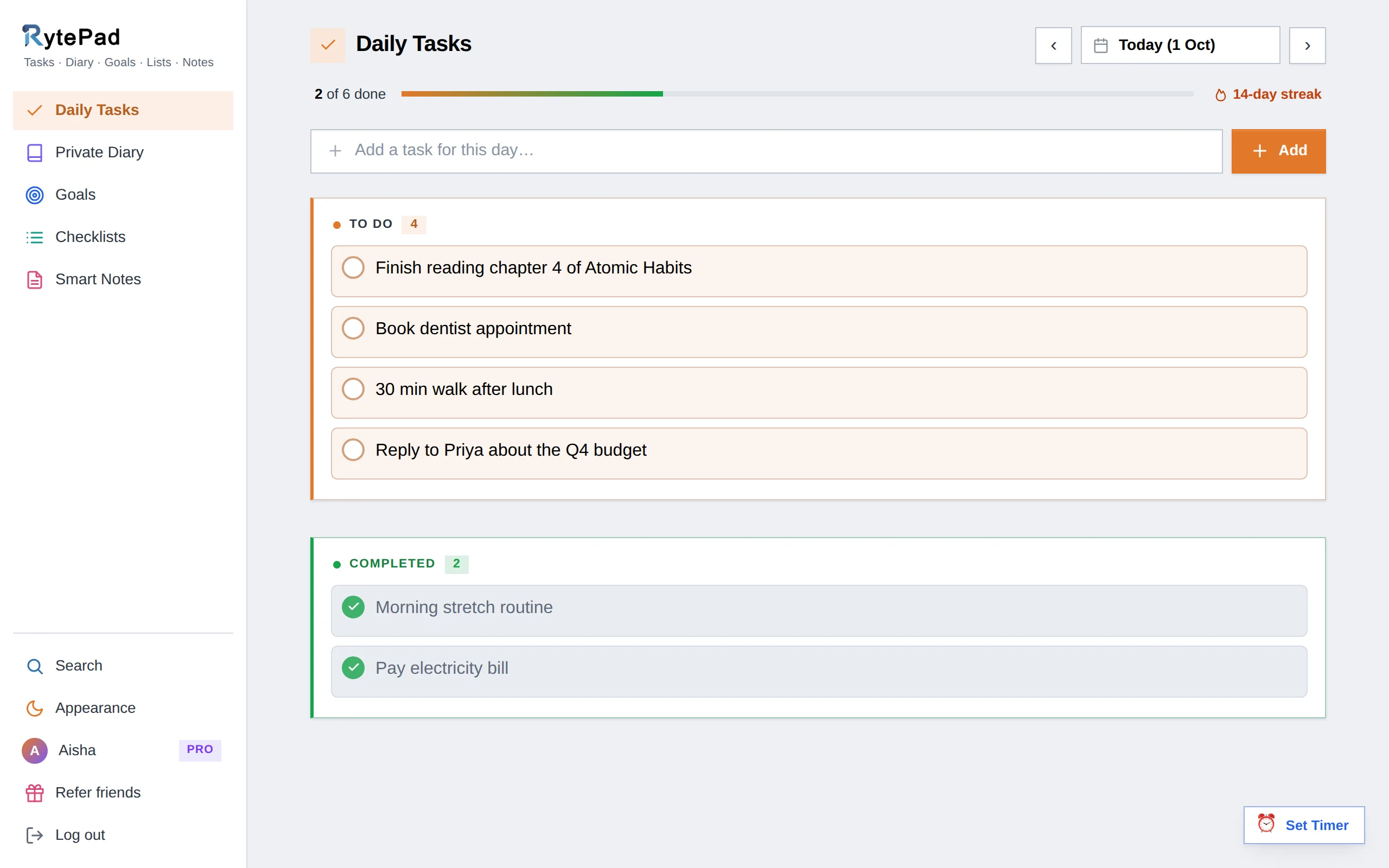
Some honest limits: there is one star, not four boxes, so boxes 3 and 4 are decisions you make as you sort. The free plan allows 25 tasks a day. RytePad has no templates, no shared or team workspaces and no native apps; it runs in any browser.
Put the important tasks on a date
A list for each day, a star for what matters, goals and a private Diary, encrypted with AES-256. Free, in any browser.
Eisenhower Matrix: your questions answered
What are the four quadrants of the Eisenhower Matrix?
Urgent and important (do it now), important but not urgent (schedule it), urgent but not important (delegate, shrink or batch it), and neither urgent nor important (drop it).
Did Eisenhower invent the Eisenhower Matrix?
Not as a grid. In a 1954 speech he quoted a former college president who said the urgent are not important and the important are never urgent. The four-box version came later and is widely taught today, for example through Stephen R. Covey's The 7 Habits of Highly Effective People.
Which quadrant matters most?
Important but not urgent. These tasks, such as planning, learning, health and relationships, have no deadline, so they are easy to put off. Giving each one a day and a time is the step that changes your week.
What if I have no one to delegate to?
Treat the urgent but not important box as a cue to make tasks smaller. Batch messages into one slot, give shorter replies, or say no. Delegating is one option, not the only one.
How often should I use the Eisenhower Matrix?
A full sort once a week takes about fifteen minutes. On other days, a quick glance at the morning list to check that box 1 is short and box 2 has a slot is enough.
The bottom line
The Eisenhower Matrix asks two questions of every task, urgent and important, and gives you four answers: do, schedule, delegate or drop. Research on the mere urgency effect suggests why it helps: deadlines pull at us even when the payoff is smaller. Sort your list once a week, and give every important task a date.
Give the important things a day.
Plan each day, star what matters and keep your goals in RytePad. Private, encrypted and free on any device.
Try RytePad free →Free plan with no time limit · No card · Works in any browserSources
- Eisenhower, D. D. (1954, 19 August). Address at the Second Assembly of the World Council of Churches, Evanston, Illinois. Online by Gerhard Peters and John T. Woolley, The American Presidency Project. presidency.ucsb.edu
- Zhu, M., Yang, Y., & Hsee, C. K. (2018). The mere urgency effect. Journal of Consumer Research, 45(3), 673–690. doi.org/10.1093/jcr/ucy008
- Johns Hopkins University Hub (2018, 31 May). How misperceptions of deadlines, urgency influence time management and performance. hub.jhu.edu/2018/05/31/meeting-deadlines-time-management-behaviors
- FranklinCovey. Habit 3: Put First Things First. The 7 Habits of Highly Effective People. franklincovey.com/habit-3