The 10 Best Note-Taking Apps in 2026 (Free & Paid)
The best note-taking apps for phones, computers and the web, compared on what they cost, what the free plan allows and how private your notes stay.
Notion is the best all-in-one note-taking app: pages, databases and to-dos in one place, free for personal use. Obsidian is the best free pick if you want linked notes stored privately on your own device, and Google Keep is the fastest for quick notes and lists. RytePad sits at #10: a simple encrypted notepad beside your daily list and diary, not a full notes system.
 By RytePad StaffPublished

The best note-taking apps all promise the same thing: write it down once and find it again later. They differ in almost everything else, from where your notes are stored to how much the free plan really lets you keep. If you only need a scratchpad in a browser tab, our list of the best online notepads is the shorter route.
This list ranks ten apps on what they do well, what they cost today and where each one falls short. Every price and limit comes from the app's own pages. It is published on RytePad, which has a simple notes section rather than a full notes system, so it comes last.
The short version: three note-taking apps to start with
The 10 best note-taking apps compared
| App | Best for | Platforms | Price |
|---|---|---|---|
| 1. Notion↓ | Notes, projects and databases in one place | Web · Desktop · Mobile | Free · Plus $10/mo yearly |
| 2. Obsidian↓ | Linked notes kept on your device | Windows · Mac · Linux · iOS · Android | Free · Sync $4/mo yearly |
| 3. Microsoft OneNote↓ | Free notebooks, handwriting and audio | Windows · Mac · iOS · Android · Web | Free · Microsoft 365 for Copilot |
| 4. Apple Notes↓ | iPhone, iPad and Mac owners | iPhone · iPad · Mac · iCloud.com | Free |
| 5. Google Keep↓ | Quick notes and shared lists | Android · iPhone · Web | Free |
| 6. Evernote↓ | Clipping and searching everything | iOS · Android · Web · Windows · Mac | Free (50 notes) · Starter · Advanced |
| 7. Joplin↓ | Open source with encrypted sync | Windows · Mac · Linux · iOS · Android | Free app · Cloud from €2.40/mo yearly |
| 8. Standard Notes↓ | End-to-end encryption on a free plan | Web · Desktop · Mobile | Free · $90/yr · $120/yr |
| 9. Bear↓ | Writing in Markdown on Apple devices | Mac · iPhone · iPad | Free · Pro $29.99/yr |
| 10. RytePad↓ | Private notes beside your daily plan | Web (all devices) | Free (10 notes) · $14.97/yr |
Prices checked 4 Nov 2026 on each app's own site or its US App Store listing. Evernote shows prices in your local currency, and app-store prices vary by region.
What kind of note-taking app do you need?
Tap what fits and get an honest pick.
The 10 best note-taking apps, ranked
Each entry opens with a one-line verdict, then says where the app wins and where it loses. Nothing here comes from paid placement, and we describe what each app's own pages document.
NotionBest all-in-one
Notion treats every note as a page, and a page can hold text, to-dos, tables or a whole database. That is why one app can be a reading list, a trip plan and a class notebook at the same time. The Free plan is described as being for individuals to organise personal projects and life.
Plus costs $10 a seat a month billed yearly, or $12 billed monthly, and adds custom forms and sites, charts and file uploads. Notion's AI agents and AI meeting notes are listed on the Business plan ($20 a seat a month, billed yearly); Free and Plus get a trial of Notion AI. If Notion feels like too much, our guide to Notion alternatives covers simpler options.
The honest catch: the flexibility takes time to learn, and a blank page with so many blocks can slow down a simple note.
- Notes, databases and to-dos together
- Generous free plan for one person
- Web, desktop and mobile apps
- Takes a while to learn
- The full AI features need Business
ObsidianBest free and private
Obsidian is free without limits and needs no sign-up. It stores notes on your device in open file formats, so you can read them even without the app. Its home page says no one else can read your notes, "not even us", and its pricing page adds that the apps collect no telemetry.
Its strength is links: you connect notes to each other and watch a web of ideas grow, with thousands of community plugins and themes on top. Obsidian's pricing page lists two optional add-ons: Sync at $4 a month and Publish at $8 a site a month, both billed yearly. Sync uses AES-256 end-to-end encryption.
The honest catch: syncing between your phone and laptop either costs $4 a month or means setting up your own method, and the plugin world can become a hobby of its own.
- Free, no account needed
- Notes live on your device in open files
- Links, graph and thousands of plugins
- Easy sync is a paid add-on
- More setup than most apps here
Microsoft OneNoteBest free notebook
OneNote works like a ring binder: notebooks, sections and pages you can type, draw or write on anywhere. Its App Store listing says OneNote is free on iPhone and many other devices; you sign in with a Microsoft account.
The free app covers a lot: digital ink, voice dictation in 27 languages, a scanner that pulls text out of photos, to-do tags and sticky notes. Copilot, Microsoft's AI assistant, comes with a Microsoft 365 subscription; Microsoft 365 Personal is $9.99 a month in the US and also adds 1 TB of cloud storage.
The honest catch: pages are free-form canvases, which suits handwriting but can make typed notes messy, and the AI features sit behind the subscription.
- Free on every major platform
- Handwriting, audio and scanning
- Works well with Word and Outlook
- Free-form pages can get untidy
- Copilot needs Microsoft 365
Apple Notes is free and already does more than most people expect. Its App Store listing names checklists, tables, a document scanner, audio recording with transcription, sketching with Apple Pencil, links between notes, tags and Smart Folders that sort notes by rules.
Sensitive notes can be locked with your iPhone passcode or a separate password. Apple's support page lists what cannot be locked, including notes with tags, PDFs, audio or video, and shared notes. On a Windows PC you can still reach your notes in a browser at iCloud.com.
The honest catch: there is no Android app, and the browser version is the only way in from a non-Apple computer.
- Free and already installed
- Scanning, tables, links and tags
- Locked notes for private things
- No Android app
- Some notes cannot be locked
Google Keep is the sticky-note wall of this list. You add a note, a checklist, a photo or a voice memo in seconds, colour it, label it and move on. A reminder can fire at a time or when you reach a place, such as your grocery list popping up at the shop.
Shared lists update in real time, voice memos are transcribed, and Keep can grab the text from an image so search finds it later. When a note grows up, you can send it to Google Docs. Our guide to Google Keep alternatives covers what to use when you outgrow it.
The honest catch: Keep sorts notes with labels and colours and is built for short notes, so it suits a shopping list far better than a semester of lectures. For lectures, our guide to note-taking methods compares five ways to lay out the page.
- Fastest capture on this list
- Time and place reminders
- Real-time shared lists, free
- Sorting by labels and colours only
- Built for short notes
Evernote is still one of the most complete note apps. Its plans page lists the Web Clipper, tasks with reminders, a calendar, search inside images and documents, offline notes and PDF annotation, and paid plans add AI tools such as semantic search and meeting transcription.
The free plan is now tight. Evernote's plan comparison allows 50 notes, 1 notebook and 1 device for free. Starter raises that to 1,000 notes, 20 notebooks and 3 devices, and Advanced removes the limits. The site shows prices in your local currency.
The honest catch: 50 notes fills up fast, so plan on paying if Evernote becomes your main notebook. Torn between the two big names? See Evernote vs Notion.
- Excellent web clipper and search
- Tasks and calendar built in
- Apps on every platform
- Free plan: 50 notes, 1 device
- Unlimited notes need Advanced
Disclosure: RytePad is our own product. It is ranked last because its notes section is simpler than the apps above, and its entry says exactly where it falls short. No app paid to be listed.
Joplin is an open source note-taking app that saves notes in an open format and uses end-to-end encryption, so only you can read what syncs. It runs on Windows, macOS, Linux, Android and iOS, and there is even a terminal app.
You choose how to sync: Dropbox, OneDrive or Joplin's own paid service. Joplin Cloud Basic is €2.99 a month (€28.69 a year) with 2 GB of storage, and Pro is €5.99 a month with 30 GB. A web clipper for Chrome and Firefox saves pages as notes, and plugins and a Markdown or rich-text editor let you shape it.
The honest catch: it looks plainer than Notion or Bear, and setting up sync takes a few more steps than signing in.
- Open source, open file format
- End-to-end encryption
- Every desktop and mobile platform
- Plain design
- Sync takes some setup
The best note-taking app is the one you can open in two seconds and search in five.
Standard Notes is built around privacy. Its free plan already includes end-to-end encryption, unlimited device sync on web, desktop and mobile, offline access, two-factor sign-in, password-protected notes and daily encrypted email backups.
The paid plans add richer note types. Productivity, at $90 a year, adds Super notes, spreadsheets and daily notebooks; Professional costs $120 a year.
The honest catch: the free plan is plain text only, and the paid plans cost more than most apps on this list.
- End-to-end encryption on the free plan
- Unlimited device sync, free
- Encrypted backups by email
- Free notes are plain text only
- Paid plans are pricey
Bear is a calm, good-looking writing app for Mac, iPhone and iPad that uses Markdown and tags to organise notes. People choose it for how pleasant it is to write in.
Bear Pro costs $2.99 a month or $29.99 a year, with a 7-day trial, and one subscription covers every device on your Apple ID. Pro adds iCloud sync, encrypted notes and a lock for the app, export to PDF, HTML, DOCX and JPG, extra themes and text search inside PDFs and images.
The honest catch: sync between your devices is a Pro feature, and there is no Android or Windows app.
- A lovely place to write
- Markdown and tags
- Encrypted notes on Pro
- Apple devices only
- Sync needs Pro
RytePadNotes beside your day
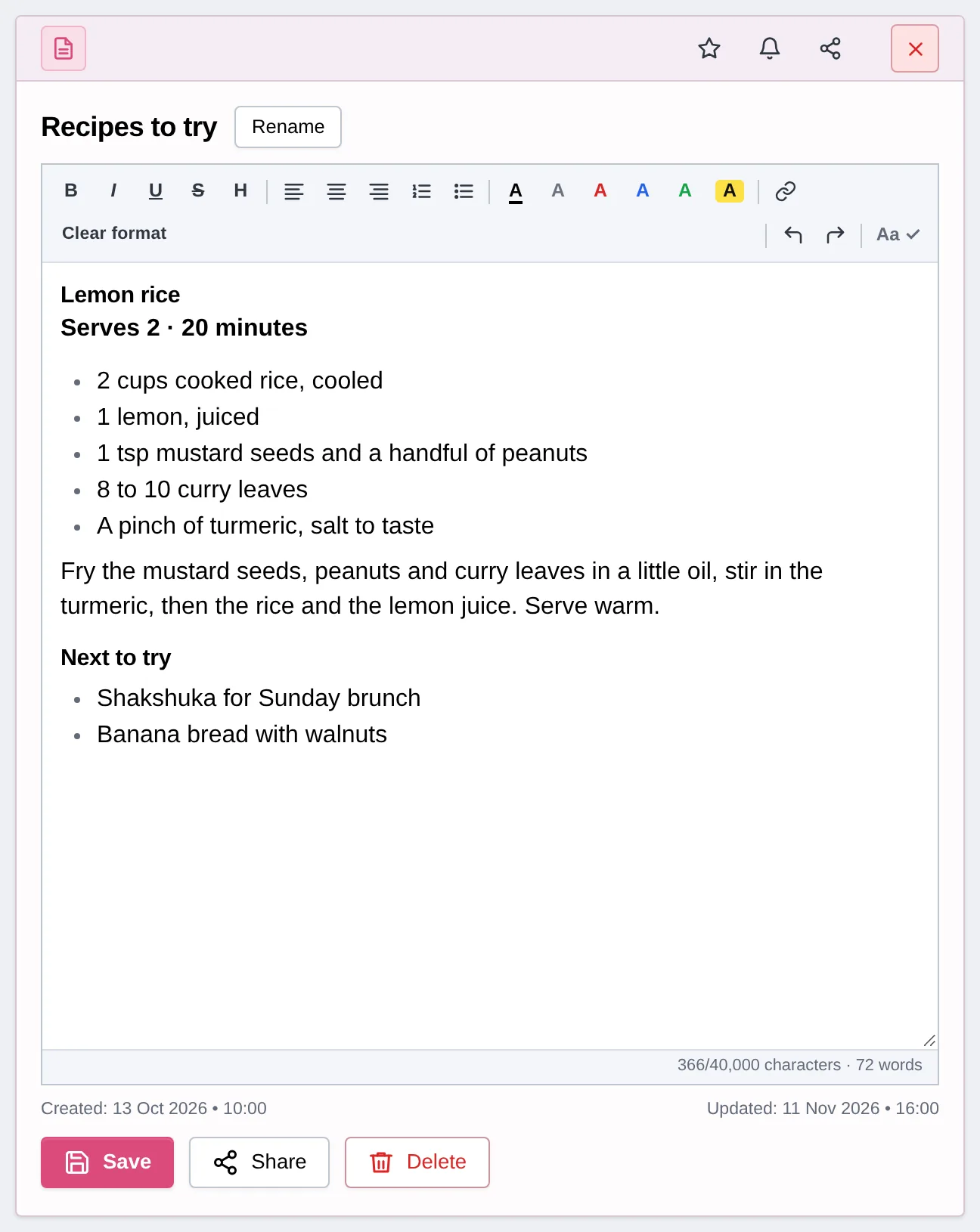
Let us be plain: RytePad is not a notes system like the nine apps above. It has no linked notes, notebooks or web clipper. It earns a place because many people want a handful of private notes in the same app where they plan their day.
Each note has a title and room for 40,000 characters, with the same formatting toolbar as the Diary. It saves every 10 seconds while you type, and Ctrl+S saves too.
You can share a note as a snapshot or as a live link that always shows the latest version; both are view-only, and Stop sharing turns a link off. Notes are searchable by word, and the Notes section sits beside Daily Tasks, the Diary, Goals and Checklists.
Everything is encrypted with AES-256 on every plan, and Account → Your data downloads every note as a text file in one zip.
The honest catch: the free plan keeps 10 notes, and Pro ($14.97 a year) removes the limit and adds a PIN lock for Notes. It is a web app with no native apps, no templates and no shared workspaces. If notes are your main job, pick one of the apps above.
- Notes beside your tasks, diary and goals
- Snapshot or live share links, view-only
- Auto-save every 10 seconds
- AES-256 encryption on every plan
- Works in any browser, free plan has no time limit
- 10 notes on the free plan
- No linking, notebooks or web clipper
- No native apps
Want your notes next to your plan for the day?
RytePad keeps today's list, a private diary, goals, checklists and notes in one encrypted web app. Simple, and nothing to install.
How to pick a note-taking app (in 15 seconds)
- Notes, projects and lists in one place: Notion.
- Free, private and on your own device: Obsidian, or Joplin if you want open source.
- Handwriting, audio or Windows: Microsoft OneNote.
- Everything Apple: Apple Notes, or Bear for writing.
- Quick notes and shared lists: Google Keep.
- Encryption first: Standard Notes.
- A few notes beside your daily plan and diary: RytePad.
Note-taking apps: your questions answered
What is the best note-taking app?
Notion is the best all-round note-taking app for most people: notes, databases and to-dos in one workspace, with a free plan for personal use. Obsidian is the best free choice if you want private notes stored on your own device, and Google Keep is best for quick notes and lists.
Is there a completely free note-taking app?
Yes. Obsidian is free without limits, Apple Notes and Google Keep are free, and Microsoft OneNote is free with a Microsoft account. Joplin is open source, and Standard Notes has a free plan with end-to-end encryption. Notion, Evernote, Bear and RytePad have free plans with limits.
Which note-taking app is the most private?
Standard Notes and Joplin use end-to-end encryption, so only you can read your synced notes. Obsidian keeps notes on your device, and its paid Sync is end-to-end encrypted. RytePad encrypts notes with AES-256 before they are stored, on every plan.
Which note-taking apps work on both iPhone and Android?
Notion, Obsidian, OneNote, Google Keep, Evernote and Joplin all have iPhone and Android apps, and RytePad works in any browser. Apple Notes and Bear are for Apple devices, though Apple Notes can be opened in a browser at iCloud.com.
Is Evernote still free?
Yes, but the free plan is small. Evernote's plan comparison allows 50 notes, 1 notebook and 1 device on the free plan. Starter raises that to 1,000 notes, 20 notebooks and 3 devices, and Advanced removes the limits.
Why is RytePad ranked last?
Because it is not a full note-taking system. RytePad has no linked notes, notebooks or web clipper, and the free plan keeps 10 notes. It suits people who want a few encrypted notes beside their daily to-do list, diary and goals in one web app.
The bottom line
For most people, Notion is the note-taking app to try first: free for one person and flexible enough to hold notes, plans and lists. If you would rather own your files and pay nothing, Obsidian is hard to beat, and Google Keep wins for the quick notes you jot down in a queue.
Pick OneNote for handwriting and Windows, Apple Notes or Bear if everything you own is Apple, and Standard Notes or Joplin when encryption comes first. If you want a few private notes next to your daily plan and diary, RytePad covers that, just not as a full notes system.
Keep your notes, plans and diary in one place
RytePad keeps your daily list, a private diary, goals, checklists and notes together: encrypted, simple and free.
Try RytePad free →Free plan with no time limit · No card · Works in any browserSources
- Notion Labs. Notion pricing and Notion desktop apps. Checked 4 Nov 2026.
- Obsidian. Pricing, home page and downloads. Checked 4 Nov 2026.
- Microsoft. OneNote and the Microsoft OneNote App Store listing (US). Checked 4 Nov 2026.
- Apple. The Notes App Store listing (US), How to lock or unlock notes on your iPhone or iPad and Set up iCloud for Notes on all your devices. Checked 4 Nov 2026.
- Google. Google Keep, the App Store listing (US) and the Google Play listing. Checked 4 Nov 2026.
- Evernote. Compare plans. Checked 4 Nov 2026.
- Joplin. joplinapp.org and Joplin Cloud plans. Checked 4 Nov 2026.
- Standard Notes. Plans. Checked 4 Nov 2026.
- Bear. Features and price of Bear Pro and the Bear App Store listing (US). Checked 4 Nov 2026.
- RytePad. Features, Pricing, User guide and What's new. Checked 4 Nov 2026.