
10 Best Google Keep Alternatives in 2026 (Free & Paid)
Google Keep is quick and free, but organisation stops at labels and colours, formatting is basic, notes are not end-to-end encrypted, and its reminders now live in Google Tasks. Here are ten better homes for your notes and lists.
RytePad is the best Google Keep alternative for most people who use Keep for quick notes, lists and to-dos: notes, checklists and a daily task list in one private web app, encrypted on every plan. Notesnook is the best for end-to-end encryption with a direct Keep import, Apple Notes is the free choice on iPhone and Mac, and Microsoft OneNote suits free-form notebooks on Windows.
 By RytePad StaffUpdated
 Google Keep does one job well: quick notes and lists that sync with your Google account. People outgrow it when they want more structure than labels and colours, richer formatting, end-to-end encryption, or reminders that don't depend on another app. Since October 2025, Keep's reminders have been moving to Google Tasks, and location reminders are gone.
The alternatives below fix one or more of those, and most can take your notes with you through Google Takeout.
The short version
The 10 best Google Keep alternatives compared
| App | Best for | Free plan | Paid from |
|---|---|---|---|
| 1. RytePad↓ | Notes, lists and your day in one place | 10 notes, 10 checklists, 25 tasks a day | $14.97/yr (optional) |
| 2. Apple Notes↓ | iPhone, iPad and Mac users | Free (5 GB iCloud) | iCloud+ $0.99/mo |
| 3. Microsoft OneNote↓ | Free-form notebooks on Windows | Free (5 GB OneDrive) | $19.99/yr |
| 4. Notesnook↓ | End-to-end encrypted notes | Unlimited notes and devices | $19.99/yr |
| 5. Standard Notes↓ | A long-term encrypted archive | Plain-text notes, unlimited devices | $90/yr |
| 6. Obsidian↓ | Markdown files you own | Free, no limits | Sync $4/mo (annual) |
| 7. Joplin↓ | Open source, your own sync | Free with your own cloud | €2.99/mo |
| 8. Notion↓ | Notes inside a bigger workspace | Free for individuals | Plus $10/mo |
| 9. Evernote↓ | Large archives, tasks and calendar | 50 notes, 1 device | $99/yr |
| 10. Bear↓ | Markdown on Apple devices | Free app, no sync | $29.99/yr |
US prices as published on 20 October 2026; Joplin lists prices in euros only. App-store prices vary by region.
Pick in 10 seconds
Tap what matters most to you.
The 10 best Google Keep alternatives
Ranked by how well each replaces what you used Keep for, quick notes and lists, and by privacy, organisation and price.
RytePadOur #1 pick
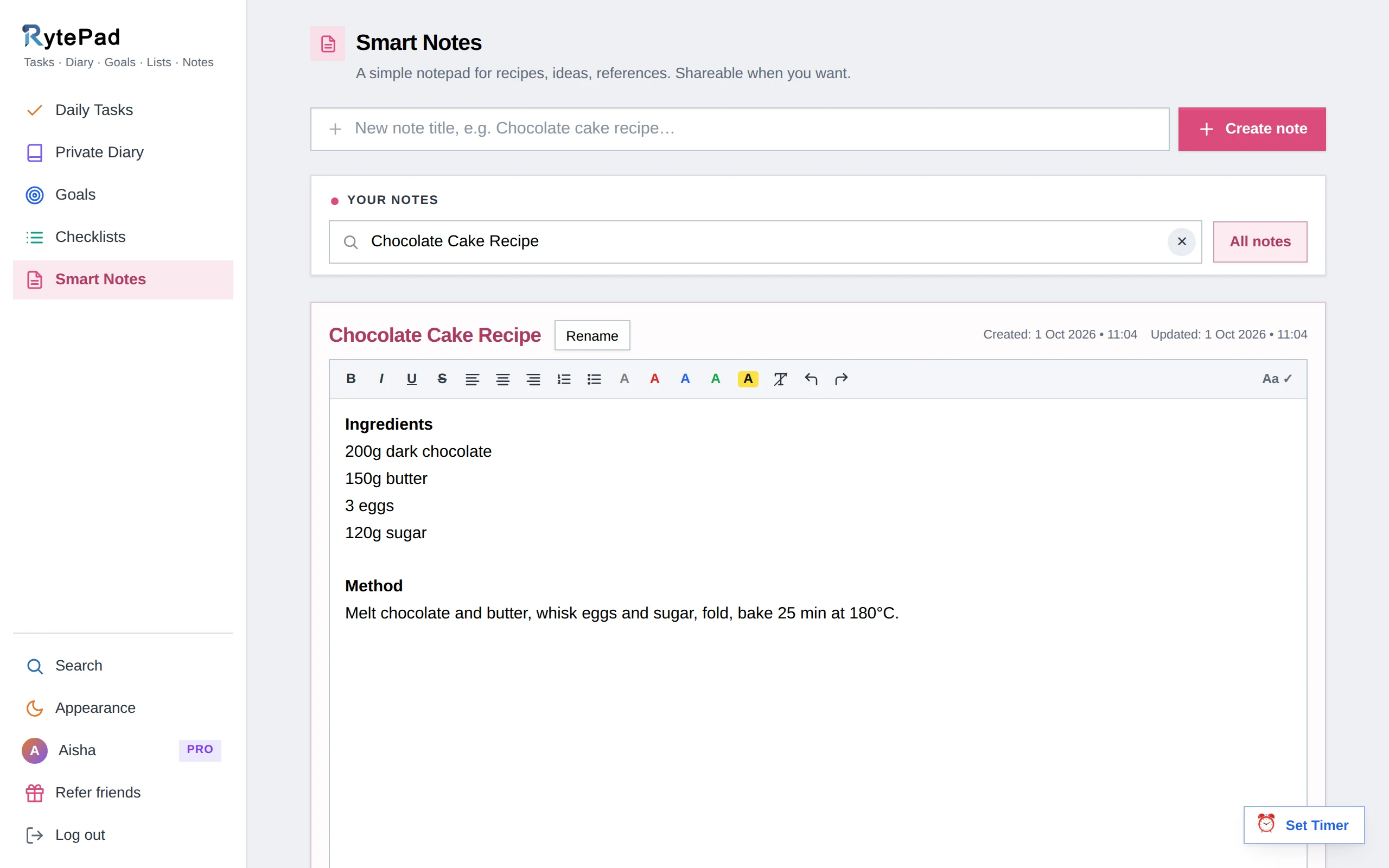
RytePad covers what most people use Keep for, in one private web app: titled notes with real formatting, reusable checklists you can tick off and restore, and a to-do list for each day. A note holds up to 40,000 characters, saves itself when you leave the editor, and can be shared as a read-only snapshot or as a live link.
Where Keep has labels and colours, RytePad has separate areas for notes, checklists and daily tasks, each with its own colour, plus one search across all of them, with date ranges for tasks and diary entries.
Reminders come by email: a 6:30 PM digest of what is still open and a 6:30 AM heads-up for tasks you planned for that day. There are no alarms on individual notes.
Everything is encrypted with AES-256 before it is stored, on every plan. The free plan keeps 10 notes and 10 checklists of 25 items, with no time limit; Pro removes every limit for $14.97 a year.
Honest caveat: there is no Google Keep importer, so you copy across the notes you want to keep. No photos or voice notes, no real-time collaboration, encryption is at rest rather than end-to-end, and it is a web app without native mobile apps.
- Notes, checklists, daily tasks, a diary and goals in one account
- Formatting and 40,000 characters per note
- Share a note as a snapshot or a live link
- AES-256 encryption on every plan, including free
- Every note exportable as a text file, on every plan
- A 4-digit PIN in front of Notes on Pro
- One search across everything
- Pro is a flat $14.97 a year
- Free plan holds 10 notes and 10 checklists
- No Google Keep importer
- No photos, voice notes or collaboration
- Web app, no native mobile apps
Disclosure: RytePad is our own product. We rank it where we believe it belongs and the caveats above are real; the other nine entries are included on their merits, and no app paid to be listed.
Try the private Keep alternative, free
Notes, checklists and a daily to-do list in one encrypted account. No card.
Apple Notes is free, already on your iPhone and Mac, and has grown into a capable notebook: checklists, folders, tags and Smart Folders, and real-time collaboration on shared notes and folders. Turn on Advanced Data Protection and your notes are end-to-end encrypted; locked notes always are.
The catch is reach. There are no Android or Windows apps, so elsewhere you use icloud.com in a browser. Notes have no reminders of their own (you share a note to the Reminders app), and there is no Keep importer, although the Mac app imports HTML files like the ones in a Google Takeout export.
- Free and built into Apple devices
- Checklists, folders, tags and Smart Folders
- Real-time collaboration on shared notes
- End-to-end encryption with Advanced Data Protection
- No Android or Windows apps
- No reminders on notes
- No Keep importer
OneNote is a free digital notebook of notebooks, sections and pages that you can type or draw anywhere on. To Do tags turn lines into checkboxes, notebooks can be shared for editing or viewing, and everything syncs through OneDrive: 5 GB free, or 100 GB with Microsoft 365 Basic at $19.99 a year.
It is heavier than Keep for a quick note, reminders only work through Outlook tasks in the desktop app, and we found no Keep import tool. OneDrive encrypts files at rest, but there is no end-to-end encryption. If you still use OneNote for Windows 10, note that it reached end of support in October 2025.
- Free on every major platform
- Free-form pages with sections and tags
- Notebook sharing for editing or viewing
- Heavier than Keep for quick notes
- Reminders only via Outlook on desktop
- No Keep import tool or end-to-end encryption
Notesnook is open source and end-to-end encrypted by default, so the company cannot read your notes. The free plan has unlimited notes and devices, basic checklists and reminders, with caps of 50 notebooks, 50 tags and 10 active reminders. It imports Keep directly from the Google Takeout .zip in its web or desktop app.
Paid plans start with Essential at $1.99 a month or $19.99 a year, which adds advanced task lists. You can publish a note as a web page, optionally with a password, but there is no collaboration feature.
- End-to-end encrypted by default
- Open source
- Imports Keep from Google Takeout
- Unlimited notes on the free plan
- Free plan caps notebooks, tags and reminders
- No collaboration feature
Standard Notes, owned by Proton since April 2024, is end-to-end encrypted on every plan, syncs across unlimited devices for free, and has a built-in importer that reads the HTML files from a Keep Takeout export.
The free plan is plain text with tags. Checklists, rich text and folders need Productivity at $90 a year, and there is no real-time collaboration.
- End-to-end encryption on every plan
- Built-in Keep importer
- Unlimited devices for free
- Checklists need a paid plan
- $90 a year for the basics
- No collaboration
Obsidian keeps your notes as Markdown files on your own device, free without limits, including for work. Its official Importer plugin reads the Keep Takeout .zip, although checklists are flattened and reminders dropped. Task lists are Markdown checkboxes, and Obsidian has no reminders.
Syncing between devices is the paid part: Obsidian Sync starts at $4 a month billed annually, or $5 month to month, and is end-to-end encrypted. There is no web app.
- Free, with notes as files you own
- Official Keep importer
- Folders and nested tags
- No web app
- Sync costs extra
- No reminders
Joplin is free and open source, with notebooks, tags, task lists and to-do notes with alarms. Sync through Dropbox, OneDrive or Nextcloud for free, or use Joplin Cloud from €2.99 a month, and switch on optional end-to-end encryption.
There is no built-in Keep importer; a community plugin, updated in February 2026, imports the Takeout files with checklists, labels and attachments. Sharing your own notebooks needs Joplin Cloud Pro.
- Free and open source
- To-do notes with alarms
- Optional end-to-end encryption
- Keep import needs a community plugin
- More setup than Keep
- Sharing notebooks needs Joplin Cloud Pro
Notion is free for one person, with unlimited blocks, to-do blocks and date reminders, and it is built for sharing: invite people with permissions or publish a page to the web.
It is far more than a notes app, which is the downside if you only want quick capture. There is no Keep importer, though Notion imports HTML and Markdown files; encryption is at rest rather than end-to-end; and paid plans start with Plus at $10 per member per month.
- Free for individuals
- Docs, databases and sharing in one place
- Date reminders on pages and to-dos
- Slower than Keep for quick notes
- No Keep importer
- No end-to-end encryption
Evernote combines notes, tasks with reminders and a calendar on every platform. Its free plan is now 50 notes, one notebook and one device, which makes it a trial for most Keep users; Starter costs $14.99 a month or $99 a year.
There is no direct import from Keep: Evernote's own guide has you export with Google Takeout and import the files, and labels and reminders do not carry over. Notes are encrypted at rest with AES-256, not end-to-end.
- Mature notes, tasks and calendar
- Apps on every platform
- A migration guide for Keep users
- Free plan is 50 notes on one device
- $99 a year for Starter
- Labels and reminders don't import
Bear is a polished Markdown editor for iPhone, iPad and Mac, with nested tags and nestable to-dos. The app is free; Pro ($2.99 a month or $29.99 a year) adds sync, password-protected notes, advanced export and themes.
It is Apple only (Bear Web is in public beta, with no plans for Android or Windows), there is no collaboration, and there is no Keep importer, although it imports HTML and Markdown files.
- A beautiful writing experience
- Nested tags and to-dos
- Inexpensive Pro
- Apple devices only
- Sync needs Pro
- No collaboration
How we chose these alternatives
Every app was compared on what Keep users most often say they miss:
- Quick capture. How fast you can jot down a note or a list.
- Lists and reminders. Checklists, and some way to be reminded.
- Organisation beyond labels. Folders, tags and search that scale.
- Privacy. Encryption at rest, and whether end-to-end encryption is available.
- Moving your notes. Whether it imports a Google Takeout export.
- Price. What a full unlock costs per year.
Keep reading: how RytePad's online notepad works, the best online notepads that need no download, the best Simplenote alternatives, Notion alternatives, and Evernote vs Notion.
Google Keep alternatives: your questions answered
What is the best free Google Keep alternative?
For notes plus checklists and a daily to-do list, RytePad's free plan covers 10 notes, 10 checklists and 25 tasks a day with AES-256 encryption. For unlimited free notes, Notesnook (end-to-end encrypted), Apple Notes (on Apple devices), OneNote and Obsidian have no note cap.
How do I export my notes from Google Keep?
Use Google Takeout and select only Keep. You get a .zip with each note as an .html and a .json file, including lists, labels, colours, pinned and archived state, and attachments.
Which alternatives can import my Google Keep notes?
Standard Notes and Notesnook have built-in Keep importers, and Obsidian's official Importer plugin reads the Takeout .zip. Joplin needs a community plugin, Evernote imports the exported files without labels or reminders, and the rest need copying or a general HTML import.
Is Google Keep end-to-end encrypted?
No. Keep does not offer end-to-end encryption. If that matters, Notesnook and Standard Notes are end-to-end encrypted on every plan, and Apple Notes is with Advanced Data Protection turned on.
What happened to reminders in Google Keep?
Since October 2025, Keep's reminders have been moving to Google Tasks, so you see and manage them in the Tasks or Calendar apps, and location-based reminders were removed.
What about Simplenote?
Simplenote is still free and simple, but its team said in September 2025 that it is no longer in active development, and notes are not encrypted at rest. We left it off this list for those reasons, and compared the best Simplenote alternatives separately.
The bottom line
If you want end-to-end encryption and a direct import, Notesnook and Standard Notes are the safest moves. On Apple devices, Apple Notes is the obvious free upgrade; on Windows, OneNote.
If Keep was really your place for quick notes, shopping lists and what to do today, RytePad puts all three in one private web app, encrypted on every plan, with a free plan to start and everything unlocked for $14.97 a year.
Notes, lists and your day, in one private place
Notes, checklists and a daily to-do list, encrypted on every plan. Free to start.
Try RytePad free →Free plan with no time limit · No card · Works in any browser