
10 Best Notion Alternatives in 2026 (Simpler, Faster, Freer)
Notion is powerful, but for a lot of people it is too much: slow to load, endless setup, complexity you never asked for. From full workspaces to focused daily apps, these are the ten worth moving to.
RytePad is the best Notion alternative for daily use and the easiest to start: tasks, a private diary, goals, checklists and notes ready the moment you sign in, encrypted and free. If you need Notion's full power with better privacy, Anytype is the closest all-in-one; for linked notes choose Obsidian; for teams, Coda or ClickUp.
 By RytePad StaffUpdated
Notion is brilliant for team wikis, documentation and complex databases. It is also the app people most often abandon, for consistent reasons: a steep learning curve, slower performance than a focused tool, the upkeep of systems you built yourself, and the way a blank canvas turns planning into procrastination. So this list has two honest camps: workspaces that replace Notion feature for feature, and simpler apps that replace what most individuals actually used it for.
The short version
The 10 best Notion alternatives compared
| App | Best for | Type | Free plan |
|---|---|---|---|
| 1. RytePad↓ | Simple daily planning + journal | Focused app | Very generous |
| 2. Anytype↓ | Private all-in-one workspace | Full workspace | Yes |
| 3. Obsidian↓ | Linked markdown notes | Notes / PKM | Free |
| 4. Coda↓ | Docs that act like apps | Full workspace | Generous |
| 5. Craft↓ | Beautiful documents (Apple) | Docs / notes | Good |
| 6. ClickUp↓ | Teams and project management | Full workspace | Generous |
| 7. AppFlowy↓ | Open-source Notion clone | Full workspace | Free / open source |
| 8. Evernote↓ | Classic note capture | Notes | 50 notes, 1 device |
| 9. Trello↓ | Visual kanban projects | Project boards | Generous |
| 10. Simplenote↓ | Minimalist plain-text notes | Notes | Fully free |
"Type" tells you whether an app replaces Notion wholesale (full workspace) or replaces one job you used it for.
Pick in 10 seconds
Tap what you actually used Notion for.
The 10 best Notion alternatives
Each entry says which Notion job it replaces, what the free plan covers and where it falls short.
RytePadBest for daily use
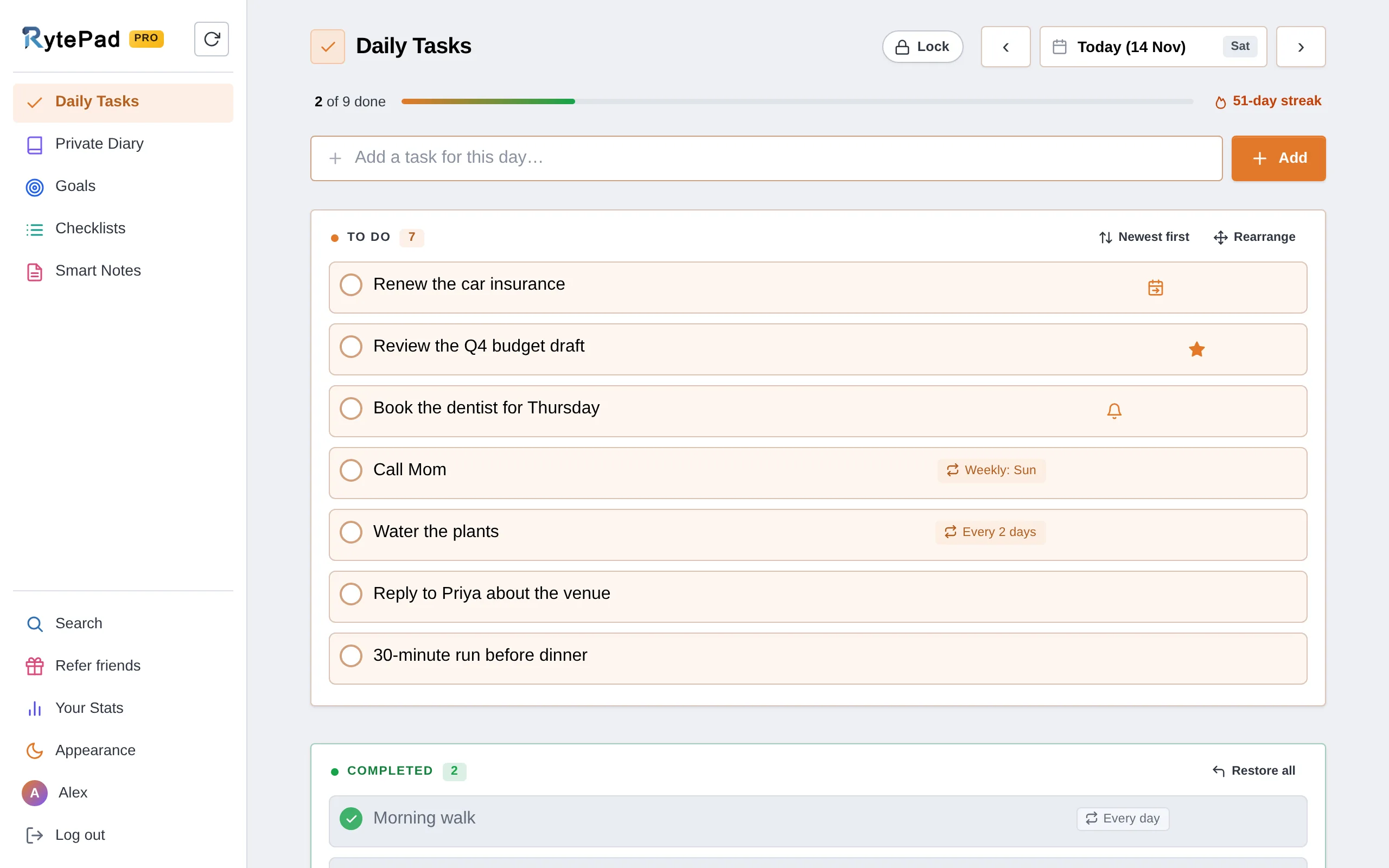
Here is the honest framing: RytePad is not a Notion replacement for teams, wikis or databases. If that is what you need, look at Anytype, Coda or ClickUp below.
But a huge share of people use Notion for something much simpler, a daily dashboard with tasks, a journal, some goals and notes, and then spend hours building and maintaining it. RytePad delivers exactly that, ready the moment you sign in.
You get a date-based task manager with free reminders, a private diary, long-term and monthly goals, reusable checklists and Smart Notes with shareable links, all searchable together and all encrypted with AES-256 on every plan, including free. Where Notion pages are readable on its servers, RytePad is built around private personal content.
The pieces people usually build by hand in Notion come built in: repeating tasks for routines (5 at a time on the free plan, no limit on Pro), Your Stats with your streaks, the last 30 days and an activity calendar, and Undo with Recently Deleted if you delete something by mistake.
There is nothing to configure and almost no learning curve, which makes it the easiest switch on this list for people Notion overwhelmed. RytePad vs Notion covers the trade-off in full.
Honest caveat: you give up Notion's superpowers: custom databases, relations, wikis, docs, team collaboration and its huge template ecosystem. RytePad's sections are fixed, not a blank canvas. It is the right pick if you want simplicity and privacy, the wrong one if you love building bespoke systems.
- Works instantly, no setup or templates
- Tasks, diary, goals, checklists and notes in one place
- Repeating tasks and Your Stats, built in
- AES-256 encryption on every plan
- A free PIN lock and CSV export for your tasks
- Fast and simple, tiny learning curve
- Pro is a flat $14.97 a year
- No databases, wikis or docs
- No team collaboration
- Not customisable like Notion
- Web app, no native apps yet
Disclosure: RytePad is our own product. We rank it where we believe it belongs and the caveats above are real; the other nine entries are included on their merits, and no app paid to be listed.
Skip the setup, just start planning
Tasks, diary, goals and notes ready to use, encrypted, on the free plan. No templates required.
Anytype is the closest true all-in-one replacement. It offers Notion-like objects, relations and databases, but it is local-first and end-to-end encrypted, which fixes Notion's biggest privacy gap. It is open source, fast, and works offline.
Honest caveat: it is younger and less polished, collaboration and the ecosystem are still maturing, and the flexibility carries some of the same learning curve you may be leaving Notion to escape.
- End-to-end encrypted, local-first
- Notion-like objects and databases
- Open source and offline-capable
- Still maturing
- Similar learning curve to Notion
Obsidian stores everything as local markdown files you own, with powerful linking, backlinks, a graph view and a massive plugin community. For note-heavy Notion users who care about ownership and speed, it is a favourite, and the app itself is free.
Honest caveat: it is notes-first, not a database or workspace tool, syncing across devices and publishing are paid add-ons, and the plugin route to "make it like Notion" adds its own complexity.
- You own local markdown files
- Powerful linking and plugins
- Fast and offline
- Not a database or workspace
- Sync and publish cost extra
Coda is Notion's most direct big-name rival. It blends docs, tables and automations into interactive documents, with strong formulas and a "pack" ecosystem for integrations. Teams building interactive trackers and mini-apps often prefer it.
Honest caveat: it can be even more complex than Notion, and pricing is based on "Doc Makers", which gets confusing for growing teams.
- Interactive docs with real logic
- Powerful formulas and packs
- Generous free plan
- Can be more complex than Notion
- Maker-based pricing
Craft is what many Notion users wish Notion looked like: stunning, fast documents with a delightful writing experience, blocks, and great export. It is ideal for polished notes and personal docs.
Honest caveat: it is more a documents-and-notes app than a full database workspace, and it is strongest inside the Apple ecosystem.
- Gorgeous, fast documents
- Excellent writing experience
- Great export options
- Less database power
- Best on Apple devices
Match the tool to what you actually did in Notion, not to Notion's full feature list.
ClickUp leans harder into project and team management than Notion, with tasks, docs, goals, whiteboards and dashboards in one place. For work teams it can replace both Notion and a separate task tool.
Honest caveat: it is feature-dense to the point of being overwhelming, and can feel heavy, the opposite direction from "simpler than Notion". If you are choosing software for a whole company, a procurement-style teardown such as TrakSource will serve you better than a personal-productivity list like this one.
- Strong project management
- Docs, goals and dashboards
- Generous free plan
- Overwhelming feature set
- Can feel heavy
AppFlowy is an open-source alternative that mirrors Notion's page-and-database model while letting you self-host and keep data local. For the privacy- and open-source-minded, it is the natural pick.
Honest caveat: as a younger open-source project it is less polished, and features and stability still trail the commercial options.
- Open source, self-hostable
- Notion-like pages and databases
- Local data ownership
- Less polished and mature
- Fewer features than Notion
Evernote is the veteran note app, with excellent web clipping, document scanning and powerful search. If you mainly used Notion as a notes archive, Evernote does that job in a more structured, notebook-based way.
Honest caveat: the free plan is now capped at 50 notes, one notebook and one device, and the paid tiers were restructured upwards (Starter $99 a year, Advanced $249.99 a year), which is why many people are searching for alternatives to it too. See Evernote vs Notion and RytePad vs Evernote.
- Excellent search and web clipping
- Document scanning
- Mature and cross-platform
- Free plan: 50 notes, 1 device
- Expensive paid tiers
Trello replaces the project-tracking side of Notion with simple, satisfying kanban boards. If you used Notion boards to manage work, Trello does it faster with far less setup, and the free plan allows ten boards per workspace with unlimited cards. We also feature it in our best free to-do list apps roundup.
Honest caveat: it is boards-first, so it will not cover docs, wikis or notes the way Notion does.
- Intuitive kanban boards
- Almost no setup
- Generous free plan
- Boards only
- No docs or wikis
Simplenote is the anti-Notion: plain text, tags, instant sync, version history, and completely free with no upsells. If Notion's complexity exhausted you and you mostly need notes, this is the reset button. It also appears in our best online notepads guide.
Honest caveat: it is deliberately bare-bones, with no databases, images or rich formatting.
- 100% free, no upsells
- Fast and distraction-free
- Version history
- Plain text only
- No databases or images
Which Notion alternative is right for you?
Be honest about what you actually used Notion for:
- You want a full workspace, but private: Anytype or AppFlowy (both local-first).
- You want interactive docs and databases: Coda for logic, ClickUp for teams.
- You mainly took notes: Obsidian (linked notes), Craft (beautiful), or Simplenote (minimal).
- You mainly tracked projects: Trello for visual boards.
- You just wanted to plan your day and journal: RytePad, ready-made and encrypted, no building required.
Keep reading: See the full RytePad vs Notion comparison, or explore the best free to-do list apps, best online notepads and best online diary apps. Prefer a comparison? Try Evernote vs Notion.
Notion alternatives: your questions answered
What is the best free Notion alternative?
It depends on the job. For a private full workspace, Anytype is free and end-to-end encrypted. For linked notes, Obsidian is free. For simple daily planning and journaling without setup, RytePad's free plan is the most complete and adds encryption.
Why do people leave Notion?
The common reasons are a steep learning curve, slower performance than focused apps, the ongoing effort of building and maintaining systems, and a lack of end-to-end privacy. Many people also realise they only used a fraction of Notion's power.
Is there a Notion alternative that is more private?
Yes. Anytype and AppFlowy are local-first and privacy-focused, and RytePad encrypts personal content with AES-256 on every plan. Notion secures data at the infrastructure level but is not end-to-end encrypted, so your content is readable on its servers.
What is a simpler alternative to Notion for personal use?
If you used Notion mainly for daily planning, a to-do list, some notes and a journal, RytePad gives you all of that ready-made with no setup. Simplenote and Craft are great if you only need notes and documents.
Can I move my Notion content to another app?
Notion exports to Markdown, CSV, HTML and PDF. Obsidian, Anytype and AppFlowy import Markdown reasonably well. For focused apps like RytePad, you would copy across the content you actually want to keep rather than importing an entire workspace.
Which alternative is best for teams?
Coda and ClickUp are the strongest team-focused replacements, with docs, databases and project management. Anytype is a good private option as its collaboration matures. Focused personal apps like RytePad are not built for team collaboration.
The bottom line
If you need Notion's full power but want privacy or open source, Anytype and AppFlowy are the closest swaps; for notes, Obsidian and Craft shine; for teams, Coda and ClickUp.
If you are honest that you mostly used Notion to plan your day, track goals and journal, RytePad is the simplest win: it does exactly that, encrypted and free, with none of the setup that made you look for an alternative in the first place.
Want simple instead of powerful?
Tasks, diary, goals and notes in one private, encrypted account. No building, no maintenance.
Try RytePad free →Free plan with no time limit · No card · Works in any browser