
10 Best Day One Alternatives (Free & Paid)
Day One is a beautiful journal, but its free plan is limited to one device, syncing costs $49.99 a year, and it does journaling and nothing else. From cross-platform diaries to all-in-one apps, these are the ten worth switching to.
RytePad is the best Day One alternative for most people: an encrypted diary with unlimited entries free, on any device through the browser, plus tasks, goals, checklists and notes. Journey is the closest like-for-like swap for multimedia memories across platforms, Apple Journal is free and end-to-end encrypted on Apple devices, and Diarium is the pick if you want to pay once.
Day One is, by most measures, the most polished journaling app ever made, and end-to-end encryption is now included on every tier. So why look for an alternative? Three reasons keep coming up: the free Basic plan is limited to one device and one photo per entry, syncing across devices needs Silver at $49.99 a year (annual billing only), and it is journaling only, so tasks, goals and planning need separate apps.
The short version
The 10 best Day One alternatives compared
| App | Best for | Platforms | Free plan |
|---|---|---|---|
| 1. RytePad↓ | Diary + full daily routine | Web (all devices) | Very generous |
| 2. Journey↓ | Cross-platform memories | Web · iOS · Android · Desktop | Basic |
| 3. Apple Journal↓ | Private free journaling | iPhone · iPad · Mac | Fully free |
| 4. Diarium↓ | One-time purchase, Windows | Windows · iOS · Android · Mac | Trial-style |
| 5. Diarly↓ | Beautiful Apple writing | iOS · Mac | Generous |
| 6. Journal it!↓ | Journaling + planning | Android · iOS · Windows | Good |
| 7. Penzu↓ | Classic diary feel | Web · iOS · Android | Single journal |
| 8. Daylio↓ | Mood tracking | iOS · Android | Good (ads) |
| 9. Dabble Me↓ | Journaling by email | Email / web | Yes |
| 10. Notion↓ | DIY custom journal | Web · iOS · Android · Desktop | Free (personal) |
Published prices at the time of writing; app-store prices vary by region.
Pick in 10 seconds
Tap the reason you are leaving Day One.
The 10 best Day One alternatives
Ranked by how well each fixes the reason people leave Day One: platform lock-in, the subscription, or wanting more than a journal.
RytePadOur #1 pick
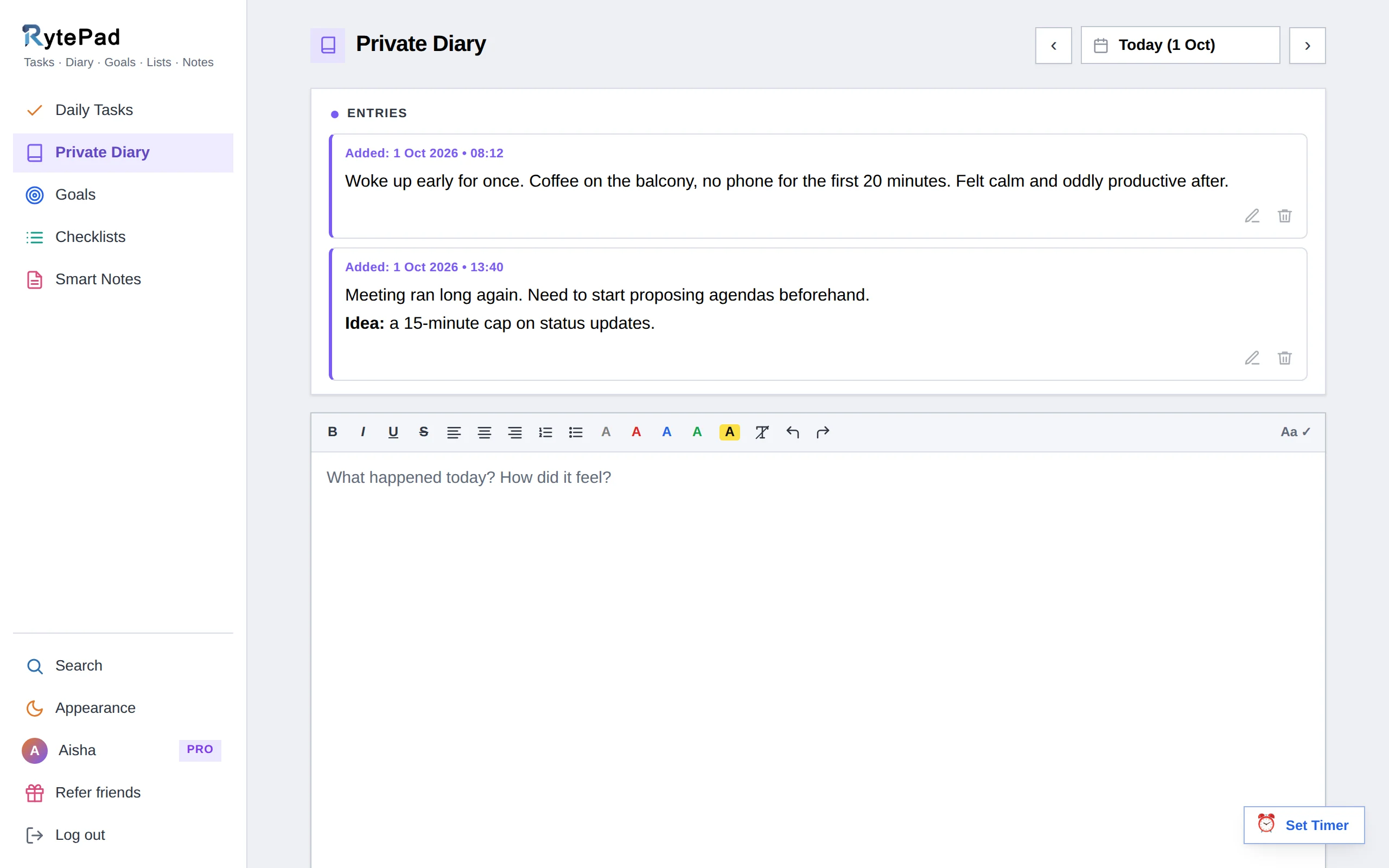
Day One keeps your memories; RytePad keeps your memories and runs your day. Its diary offers unlimited timestamped entries free, formatting, several entries a day and calendar dots, all stored encrypted with AES-256 on every plan, including free.
Around that diary sit a daily task manager, long-term and monthly goals, reusable checklists and Smart Notes with shareable links, unified by one search.
It also solves Day One's platform problem in a different way: instead of native apps, RytePad is a responsive web app that works identically on any device with a browser, no Apple ecosystem required. The user guide shows how the diary works alongside tasks and goals.
Honest caveat: this is the biggest trade-off on the list. RytePad is text-first, so it has no photo or video uploads inside entries, no audio, no maps and none of Day One's automatic weather and location metadata or themes.
Encryption is at rest with RytePad holding the key, not end-to-end like Day One. If your journal is fundamentally a multimedia scrapbook, Journey or Diarium will suit you better.
- Encrypted diary on the free plan
- Adds tasks, goals, checklists and notes
- Works on any device via the browser
- One search across everything
- Pro is a flat $14.97 a year
- No photos, video or audio in entries
- No automatic metadata or maps
- Encrypted at rest, not end-to-end
- Web app, no native mobile apps yet
Disclosure: RytePad is our own product. We rank it where we believe it belongs and the caveats above are real; the other nine entries are apps we use and recommend on their merits.
Journaling plus your whole day, free
An encrypted diary next to tasks, goals, checklists and notes. No Apple lock-in, no subscription to start.
Journey is the closest like-for-like swap for Day One if platform is your issue. It offers the same rich multimedia entries (photos, video, audio, location) with a real web app and a strong Android app, plus guided coaching programs, fitness and calendar imports, and exports to PDF, DOCX and ePub.
Honest caveat: end-to-end encryption applies only when you use Journey Cloud sync, and the best features need the Membership ($6.99 a month or $49.99 a year), so you are trading one paywall for a more cross-platform one. A $17.99 one-time licence unlocks the app without cloud features.
- True cross-platform with a real web app
- Rich multimedia entries
- Guided programs and great exports
- End-to-end encryption only with Cloud sync
- Best features need the Membership
Apple's Journal app is the obvious free alternative if you are staying on Apple devices. It is private (iCloud end-to-end encryption on by default), pulls in smart suggestions from photos, workouts and places, costs nothing, and now runs on iPad and Mac as well as iPhone. For casual journaling it removes Day One's subscription entirely.
Honest caveat: no web or Android version, and it is more basic than Day One on organisation and export.
- Free with no upsells
- End-to-end encrypted by default
- Smart, context-aware prompts
- Apple devices only
- Basic organisation and export
Diarium gives you Day One-style richness, photos, audio and automatic imports from calendar and fitness apps, on Windows especially, and charges once instead of monthly. It syncs through your own cloud storage, so entries never sit on the developer's servers.
Honest caveat: the one-time price is per platform (so PC plus phone means two purchases), and it is more functional than beautiful next to Day One.
- Pay once, no subscription
- Best-in-class on Windows
- Syncs via your own cloud
- Separate purchase per platform
- Utilitarian design
The right Day One replacement depends on which limitation pushed you away: the platform, the price, or the scope.
Diarly stays in the Apple ecosystem but is lighter, cheaper and local-first (entries live on your device unless you opt into iCloud). It has a lovely writing experience, markdown, templates, per-journal passcodes, and a free tier that is a real journal rather than a trial.
Honest caveat: Apple-only like Day One, so it does not fix the platform issue, and it is less multimedia-rich.
- Beautiful, lighter than Day One
- Local-first privacy
- Useful free tier
- Apple ecosystem only
- Less multimedia focus
Journal it! blends diary entries with mood tracking, goals, habits and a calendar, and its Android app is notably better than Day One's. Entries support photos and tags, and you can lock the app with a passcode.
Honest caveat: the many modes can feel cluttered, and the more powerful features need premium. For a cleaner web-based all-in-one, RytePad covers similar ground with encryption.
- Diary plus goals and habits
- Strong Android experience
- Photos, tags and passcode lock
- Interface can feel busy
- Best features need premium
Penzu is a long-running online diary with a traditional paper-journal aesthetic, customisable covers, writing prompts and a Time Capsule feature. It is fully web-based with mobile apps, so it avoids Day One's Apple-first bias.
Honest caveat: the interface feels dated, and its strongest encryption plus most features are paywalled from $19.99 a year. We break it down in RytePad vs Penzu and the Penzu alternatives guide.
- Familiar classic-diary feel
- Web plus mobile apps
- Prompts and photo uploads
- Dated interface
- Strong encryption is paid-only
Daylio is a micro-journal: tap your mood and activities, add an optional note, and you are done in seconds, building rich mood statistics over time. It is a very different approach from Day One's long-form entries, and great if writing paragraphs is not your thing.
Honest caveat: it is mobile-only and not built for narrative journaling, so it complements a written diary more than it replaces Day One. Premium pricing varies by region (roughly $24 to $36 a year).
- 15-second entries
- Insightful mood statistics
- Usable free tier
- Not for long-form writing
- Mobile only
Dabble Me takes a refreshingly simple approach: it emails you a prompt, and you journal by replying. Entries are stored on the web and it can resurface past entries, which makes it effortless for people who live in email and never open a journaling app.
Honest caveat: it is minimal by design, with no multimedia, apps or rich organisation, so it is the opposite of Day One's feature depth.
- Journal by replying to an email
- No app to open
- Resurfaces old entries
- Very minimal
- No multimedia or apps
Notion is not a journaling app, but its databases and templates let you build a powerful custom journal with images, tags and linked goals, free for personal use and fully cross-platform. Tinkerers love it.
Honest caveat: you have to build and maintain the system, and Notion pages are not privately encrypted like a dedicated diary. We compare the daily-use experience in RytePad vs Notion.
- Endlessly customisable
- Free for personal use
- Cross-platform with native apps
- Requires setup and upkeep
- Not private-diary encryption
How to choose your Day One replacement
The right alternative depends on which Day One limitation pushed you away:
- You left because of Apple lock-in: Journey (multimedia) or RytePad (all-in-one, browser-based).
- You left because of the subscription: Apple Journal (free), Diarium (pay once), or RytePad (generous free plan).
- You want more than journaling: RytePad (tasks, goals, checklists, notes) or Journal it! (light planning).
- You want maximum privacy: Apple Journal (end-to-end by default) or RytePad (encrypted on free).
- You loved the multimedia most: Journey or Diarium come closest to the Day One feel.
Keep reading: Compare the wider field in the best online diary apps and best free journal apps. Want tasks too? See the best free to-do list apps. New to journaling? Start with how to start a daily journal.
Day One alternatives: your questions answered
What is the best free alternative to Day One?
For Apple users, Apple Journal is free and end-to-end encrypted by default. For a free option that works on any device and adds tasks and goals, RytePad's free plan is the most complete. Both remove Day One's subscription entirely.
Is there a Day One alternative for Android?
Yes. Journey and Journal it! both have strong Android apps with multimedia entries, and RytePad works on Android through any browser. Day One does have an Android app, but its iOS version still leads on features.
Which Day One alternative has no subscription?
Diarium is a one-time purchase (per platform), Journey sells a $17.99 one-time licence, Apple Journal and Notion's personal plan are free, and RytePad's free plan has no time limit, with an optional flat $14.97 a year for Pro.
Can I import my Day One entries into another app?
Day One lets you export entries (including as PDF, JSON or plain text). Journey offers an importer; for others, including RytePad, the practical route is to export an archive and paste across the entries you want to keep. There is rarely a one-click transfer between services.
Is Day One worth paying for, or should I switch?
If you love multimedia journaling and want it synced across your devices, Day One Silver at $49.99 a year remains excellent, and end-to-end encryption is now on every tier. Switch if you want a free plan that syncs, a browser-based option, or a journal that also handles tasks and goals, which is where alternatives like RytePad pull ahead.
Which alternative is most private?
Apple Journal leads with default end-to-end encryption, and Day One itself now encrypts end to end on every tier. Among browser-based options, RytePad encrypts all data with AES-256 at rest on every plan including free, and Diarium keeps entries on your own cloud storage rather than a company server.
The bottom line
Day One is a superb journal if you are happy syncing on one device or paying $49.99 a year. If you are not, the best replacement depends on your reason for leaving: Journey and Diarium come closest to its multimedia feel, Apple Journal is the free and private option on Apple devices, and RytePad is our overall pick for anyone who wants an encrypted diary that also runs their tasks, goals, checklists and notes, free on any device. Just remember RytePad is text-first, so choose a native diary if photos are the whole point.
An encrypted diary that runs your whole day
Unlimited entries, tasks, goals, checklists and notes in one private place. No Apple lock-in, no subscription to start.
Try RytePad free →Free plan with no time limit · No card · Works in any browser