10 Best Online Diary Apps in 2026 (Free & Private)
A diary only works if you trust it and actually open it. We compared the best online diary and journaling apps on the two things that matter most: how private your entries really are, and how much you get for free.
RytePad is the best online diary app for most people and the easiest to keep: encrypted entries on the free plan (up to four a day, unlimited on Pro), on any device through the browser, with your tasks, goals and notes in the same account. Apple Journal is the most private free option if you only use Apple devices, and Day One is the best for photo-rich memories, with end-to-end encryption now on every tier.
 By RytePad StaffUpdated
"Private" is the most abused word in journaling apps: many simply hide entries behind a login while storing them in plain text. We weighted real encryption first, then how generous the free tier is, then how pleasant the app is to write in every day.
The short version
The 10 best online diary apps compared
| App | Best for | Encryption | Free plan |
|---|---|---|---|
| 1. RytePad↓ | Diary + full daily routine | AES-256 at rest, all plans; PIN lock on Pro | Very generous |
| 2. Day One↓ | Multimedia memories | End-to-end, all tiers | 1 photo per entry, 1 device |
| 3. Journey↓ | Cross-platform journaling | End-to-end with Cloud sync | Basic |
| 4. Apple Journal↓ | Free Apple journaling | End-to-end by default | Fully free |
| 5. Diarly↓ | Beautiful Apple writing | Local + passcode | Generous |
| 6. Diarium↓ | One-time purchase | Your own cloud | Trial-style |
| 7. Penzu↓ | Classic diary feel | Strongest tier is paid | Single journal |
| 8. Daylio↓ | Mood tracking, little writing | Local / app lock | Good (ads) |
| 9. Journal it!↓ | Journaling + planning combo | Local + lock | Good |
| 10. Stoic↓ | Guided reflection routine | Device-level | Basic |
Encryption claims come from each vendor's own documentation at the time of writing. "End-to-end" means the company cannot read your entries; "at rest" means entries are encrypted on the server.
Pick in 10 seconds
Tap what matters most and we will point you at the right diary.
The 10 best online diary apps
Ranked by real privacy first, then free-plan value, then day-to-day writing comfort.
RytePadOur #1 pick
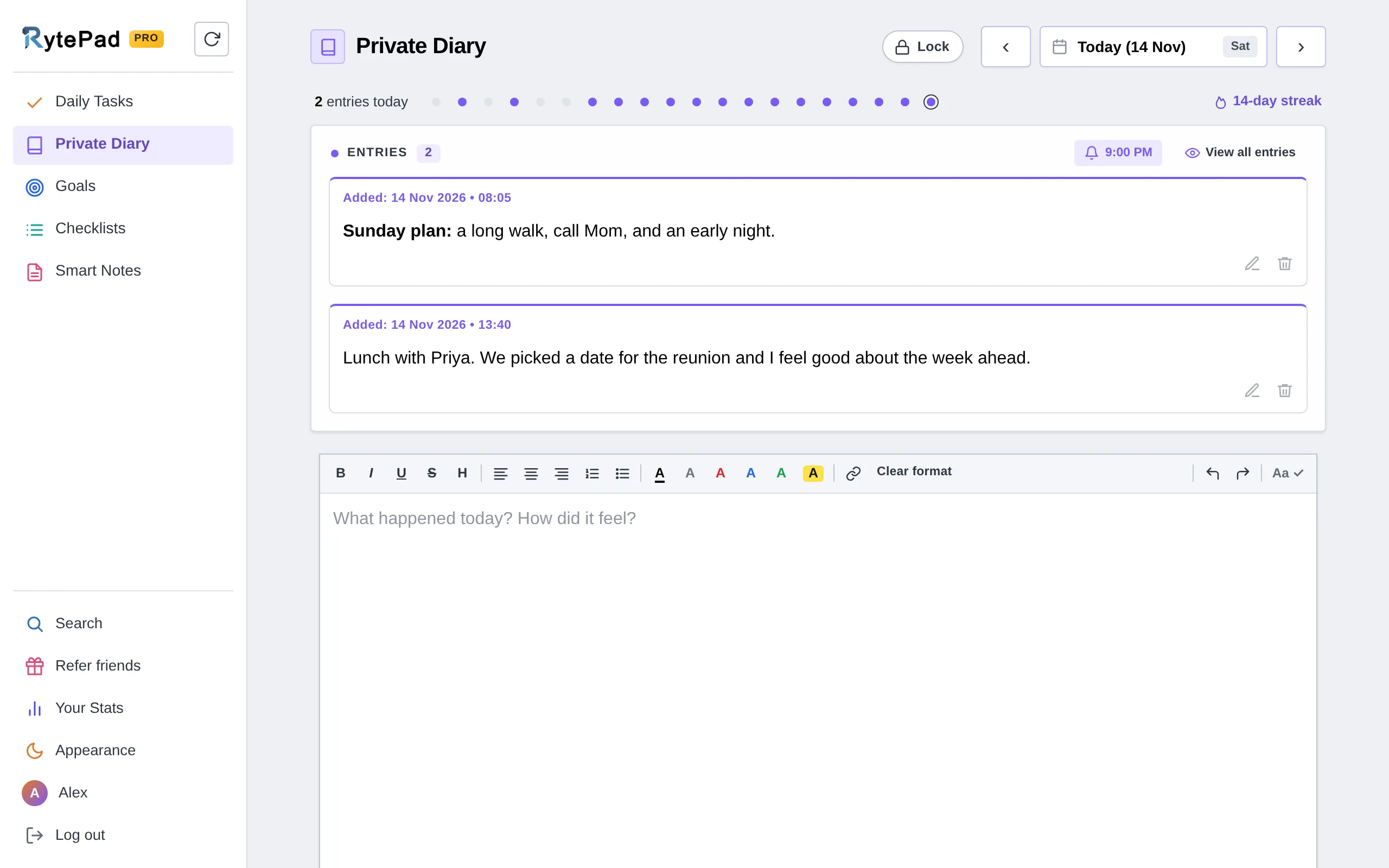
RytePad's diary gives you up to four timestamped entries a day on the free plan (unlimited on Pro), formatting (bold, italic, underline, lists, colours and highlights), up to 25,000 characters per entry, calendar dots marking every day you wrote, and a writing streak that shows your recent days as dots you can click to open. Search entries by keyword or date range from the same screen that searches your tasks, goals and notes; Pro can export the results as a text file.
It is also the easiest diary here to keep up: open it, today's date is already selected, write, and click Add entry. View all entries puts everything you have written on one page, newest first. Your Stats shows your writing streak and entries per week, as counts only, never your words.
Privacy is the headline: every plan, including free, stores your entries encrypted with AES-256. That is a real step above diary apps that reserve encryption for paid tiers.
And because the diary sits in the same account as a task manager, goals, checklists and notes, journaling becomes part of your daily routine instead of a separate chore, which is exactly the habit trick we describe in how to start a daily journal.
Honest caveat: RytePad is text-first, so there are no photo uploads inside entries and none of the covers or themes that memory-keepers love (Day One is better there). Encryption is at rest with RytePad holding the key, not end-to-end like Apple Journal or Day One.
It is also a web app rather than an app-store app. If your diary is mostly a photo scrapbook, look at Day One; if it is writing you want private and always at hand, RytePad wins.
- Simple, distraction-free writing screen
- Up to 4 entries a day free, unlimited on Pro
- AES-256 encryption on every plan, including free
- A 4-digit PIN in front of the diary on Pro
- Export everything as one zip, on every plan
- Undo, and 1 hour to bring back a deleted entry (48 hours on Pro)
- Formatted entries with calendar tracking and search
- Tasks, goals, checklists and notes in the same account
- Pro is a flat $14.97 a year
- No photo uploads inside entries
- Encrypted at rest, not end-to-end
- Web app, no native mobile apps
- Free plan allows 4 entries a day
Disclosure: RytePad is our own product, built by the small team at MarkSurge. We rank it where we believe it belongs and the caveats above are real; the other nine entries are included on their merits, and no app paid to be listed.
Start a private, encrypted diary, free
The easiest private diary to keep, with AES-256 encryption on the free plan, next to your tasks, goals and notes.
Day One is the most beautiful traditional journal available. Entries hold photos, videos, audio and drawings, and the app auto-logs weather, location and activity. On This Day, maps and timelines make revisiting memories a joy, and end-to-end encryption is now included on every tier, free Basic included.
The free Basic plan allows unlimited journals and entries but only one photo per entry and one device. Syncing across devices, 30 photos or videos per entry and audio transcription need Silver at $49.99 a year; Gold ($74.99 a year) adds AI summaries and prompts. There is no monthly billing, and it does journaling only.
- Best-in-class multimedia entries
- End-to-end encryption on every tier
- Automatic context metadata
- Free plan is limited to one device
- Annual billing only, from $49.99
- Journaling only
Journey is one of the few cross-platform diaries with a full web version. It syncs text, photos, video, audio and location, offers guided coaching programs, imports from fitness apps and your calendar, and exports to PDF, DOCX and ePub.
End-to-end encryption applies only when you use Journey Cloud sync, and the best features sit behind the Membership at $6.99 a month or $49.99 a year. A one-time $17.99 licence unlocks the app without cloud features, and there is a $199 lifetime option.
- True cross-platform with a web app
- Guided programs and templates
- Excellent export options
- End-to-end encryption only with Cloud sync
- Basic free tier
Apple's Journal app is free and arguably the most private option on this list: iCloud end-to-end encryption is on by default and cannot be turned off, so not even Apple can read your entries. Smart suggestions pull in photos, workouts and places as prompts, and the app now runs on iPad and Mac as well as iPhone.
There is still no Android or web access, and organisation and export are thin compared with dedicated journals.
- Free with no upsells
- End-to-end encrypted by default
- Smart, context-aware prompts
- Apple devices only
- Limited organisation and export
A private diary should be encrypted, not just hidden behind a login.
Diarly is a lovely writing surface that keeps entries on your device by default (with optional iCloud sync). It supports markdown, templates, per-journal passcodes and a free tier you can actually use rather than a trial.
It is Apple-only, with no Windows, Android or web version, and it is journaling only.
- Local-first privacy model
- Beautiful, distraction-free editor
- Useful free tier
- Apple ecosystem only
- Journaling only
Diarium charges once instead of monthly and is widely considered the best journaling app on Windows. It auto-imports photos, calendar events, social posts and fitness data, and syncs through your own cloud storage (OneDrive, Google Drive) so entries never sit on the developer's servers.
"One-time" applies per platform, so a PC and a phone mean two purchases, and the design is functional rather than beautiful.
- Pay once, no subscription
- Syncs via your own cloud
- Rich automatic imports
- Separate purchase per platform
- Utilitarian interface
Penzu is one of the original online diaries, running since 2008. It recreates a paper journal with customisable covers, offers writing prompts and reminders on paid plans, and its Time Capsule feature can email an entry to your future self. If a traditional diary aesthetic appeals, it delivers.
The interface feels dated, the free plan limits you to a single journal, and its strongest encryption and most features are locked to Pro ($29.99 a year on Penzu's website, or $19.99 a year or $4.99 a month in the app stores) and the pricier Pro+ tier. See our full RytePad vs Penzu comparison.
- Familiar classic-diary feel
- Photo uploads and prompts
- Native mobile apps
- Strongest encryption is paid-only
- Dated interface
- Single journal on free
Daylio is a micro-diary: tap your mood and today's activities, add an optional line of text, and you are done in seconds. Over time it builds mood charts and correlations that reveal real patterns, which makes it great for emotional tracking rather than long-form writing.
It is not built for narrative journaling, it is mobile-only with no web or desktop version, and Premium pricing varies by region (roughly $24 to $36 a year, with a lifetime option).
- 15-second entries
- Insightful mood statistics
- Usable free tier
- Not for long-form writing
- Mobile only
Journal it! blends journaling with mood tracking, goals, habits and a calendar, so it is a middle ground between a pure diary and a planner. Entries support photos and tags, and it can lock the app with a passcode.
The many modes can feel cluttered, and the more powerful features need the premium subscription. For a cleaner all-in-one that is web-based and encrypted, RytePad covers similar ground.
- Diary plus goals and habits
- Photos and tags
- Passcode lock
- Interface can feel busy
- Best features need premium
Stoic wraps journaling in a structured wellness routine: morning intentions, evening reflections, mood check-ins, breathing exercises and a large prompt library. If a blank page leaves you stuck, its structure is a real help.
It is more a guided practice than a free-form diary, and the deeper content needs a subscription.
- Excellent guided structure
- Combines journaling with mindfulness
- Great for habit-building
- Less suited to long free-form entries
- Best content is paid
How we judged privacy (and why it matters)
"Private diary" should mean more than a login screen. Here is the hierarchy we used, from strongest to weakest, so you can judge any app yourself:
- End-to-end encryption by default. Only you hold the key; the company cannot read entries even if compelled. (Apple Journal, Day One on every tier.)
- Strong encryption at rest, on all plans. Entries are encrypted on the server, free tier included, with the provider holding the key. (RytePad, AES-256.)
- Encryption that depends on a plan or setting. Protected only if you pay or switch it on. (Penzu's strongest tier, Journey outside Cloud sync.)
- Local-only storage. Private because it never leaves your device, but no cross-device sync unless you add your own cloud. (Diarly, Diarium.)
- Password lock only. Hides entries but may store them in plain text. Treat it as the weakest option.
Keep reading: New to the habit? Start with how to start a daily journal. Leaving a specific app? See Penzu alternatives, Day One alternatives, Journey alternatives, Diaro alternatives and RytePad vs Penzu. Want your diary beside your to-dos and notes? Compare the best free to-do list apps and best online notepads.
Online diary apps: your questions answered
What is the best free online diary app?
For most people, RytePad, the easiest diary to keep: AES-256 encryption on the free plan (up to four entries a day, unlimited on Pro), plus tasks, goals, checklists and notes in the same account. If you only journal on Apple devices, Apple Journal is completely free and end-to-end encrypted by default.
Which diary app is the most private?
Apple Journal and Day One lead for default end-to-end encryption; Apple Journal is free but Apple-only, while Day One's free tier is limited to one device. Among browser-based options, RytePad encrypts all data with AES-256 at rest on every plan including free, and Diarium keeps entries on your own cloud storage. Be cautious of apps that only "password-protect" entries without encrypting them.
Are free diary apps actually safe?
It depends entirely on encryption. A free app that encrypts your entries (RytePad, Apple Journal, Day One Basic) can be very safe; a free app that merely hides them behind a login while storing plain text is not. Always check whether encryption is included on the free plan.
Can I keep a diary and manage my day in the same app?
Yes. RytePad is built for this: a private diary alongside a daily task manager, goal tracking, checklists and notes, all searchable together. Journal it! also blends journaling with light planning. Most other diary apps focus on journaling alone.
Is an online diary better than a paper one?
Each has strengths. Paper is tactile and screen-free; a good online diary is searchable, backed up, encrypted and always with you. Many people keep both. If privacy is your concern, a properly encrypted app is often safer than a paper diary anyone in your home could open.
How do I move my entries from one diary app to another?
Most apps let you export (often as PDF or text); Day One and Journey both offer exports, and RytePad exports everything in your account as one zip (CSV, text and JSON) on every plan. There is rarely a one-click importer between services, so the practical route is to export an archive from the old app and start fresh in the new one, pasting across any entries you want to keep.
The bottom line
If your diary is really a photo album, Day One is stunning and now end-to-end encrypted on every tier; if you are all-in on Apple, its free Journal app is impressively private. But for a diary that is encrypted on the free plan, works on any device through the browser, and sits right next to your tasks, goals and notes, RytePad is our top pick and the easiest to keep, free to start and fully unlocked at $14.97 a year.
Your private diary, free and encrypted
Simple to keep, AES-256 encryption on every plan, and your tasks, goals and notes in one place.
Try RytePad free →Free plan with no time limit · No card · Works in any browser