
10 Best Journey Alternatives in 2026 (Free & Paid)
Journey runs almost everywhere, but its free plan syncs only 60 entries, the desktop app needs a membership, and Membership costs $49.99 a year. Here are ten alternatives, from free and private to pay-once.
RytePad is the best Journey alternative for a private diary that works in any browser, free or $14.97 a year, with your tasks and goals beside it. Day One is the closest like-for-like journal app and imports Journey on Android, Diarium is the best one-time purchase, and Apple Journal is the free pick on iPhone, iPad and Mac.
 By RytePad StaffUpdated
Journey is one of the few journal apps that runs on nearly everything: Android, iPhone, Mac, Windows, Linux, ChromeOS and the web. The catch is the free plan. Journey Cloud Sync stops at 60 entries (70 MB), photos are limited, the desktop app needs Membership, and Membership costs $6.99 a month or $49.99 a year.
Its encryption has fine print too: end-to-end encryption is optional, covers Journey Cloud Sync only, cannot be turned off again and switches off search. If any of that is why you are looking, the ten alternatives below cover free, private and pay-once options. Export your journal first; Journey's phone and desktop apps save it as a .zip.
The short version
The 10 best Journey alternatives compared
| App | Best for | Free plan | Paid from |
|---|---|---|---|
| 1. RytePad↓ | A private diary in any browser | 4 entries a day, encrypted | $14.97/yr (optional) |
| 2. Day One↓ | The most polished journal | 1 device, 1 photo per entry | $49.99/yr |
| 3. Diarium↓ | Pay once, sync your own way | 1 attachment per entry | $14.99 once (iOS) |
| 4. Apple Journal↓ | Free and private on Apple devices | Free | No paid plan |
| 5. Diarly↓ | Markdown-friendly, Apple only | 1 diary on 1 device | $24.99/yr |
| 6. Penzu↓ | A simple private diary | Unlimited entries | $19.99/yr (apps) |
| 7. Obsidian↓ | Markdown files you own | Free, no limits | Sync $4/mo (annual) |
| 8. Grid Diary↓ | Guided, prompt-based journaling | Free app; sync needs Membership | $29.99/yr |
| 9. Daylio↓ | Mood tracking, not long entries | Free version | Premium (in-app) |
| 10. LiveIt (Journal it!)↓ | Journal plus planner | Free download | from $19.99/yr |
US prices as published on 20 October 2026. App-store prices vary by region, and several apps show different prices on their websites and in the app stores.
Pick in 10 seconds
Tap what matters most to you.
The 10 best Journey alternatives
Ranked by how well each replaces Journey for everyday journaling, and by privacy, platforms, how easily you can move in, and price.
RytePadOur #1 pick
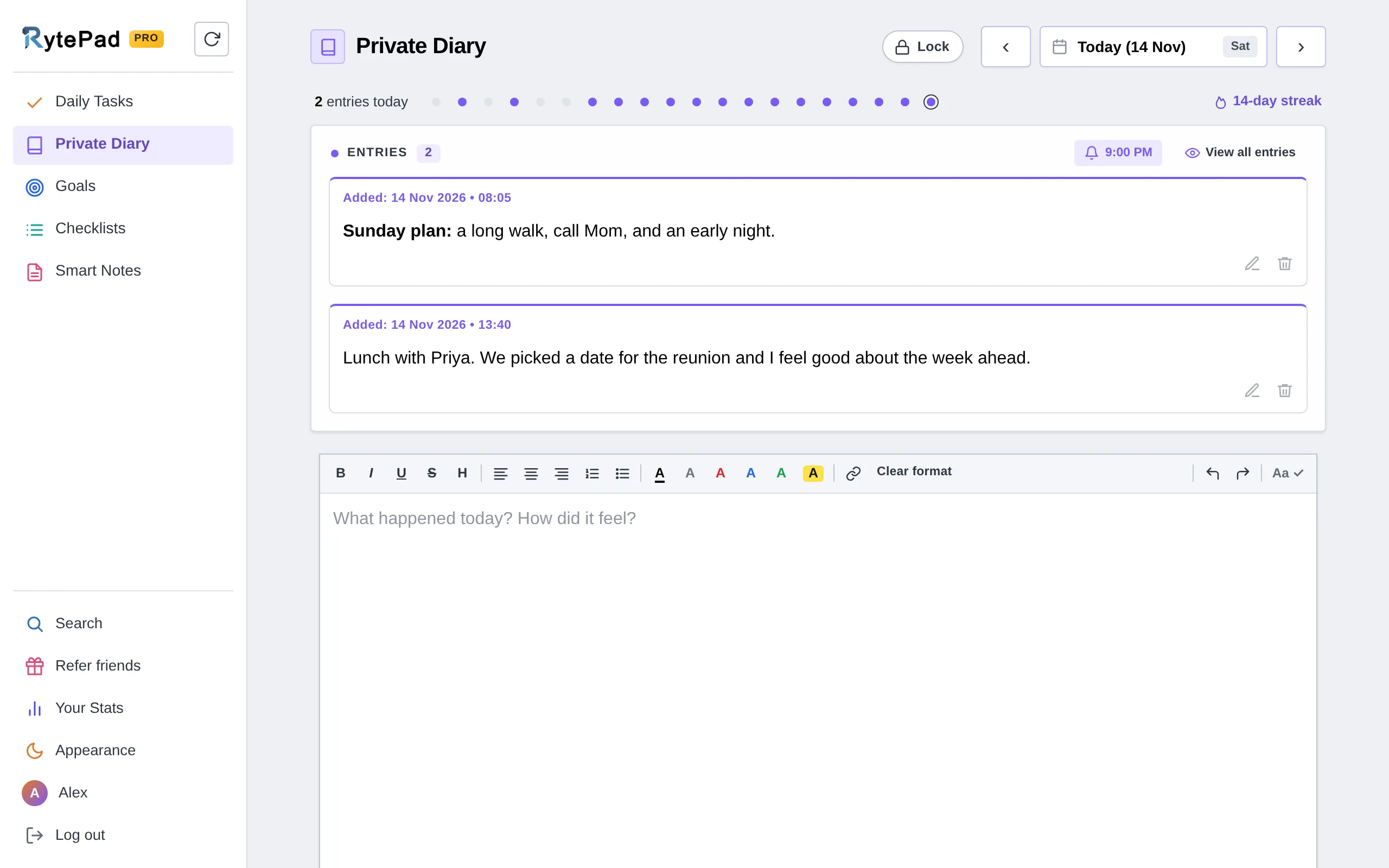
Journey's draw is that it runs everywhere; RytePad gets there another way. It is a web app, so your diary opens in any browser on any phone, tablet or computer, including Linux and Chromebooks, with nothing to install. The Private Diary gives you up to four timestamped entries a day on the free plan (unlimited on Pro), formatting, up to 25,000 characters per entry, calendar dots for every day you wrote, and a writing streak. There is no cap on how many entries you keep.
Every plan, including free, stores your entries encrypted with AES-256. Search finds entries by keyword or date range, View all entries puts everything you have written on one page, and on Pro you can export search results as a text file. Your Stats shows your writing streak and entries per week, as counts only, never your words.
The diary also sits beside a daily to-do list, goals, checklists and notes, so journaling becomes part of your day rather than one more app to open. If you need a nudge, there are 110 journal prompts to start from.
Honest caveat: RytePad is text-first. There are no photos, audio or locations in entries, and no Journey importer, so you copy across the entries you want to keep. Encryption is at rest rather than end-to-end, and it is a web app without native mobile apps or offline mode.
- Opens in any browser, nothing to install
- AES-256 encryption on every plan, including free
- A 4-digit PIN in front of the diary on Pro
- Export everything as one zip, on every plan
- Undo, and 1 hour to bring back a deleted entry (48 hours on Pro)
- Up to 4 entries a day free, unlimited on Pro
- Search by keyword or date range
- Tasks, goals, checklists and notes in the same account
- Pro is a flat $14.97 a year
- No photos or audio in entries
- No Journey importer
- Encrypted at rest, not end-to-end
- Web app, no native apps or offline mode
Disclosure: RytePad is our own product. We rank it where we believe it belongs and the caveats above are real; the other nine entries are included on their merits, and no app paid to be listed.
Keep your diary private, free
An encrypted online diary with tasks and goals in the same account. No card.
Day One is the most polished journaling app here, with apps for iPhone, iPad, Mac, Android and Windows plus a web version. Entries are end-to-end encrypted on every plan, and since May 2025 the free Basic plan includes unlimited journals and shared journals, but only one device and one photo per entry.
Silver costs $49.99 a year for unlimited devices, 30 photos per entry, video and audio, and Gold adds AI features for $74.99. Day One's Android app imports a Journey .zip, so do the import on an Android phone or tablet.
- Polished apps on every major platform
- End-to-end encryption on every plan
- Imports Journey (on Android)
- Free plan is one device, one photo per entry
- Journey import only on Android
- $49.99 a year for the full app
Diarium is a journal for Windows, Android, iPhone, iPad and Mac that syncs through your own OneDrive, Google Drive, Dropbox, iCloud or WebDAV, with no Diarium account. It is free on Android, iPhone, iPad and Mac with one attachment per entry; Pro is a one-time purchase per platform ($14.99 on iPhone and on Mac), and the Windows app is paid, with Pro included.
Its migration import covers Journey, Diaro, Day One, Daylio, Diarly and more. Entries can be locked with a password, PIN or biometrics, but Diarium does not claim end-to-end encryption.
- One-time Pro, no subscription
- Imports Journey and Day One
- Sync through your own cloud
- Pro is bought per platform
- No end-to-end encryption claimed
- No web or Linux app
Apple Journal is free on iPhone and, since the 2025 updates (iPadOS 26 and macOS Tahoe 26), on iPad and Mac. Apple lists Journal data as end-to-end encrypted in iCloud even with standard data protection, and you can lock it with Face ID, Touch ID or your passcode.
Apple documents no way to import entries, so your Journey journal stays behind, and there is nothing for Android, Windows or the web. It exports everything as one .zip.
- Free, with no paid tiers
- End-to-end encrypted in iCloud
- Built into iPhone, iPad and Mac
- Apple devices only
- No import from other apps
- No web version
Diarly is a clean journal for iPhone, iPad, Mac and Apple Watch, with no ads and no account. The free plan gives you one diary on one device with unlimited entries, photos and videos; Premium, from $2.99 a month or $24.99 a year in the US App Store, adds sync through your own iCloud and end-to-end encryption for entry text.
It lists Journey among its imports, alongside Day One, Apple Journal, CSV and Markdown files. Free exports are Markdown; PDF and EPUB need Premium.
- No ads, no account
- Imports Journey and Day One
- Free Markdown export
- Apple devices only
- Sync and encryption need Premium
- Attachments are not encrypted
Penzu is a long-running private online diary for the web, iOS and Android. The free plan lets you write as many entries as you like, with double password protection, and the mobile apps are included.
Pro is $29.99 a year on Penzu's website or $19.99 a year in the app stores, and Pro+ is $49.99 a year on the website. Penzu documents no import, so Journey entries are copied across by hand, export is PDF only (from the website, on a paid plan), and Penzu does not claim end-to-end encryption.
- Unlimited private entries free
- Works in any browser
- Double password protection
- No import from other apps
- PDF-only export on paid plans
- No end-to-end encryption stated
Obsidian is free without limits, and its Daily notes core plugin opens or creates a note for today, named by date, from a template if you like. Everything is plain Markdown files in a folder on your own device, on Windows, Mac, Linux, iPhone and Android.
Syncing between devices is Obsidian Sync, at $4 a month billed annually and end-to-end encrypted, and there is no web app. Obsidian's importer has no Journey option, so entries come across by hand.
- Free, with files you own
- Runs on Linux too
- End-to-end encrypted Sync
- No web app
- Sync costs extra
- More setup than a journal app
Grid Diary turns each day into a grid of questions you answer, which makes it easy to start when a blank page feels like too much. It runs on iPhone, iPad and Mac (the current version needs Apple's version 26 systems) and on Android.
Membership adds sync, a passcode lock and more themes, at $4.99 a month or $29.99 a year in the US App Store; Grid Diary's website lists lower prices. It does not claim end-to-end encryption, and it has no Journey import.
- Question prompts make starting easy
- iPhone, iPad, Mac and Android
- Exports PDF and Markdown
- Sync and passcode lock need Membership
- No end-to-end encryption stated
- No Journey import
Daylio is a micro-diary: pick a mood and a few activities, add a note if you like, and it turns your days into charts and stats. It runs on iPhone and Android, with a free version and a Premium upgrade for advanced stats, unlimited moods, a PIN lock on iPhone, automatic backups and PDF export.
Entries stay on your device, with optional backups to your own Google Drive or iCloud; there is no end-to-end encrypted sync and no import from other journal apps. Daylio's site does not list Premium prices.
- Fast mood and activity tracking
- Charts, stats and On This Day
- Entries stay on your device
- Not built for long entries
- No import from other apps
- iPhone and Android only
LiveIt, renamed from Journal it! in July 2026 with the same app and data, combines a journal with planning tools on Android, iPhone, iPad, Mac and the web. Its store listings describe end-to-end encryption.
It is free to download with in-app purchases, and the US App Store lists yearly plans from $19.99 and lifetime options. A Journey import is not documented, so plan to copy entries across.
- Journal and planner in one
- Web app as well as phones
- End-to-end encryption, per its listings
- No documented Journey import
- Prices shown only in the app stores
- Recently renamed, so guides use the old name
How we chose these alternatives
Every app was compared on what Journey users most often want from a new home:
- Writing every day. How quickly you can open the app and write.
- Platforms. Phones, computers and the web, since Journey runs almost everywhere.
- Privacy. Encryption, and whether end-to-end encryption is available.
- Moving your journal. Whether it imports a Journey export.
- The free plan. What you can do before paying.
- Price. What a full unlock costs per year, or once.
Keep reading: how RytePad's online journal works, journal prompts to get you writing, the best Day One alternatives, and the best online diary apps.
Journey alternatives: your questions answered
What is the best alternative to Journey?
For a private diary in any browser, RytePad: up to four entries a day free, encrypted with AES-256, and $14.97 a year for everything. For a like-for-like app with photos, Day One, which imports Journey in its Android app. Diarium is the pick if you would rather pay once.
Is Journey free?
Journey is free to download, but the free plan is limited: Journey Cloud Sync holds 60 entries (70 MB), photos are limited, and the desktop app needs Membership at $6.99 a month or $49.99 a year.
How do I export my Journey entries?
Journey's Android, iPhone, Mac and desktop apps export a .zip of your entries, in bulk or one at a time, and it can also export DOCX files. On the web, a full export is only available as a Journey Cloud Sync backup.
Which apps can import Journey?
Day One (in its Android app), Diarium (through its migration import) and Diarly, which lists Journey among its imports. For the others, including RytePad, you copy the entries you want to keep.
Is Journey end-to-end encrypted?
Optionally, for Journey Cloud Sync only: you set a passphrase that Journey does not store, the change cannot be undone, and search stops working. If you sync through Google Drive instead, your entries rely on Google's own encryption. Day One and Apple Journal are end-to-end encrypted by default.
The bottom line
If you want Journey's polish with photos and apps everywhere, Day One is the closest move, and it imports Journey on Android. If you would rather pay once, Diarium; on Apple devices only, Apple Journal is free and end-to-end encrypted.
If your journal is mostly words, RytePad keeps it private and in any browser, with up to four entries a day free, AES-256 encryption on every plan, and everything unlocked for $14.97 a year.
Your diary, private and in one place
Up to four entries a day free, encrypted with AES-256 on every plan. No card.
Try RytePad free →Free plan with no time limit · No card · Works in any browser