
10 Best Simplenote Alternatives in 2026 (Free & Paid)
Simplenote still works, but it is no longer in active development, its iPhone app has not been updated since November 2024, and notes are not encrypted at rest. Here are ten places to move your notes, starting with three that import a Simplenote export directly.
Standard Notes is the closest Simplenote alternative: simple notes on every platform, end-to-end encrypted, with a built-in Simplenote importer. RytePad is the best if you want your notes beside your daily tasks, checklists and diary in one private web app. Notesnook is the best free pick, with unlimited end-to-end encrypted notes and its own importer, and UpNote suits a fast notes app with a one-time price.
 By RytePad StaffUpdated
 Simplenote earned its fans by doing very little, very well: plain notes, tags and fast sync, free on every platform. On 5 September 2025 its team said it is no longer in active development: the app remains available and its basic functions are maintained, but no new features are planned.
Small updates still appear (the Android app was updated on 1 October 2026), but the iPhone app has not been updated since November 2024, and notes are not encrypted at rest. If that is reason enough to move, export your notes first; the FAQ below shows how. Standard Notes, Notesnook and UpNote import a Simplenote export directly, and Bear and Apple Notes take its text files.
The short version
The 10 best Simplenote alternatives compared
| App | Best for | Free plan | Paid from |
|---|---|---|---|
| 1. Standard Notes↓ | Closest to Simplenote | Plain-text notes, unlimited devices | $90/yr |
| 2. RytePad↓ | Notes beside your whole day | 10 notes, 10 checklists | $14.97/yr (optional) |
| 3. Notesnook↓ | Free, end-to-end encrypted | Unlimited notes | $19.99/yr |
| 4. UpNote↓ | Fast notes, one-time price | 50 notes | $1.99/mo or $39.99 once |
| 5. Bear↓ | Markdown on Apple devices | Free app, no sync | $29.99/yr |
| 6. Obsidian↓ | Markdown files you own | Free, no limits | Sync $4/mo (annual) |
| 7. Joplin↓ | Open source, your own sync | Free with your own cloud | €2.40/mo (yearly) |
| 8. Apple Notes↓ | iPhone, iPad and Mac users | Free (5 GB iCloud) | iCloud+ $0.99/mo |
| 9. Google Keep↓ | Quick notes and lists | Free | No paid plan |
| 10. Microsoft OneNote↓ | Free-form notebooks | Free (5 GB OneDrive) | $19.99/yr |
US prices as published on 20 October 2026; Joplin lists prices in euros only. App-store prices vary by region.
Pick in 10 seconds
Tap what matters most to you.
The 10 best Simplenote alternatives
Ranked by how well each replaces what people used Simplenote for, fast and simple notes on every device, and by how easily you can move in, privacy and price.
Standard Notes is the closest thing to Simplenote with stronger privacy: a clean notes app for the web, Windows, Mac, Linux, iPhone and Android, end-to-end encrypted on every plan, including free. It has been part of Proton since April 2024.
Moving is built in: unzip your Simplenote export, then choose Import, Simplenote, and the notes.json file in the export's source folder. The free plan is for plain-text notes; rich text, checklists and folders need Productivity at $90 a year.
- End-to-end encrypted on every plan
- Built-in Simplenote importer
- Apps on every platform, plus the web
- Free plan is plain text
- $90 a year for rich text and checklists
- No collaboration
RytePadBest all-in-one
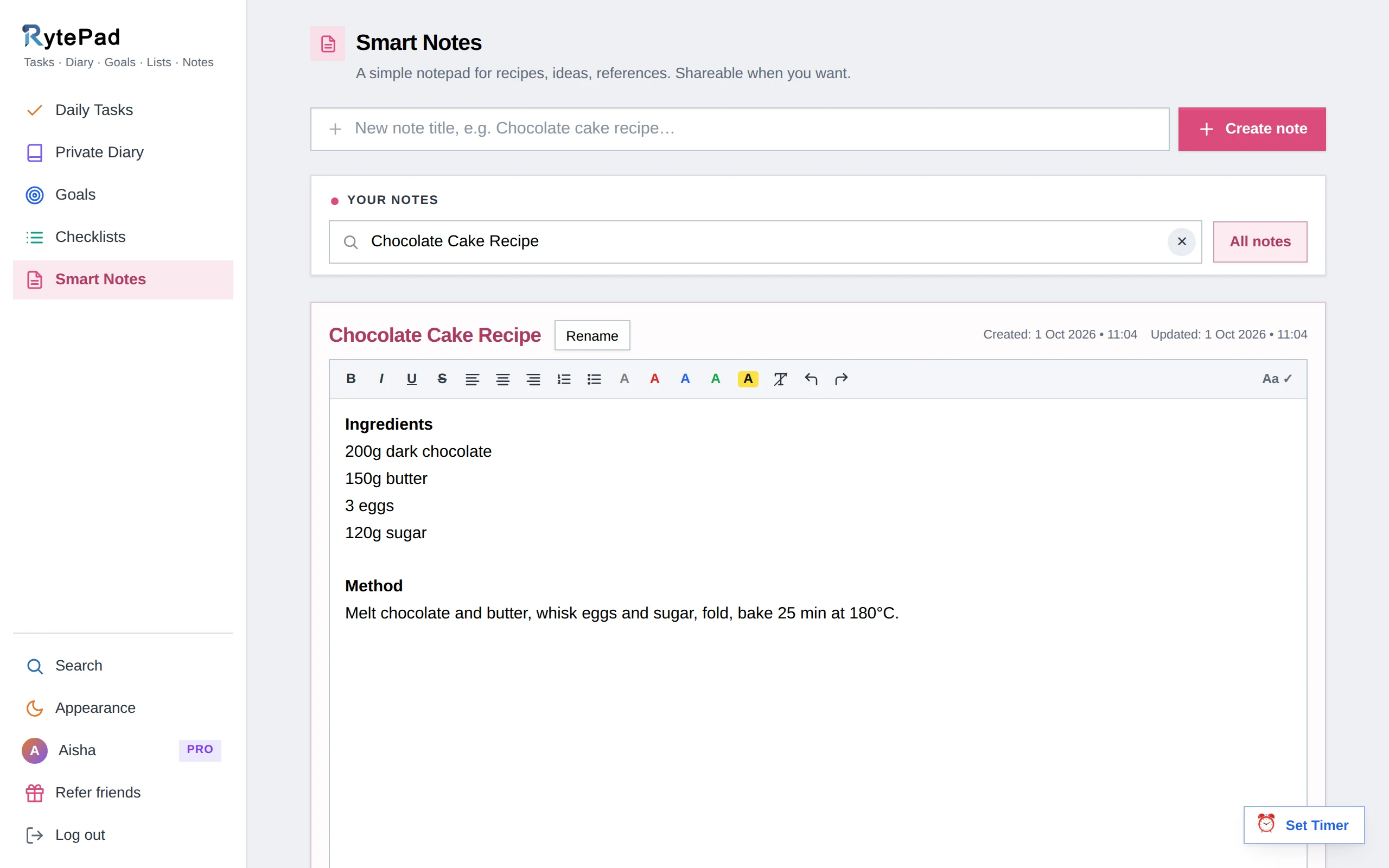
If Simplenote was where you kept quick notes and lists, RytePad keeps them in one private web app, next to your daily to-do list. RytePad's notes are titled notes with real formatting, up to 40,000 characters each, saved when you leave the editor, and shareable as a read-only snapshot or as a live link.
Everything is encrypted with AES-256 before it is stored, on every plan, and one search covers your notes, checklists, daily tasks and diary. The free plan keeps 10 notes and 10 checklists with no time limit; Pro removes every limit for $14.97 a year.
Honest caveat: RytePad is not a plain-text notes app. There is no Markdown, no tags or folders, and no Simplenote importer, so you copy across the notes you want to keep. Encryption is at rest rather than end-to-end, and it is a web app without native apps or offline mode.
- Formatting and 40,000 characters per note
- Share a note as a snapshot or a live link
- AES-256 encryption on every plan, including free
- Every note exportable as a text file, on every plan
- A 4-digit PIN in front of Notes on Pro
- Tasks, diary, goals and checklists in the same account
- Pro is a flat $14.97 a year
- Free plan holds 10 notes
- No Markdown, tags or Simplenote importer
- Encrypted at rest, not end-to-end
- Web app, no native apps or offline mode
Disclosure: RytePad is our own product. We rank it where we believe it belongs and the caveats above are real; the other nine entries are included on their merits, and no app paid to be listed.
Try the all-in-one Simplenote alternative, free
Notes, checklists and a daily to-do list in one encrypted account. No card.
Notesnook is open source and end-to-end encrypted by default, with apps for Windows, Mac, Linux, iPhone, Android and the web. The free plan has unlimited notes on every device, with 50 MB of uploads a month.
Its Notesnook Importer, in the web and desktop apps, takes the .zip from Simplenote's Export notes and runs on your own device; Notesnook suggests switching Markdown off in Simplenote before you export. Essential costs $1.99 a month or $19.99 a year.
- Unlimited notes on the free plan
- End-to-end encrypted by default
- Built-in Simplenote importer
- Import runs in the web or desktop app
- Free uploads capped at 50 MB a month
- No collaboration
UpNote is a fast notes app for Mac, Windows, Linux, iPhone and Android; there is no web app. The free plan holds 50 notes, and Premium removes the limit for $1.99 a month or a one-time $39.99 on its website (prices vary by region), which is rare among notes apps.
Its Mac and Windows apps import Simplenote's .json export directly. Synced notes are encrypted in transit and at rest, but not end-to-end, and PDF and Markdown export are Premium features.
- One-time lifetime price
- Simplenote importer on Mac and Windows
- Native apps on five platforms
- Free plan holds 50 notes
- No web app
- Not end-to-end encrypted
Bear is a polished Markdown notes app for iPhone, iPad and Mac, with nested tags and to-dos. The app is free; Pro ($2.99 a month or $29.99 a year) adds sync between your devices, password-protected notes and more export options.
There is no Simplenote importer, but Bear imports plain text and Markdown files and can keep their original dates, so each text file in your Simplenote export becomes a Bear note. It is Apple only.
- A beautiful Markdown editor
- Nested tags
- Imports text files and keeps their dates
- Apple devices only
- Sync needs Pro
- No Simplenote importer
Obsidian keeps notes as Markdown files on your own device, free without limits, including for work. Syncing between devices is the paid part: Obsidian Sync costs $4 a month billed annually, or $5 month to month, and is end-to-end encrypted.
There is no Simplenote importer, but Obsidian works with Markdown files, so Simplenote's plain-text notes can come in as Markdown notes, with folders and links on top. There is no web app.
- Free, with notes as files you own
- Folders, links and tags
- End-to-end encrypted Sync
- No web app
- Sync costs extra
- No Simplenote importer
Joplin is a free, open-source notes app with notebooks, tags, to-do notes with alarms and optional end-to-end encryption. Sync through Dropbox, OneDrive or Nextcloud for free, or use Joplin Cloud from €2.40 a month billed yearly (€2.99 month to month).
There is no Simplenote importer: Joplin imports Markdown files and folders, so Simplenote's text notes come in as Markdown. It takes more setup than Simplenote did.
- Free and open source
- To-do notes with alarms
- Optional end-to-end encryption
- No Simplenote importer
- More setup than Simplenote
- Joplin Cloud priced in euros
Apple Notes is free and already on your iPhone, iPad and Mac, with checklists, folders, tags and real-time collaboration; on other computers you use icloud.com. Turn on Advanced Data Protection and your notes are end-to-end encrypted.
On a Mac, File, then Import to Notes, turns each text file from your Simplenote export into a note. There are no Android or Windows apps.
- Free and built into Apple devices
- Checklists, folders and tags
- End-to-end encryption with Advanced Data Protection
- No Android or Windows apps
- Bulk import is easiest on a Mac
- No Simplenote importer
Google Keep is free on Android, iPhone and the web, and as quick as Simplenote for jotting things down: notes, checklists, labels and colours, synced with your Google account.
It cannot import files, so moving from Simplenote means copying notes across by hand, and it offers no end-to-end encryption. Its reminders have been moving to Google Tasks since October 2025.
- Free and very quick
- Checklists, labels and colours
- Android, iPhone and the web
- No way to import a Simplenote export
- No end-to-end encryption
- Basic formatting
Microsoft OneNote is free on Windows, Mac, iPhone, Android and the web: notebooks of sections and pages that you can type or draw anywhere on, synced through OneDrive.
It is the opposite of Simplenote's plain list of notes, and there is no way to import a Simplenote export, so it suits people who want free-form notebooks more than a quick notepad. More OneDrive storage comes with Microsoft 365 Basic at $19.99 a year.
- Free on every major platform
- Free-form pages with sections
- Notebook sharing
- Heavier than Simplenote
- No Simplenote import
- No end-to-end encryption
How we chose these alternatives
Every app was compared on what Simplenote users most often want from a new home:
- Simplicity. How quickly you can open the app and write.
- Moving your notes. Whether it imports a Simplenote export, or at least its text files.
- Sync. Which devices it runs on, and what syncing costs.
- Privacy. Encryption at rest, and whether end-to-end encryption is available.
- Plain text or formatting. Markdown and plain text, or a formatting toolbar.
- Price. What is free, and what a full unlock costs per year.
Keep reading: how RytePad's online notepad works, the best Google Keep alternatives, the best online notepads, and Notion alternatives.
Simplenote alternatives: your questions answered
Is Simplenote shutting down?
No shutdown has been announced. On 5 September 2025 Simplenote's team said it is no longer in active development: the app remains available and its basic functions are maintained, but no new features are planned. Small updates still appear, such as the Android app on 1 October 2026, while the iPhone app was last updated in November 2024.
How do I export my notes from Simplenote?
Use the web app (Settings, then Tools, then Export Notes), the Android app (Settings, then Export data) or the desktop app (File, then Export Notes). You get a .zip with each note as a text file, plus a notes.json file with tags, pinned notes and dates. The iPhone app and the Mac App Store version cannot export.
Which apps can import my Simplenote notes?
Standard Notes (from notes.json), Notesnook (from the .zip, in its web or desktop app) and UpNote (from the .json, on Mac and Windows) have built-in Simplenote importers. Bear and Apple Notes on a Mac import the text files; Obsidian and Joplin work with Markdown files.
Is Simplenote encrypted?
Notes are encrypted in transit, but Simplenote's help says they are not encrypted at rest, and it advises against storing anything particularly sensitive. Standard Notes and Notesnook are end-to-end encrypted, and Apple Notes is with Advanced Data Protection turned on.
What is the best free Simplenote alternative?
Notesnook, with unlimited end-to-end encrypted notes on its free plan and a built-in importer. Standard Notes is free for plain-text notes, Obsidian and Joplin are free, and Apple Notes and Google Keep are free on their platforms. RytePad's free plan keeps 10 notes and 10 checklists alongside a daily to-do list.
The bottom line
If you want Simplenote's simplicity with better privacy, move to Standard Notes or Notesnook: both are end-to-end encrypted and import a Simplenote export directly. On Apple devices, Bear is the polished choice; for Markdown files you own, Obsidian.
If your notes are really lists and plans for your day, RytePad puts notes, checklists and a daily to-do list in one private web app, encrypted on every plan, free to start and $14.97 a year for everything.
Notes, lists and your day, in one private place
Notes, checklists and a daily to-do list, encrypted on every plan. Free to start.
Try RytePad free →Free plan with no time limit · No card · Works in any browser