
10 Best Online Notepads (Free, No Download)
Free notepads that work in any browser, ranked after testing: instant scratchpads, encrypted vaults, and one that does much more than notes.
RytePad is the best free online notepad for most people: formatted notes with snapshot and live share links, AES-256 encryption on the free plan, and your tasks, diary, goals and checklists in the same account. If you refuse to sign up for anything, aNotepad and Editpad let you type the moment the page loads, and Standard Notes is the most private choice, with end-to-end encryption on its free tier.
All ten run in a browser, cost nothing to use and need nothing installed. What separates them is privacy, formatting, sharing, and whether your notes sit beside the rest of your day or in yet another silo.
The short version
The 10 best free online notepads compared
| Notepad | Best for | Signup needed? | Standout feature |
|---|---|---|---|
| 1. RytePad↓ | Notes + your whole day | Yes (free) | Snapshot and live share links |
| 2. Google Keep↓ | Quick capture, Google users | Google account | Reminders and labels |
| 3. Simplenote↓ | Minimalist plain text | Yes (free) | Version history |
| 4. OneNote (web)↓ | Feature-rich notebooks | Microsoft account | Freeform canvas |
| 5. aNotepad↓ | Instant, zero friction | No | Type immediately |
| 6. ProtectedText↓ | Password-locked pages | No | Encrypted in the browser, no account |
| 7. Standard Notes↓ | Maximum privacy | Yes (free) | End-to-end encryption |
| 8. Zoho Notebook↓ | Visual note cards | Yes (free) | Card-based design, free tier |
| 9. Rentry↓ | Shareable markdown pages | No | Custom URL + edit code |
| 10. Editpad↓ | Scratchpad + text tools | No | Word counter and utilities |
All ten have a free tier you can use indefinitely. Where a paid plan exists, the entry below says what it costs and what it adds.
Pick in 10 seconds
Tap what you need and we will point you at the right notepad.
The 10 best free online notepads
Each entry says how fast you can start, how private your notes are and where the limits sit.
RytePadOur #1 pick
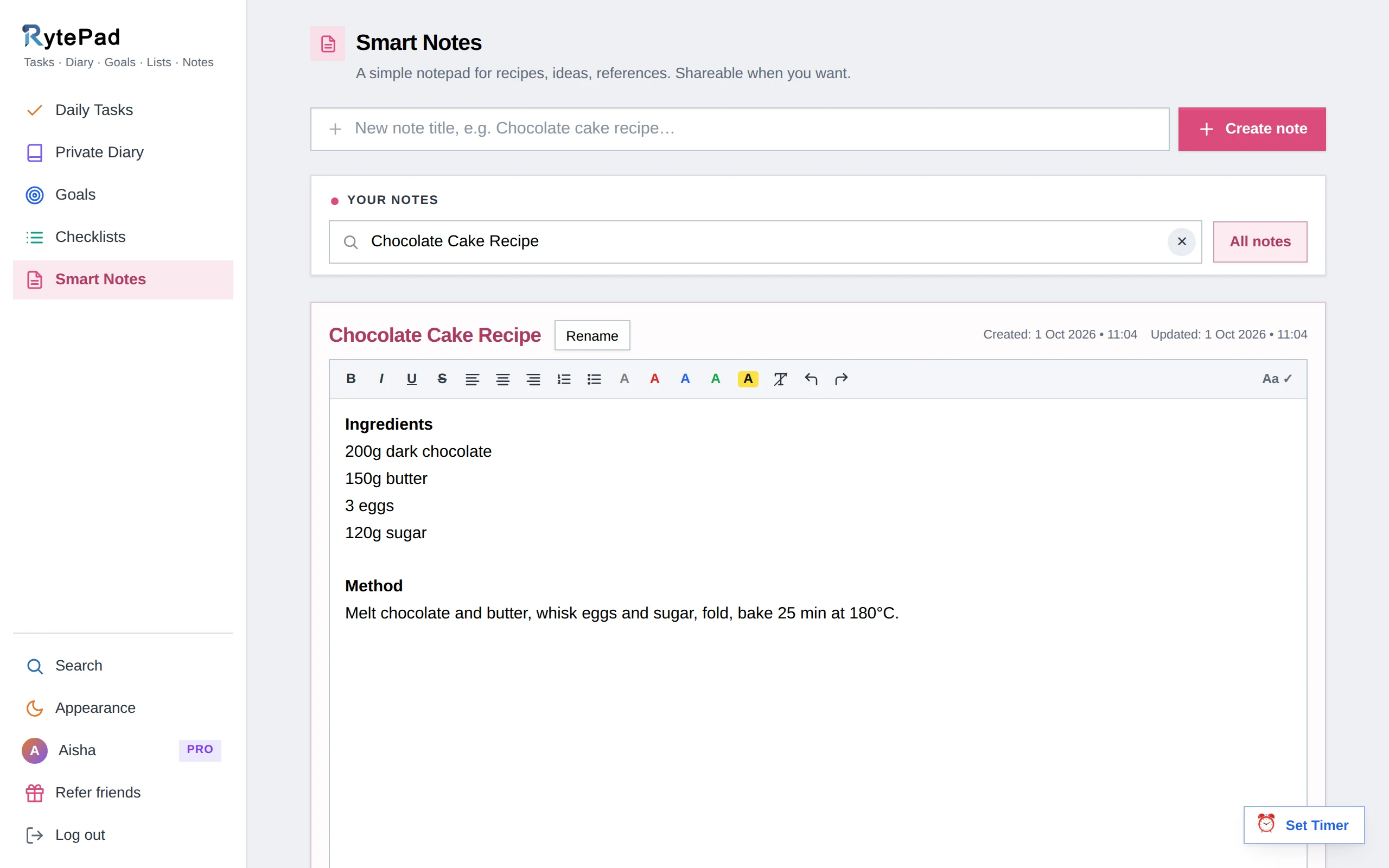
RytePad's Smart Notes are titled notes of up to 20,000 characters with real formatting: bold, italic, underline, bullet lists, coloured text and highlights. They save themselves every ten seconds while you type, so there is no save button to forget.
The free plan includes 20 notes; Pro removes the cap.
Sharing is the standout. A snapshot link freezes a copy of the note; a live link always shows your latest saved version. Send a packing list or meeting notes to someone with no account, edit the note, and the live link updates. Delete the note and every link dies with it.
The bigger win is context. Notes sit in the same encrypted account as a daily task manager, a private diary, goals and checklists, and one search covers all of them. Everything is encrypted with AES-256 at rest on every plan, free included. The user guide covers notes and sharing step by step.
Honest caveat: it needs a free account, so it is not an instant scratchpad like aNotepad, and notes are text only, with no image attachments.
- Snapshot and live share links, no login needed to view
- Formatted notes plus tasks, diary, goals and checklists
- AES-256 encryption on every plan, including free
- One search across notes and everything else
- Pro is a flat $14.97 a year
- Free plan caps notes at 20
- Needs a free account, not an instant scratchpad
- Text only, no images inside notes
Disclosure: RytePad is our own product. We rank it where we believe it belongs and the caveats above are real; the other nine entries are apps we use and recommend on their merits.
Try the #1 online notepad, free
Formatted notes with share links, plus your tasks, diary and goals in one encrypted place.
Google Keep is the sticky-note wall of the internet: coloured cards, checklists, labels, pinned notes, image attachments and reminders that plug into Google Calendar. Capture is instant and search is Google-grade.
Notes also surface in the Gmail and Docs sidebars, which is the real reason Google users stick with it.
The ceiling is low: little formatting beyond bullets, a cluttered wall past a few dozen cards, and your data lives inside a Google account.
- Fast capture with reminders
- Syncs across every device instantly
- Integrated with Gmail, Docs and Calendar
- Minimal text formatting
- Gets messy at scale
- Requires a Google account
Simplenote, made by Automattic (the WordPress company), is the purest note tool here: plain text, tags, instant sync and markdown support. It is entirely free with no premium tier at all.
Version history is the killer feature: slide back through every edit of a note.
The simplicity is also the limit: no rich formatting, no images, no checklists, and sharing stops at a basic publish feature.
- 100% free, no upsells
- Version history on every note
- Fast and distraction-free
- Plain text only, no images
- No checklists or reminders
OneNote's web version is the most powerful free notepad here: notebooks, sections and pages, a click-anywhere canvas, images, tables, drawings and shared notebooks for collaboration.
For students and researchers organising lots of material, it is hard to beat at $0.
All that power costs speed. It is heavyweight for a quick jot, the interface can overwhelm, and it needs a Microsoft account.
- Richest feature set of any free notepad
- Freeform canvas, images and tables
- Real-time collaboration
- Slow and heavy for quick notes
- Overkill for simple needs
aNotepad is exactly what the name promises: load the page, start typing. No account, no download, nothing.
Register (free) if you want notes saved across devices, basic rich text and a share-by-link option.
It is a scratchpad, not a system: organisation is minimal, there is no encryption, and anything sensitive does not belong here.
- Zero friction, type instantly
- No account required
- Optional free account for saving
- No encryption or real privacy
- Bare-bones organisation
- Ad-supported
The best notepad is the one that is open before you have finished the thought.
ProtectedText has a clever model: pick any URL such as protectedtext.com/yourword, set a password, and your text is encrypted in the browser before it is stored. The site says it cannot read your notes. No ads, no account, no cost.
The trade-offs are serious: forget the password and the note is gone for good, there is no formatting, and multiple notes mean multiple URLs.
- In-browser encryption, no account
- Free with no ads
- Works from any device via your URL
- Lost password means lost notes
- Plain text only
- No organisation or search
Standard Notes is built around one promise: zero-knowledge, end-to-end encryption by default, even on the free plan. Not even the company can read your notes.
It is open source, syncs across every platform, and the free tier covers unlimited plain-text notes, tags, offline access and encrypted backups.
The free experience is deliberately spartan. Rich text, markdown editors, themes and file attachments need Productivity at $90 a year or Professional at $120, more than most tools on this list.
- End-to-end encrypted by default
- Open source and audited
- Unlimited notes free
- Free tier is plain text only
- Paid plans are relatively pricey
Zoho Notebook is the most polished-looking free notepad around: notes live as colourful cards in customisable notebooks, with card types for text, checklists, audio, photos and sketches.
The free Essential plan includes sync and 500 MB of storage with no ads; Pro tiers add storage, collaboration and AI tools.
Weak spots: search and export are less robust than rivals, and power users may bump into its consumer-first design.
- Beautiful card-based interface
- Text, checklist, audio and sketch cards
- Free tier with no ads
- Weaker search and export
- Less suited to heavy text work
Rentry sits between a notepad and a pastebin: write in markdown, pick a custom URL, set an edit code, and you have published a clean page you can update any time.
It is loved for sharing lists, guides and snippets without accounts on either side.
It is built for publishing rather than private note keeping: pages are open to anyone with the URL, and losing your edit code means you cannot change the page.
- Markdown with live preview
- Custom URLs, no account
- Great for shareable lists and guides
- Anyone with the URL can view
- Lost edit code means a locked page
Editpad is an instant browser notepad wrapped in a toolbox: live word and character counts plus text utilities such as a case converter, grammar and plagiarism checkers and a summariser.
Handy when your note is really a draft that needs quick processing.
Notes live in your browser's local storage unless you save manually, and the toolbox interface comes with ads.
- Instant, no account needed
- Live word and character counts
- Bundled text utilities
- Local-only unless saved manually
- Ad-heavy interface
How we chose these notepads
Every tool was tested in the browser and judged on five things:
- Truly free. A usable free tier, not a trial.
- No download. Full functionality in any modern browser.
- Speed to first word. How fast you can go from URL to typing.
- Privacy. Whether notes are encrypted, and on which tiers.
- Sharing. Getting a note to someone else without friction.
Keep reading: If your notes are really a journal, read how to start a daily journal and the best online diary apps. If they are really to-dos, see the best free to-do list apps. Weighing heavier tools? Try Evernote vs Notion and the best Notion alternatives.
Online notepads: your questions answered
What is the best free online notepad?
For most people, RytePad: formatted notes with snapshot and live share links, AES-256 encryption on the free plan, and your tasks, diary, goals and checklists in the same account. If you refuse to create any account, aNotepad or Editpad get you typing instantly.
Which online notepad needs no signup at all?
aNotepad, ProtectedText, Rentry and Editpad all work with zero registration. The trade-off is persistence and privacy: without an account, notes rely on the URL, a password, or your browser's local storage.
Are online notepads safe for sensitive information?
Only if they encrypt. RytePad encrypts all data with AES-256 at rest on every plan, Standard Notes is end-to-end encrypted by default, and ProtectedText encrypts in the browser. Plain scratchpads such as aNotepad or Editpad are fine for grocery lists, not for passwords or private thoughts.
How do I share a note with someone who has no account?
RytePad generates share links anyone can open in a browser: a snapshot link freezes the note as it is, while a live link always shows your latest saved version, and deleting the note disables both. Rentry works similarly for markdown pages with a custom URL.
What is the difference between an online notepad and a note-taking app?
Mostly weight. Online notepads prioritise speed in the browser with nothing to install, while note-taking apps such as OneNote or Notion add heavy organisation at the cost of friction. Tools like RytePad bridge the two: notepad speed with real structure behind it.
Can an online notepad replace my to-do app too?
Most cannot; they store text, not workflows. RytePad is the exception on this list: alongside notes it includes a daily task manager with reminders, goal tracking, a private diary and reusable checklists, so one free account covers what usually takes two or three apps.
The bottom line
For a five-second scratchpad, bookmark aNotepad or Editpad. For a privacy vault, Standard Notes or ProtectedText.
If you want notes that are formatted, encrypted, shareable by link and connected to your tasks, diary and goals, RytePad is the one notepad that replaces the rest, and the free plan covers everything most people need.
One notepad for notes, tasks, diary and goals
Stop scattering your writing across five tools. Everything in one private, encrypted account, free.
Try RytePad free →Free plan with no time limit · No card · Works in any browser