
10 Best Penzu Alternatives (Free & Paid)
Penzu helped popularise online journaling, but its dated interface, paywalled encryption and journaling-only scope send many writers looking elsewhere. Here are the ten worth switching to.
RytePad is the best Penzu alternative for most people: a private diary with unlimited entries and AES-256 encryption on the free plan, plus daily tasks, goals, checklists and notes in the same account. Day One is the best for photo-rich memories, Diarium is the best one-time purchase, and Apple Journal is free and end-to-end encrypted if you stay on Apple devices.
Penzu still does one thing well: a simple, password-protected online diary. That single focus is why people outgrow it. The interface feels dated, the strongest encryption sits behind paid tiers (Pro is $19.99 a year, Pro+ more), and it offers nothing beyond journaling: no tasks, no goals, no notes, no mood tracking. The alternatives below fix one or more of those.
The short version
The 10 best Penzu alternatives compared
| App | Best for | Free plan | Paid from |
|---|---|---|---|
| 1. RytePad↓ | All-in-one journal + productivity | Very generous | $14.97/yr (optional) |
| 2. Day One↓ | Multimedia memory keeping | 1 photo per entry, 1 device | $49.99/yr |
| 3. Journey↓ | Cross-platform + coaching | Basic | $49.99/yr or $17.99 once |
| 4. Diarium↓ | One-time purchase, Windows | Trial-style | One-time, per platform |
| 5. Daylio↓ | Mood tracking without writing | Good (ads) | About $24–36/yr |
| 6. Apple Journal↓ | Free journaling on Apple devices | Fully free | No paid tier |
| 7. Diarly↓ | Beautiful Apple-first writing | Generous | Subscription |
| 8. Stoic↓ | Guided morning/evening practice | Basic | Subscription |
| 9. Grid Diary↓ | Structured Q&A journaling | Basic | Pro subscription |
| 10. Notion↓ | DIY custom journal system | Free (personal) | Optional |
Published US prices at the time of writing; app-store prices vary by region.
Pick in 10 seconds
Tap what you missed most in Penzu.
The 10 best Penzu alternatives
Ranked by privacy, free-plan value and whether the app fixes what made you leave Penzu.
RytePadOur #1 pick
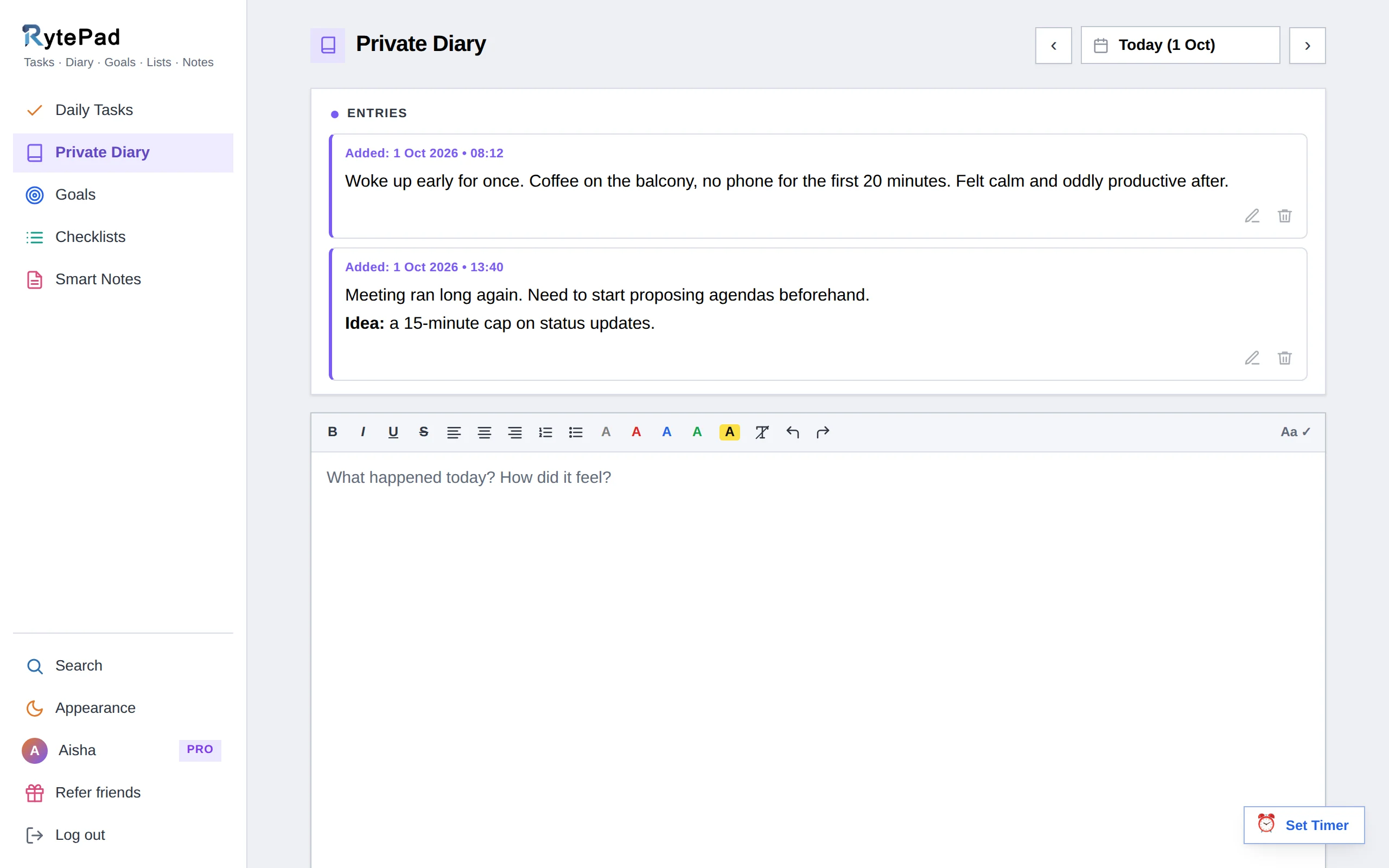
RytePad takes Penzu's biggest weakness, its journaling-only scope, and turns it upside down. Behind one login you get a private diary with formatting and unlimited timestamped entries, a daily task manager, long-term and monthly goals, reusable checklists and Smart Notes with shareable links. One search covers all five with keyword and date filters.
Privacy is where it quietly beats Penzu: every plan, including free, stores your entries encrypted with AES-256. Penzu reserves its strongest encryption for paid tiers.
Pricing is simpler too. The free plan includes unlimited diary entries, unlimited tasks and long-term goals with no trial clock; Pro is a flat $14.97 a year with no auto-renewal. The user guide walks through every feature, and RytePad vs Penzu covers the head-to-head.
Honest caveat: no photo uploads inside entries, encryption is at rest rather than end-to-end, and it is a web app with no native mobile apps.
- Diary, tasks, goals, checklists and notes in one account
- Unlimited entries, tasks and long-term goals free
- AES-256 encryption on every plan, including free
- Search across everything with date filters
- Cheapest full unlock here at $14.97/yr
- No native mobile apps (responsive web app)
- No photo uploads in diary entries
- Encrypted at rest, not end-to-end
Disclosure: RytePad is our own product, built by the small team at MarkSurge. We rank it where we believe it belongs and the caveats above are real; the other nine entries are apps we use and recommend on their merits.
Try the #1 Penzu alternative, free
Unlimited diary entries, tasks and goals on the free plan. Encrypted, private, no card.
Day One is the most polished traditional journal on this list. Entries can include photos, videos, audio and drawings, and the app logs weather, location and activity automatically. On This Day, map views and timelines make revisiting memories a joy, and end-to-end encryption is now included on every tier, free Basic included.
The trade-offs: the free plan allows one photo per entry and one device, Silver ($49.99 a year, annual billing only) is needed to sync across devices, and like Penzu it stays in its lane. It keeps memories beautifully but will not manage your tasks or goals.
- Best-in-class multimedia entries
- End-to-end encryption on every tier
- Automatic weather, location and activity metadata
- Free plan is limited to one device
- Annual billing only, from $49.99
- Journaling only, no productivity features
Journey runs practically everywhere and syncs entries with text, photos, video, audio and location tags. Its extras are guided coach programs on topics such as gratitude and self-care, plus imports from fitness apps and your calendar. Exports include PDF, DOCX and ePub.
End-to-end encryption applies only when you use Journey Cloud sync, and the best features sit behind the Membership ($6.99 a month or $49.99 a year). A $17.99 one-time licence unlocks the app without cloud features.
- Truly cross-platform
- Guided programs and templates
- Excellent export formats
- End-to-end encryption only with Cloud sync
- Free tier is fairly basic
In a world of endless subscriptions, Diarium charges you once. It is widely considered the best journaling app on Windows, and it pulls in your photos, calendar events, social posts and fitness data automatically. Sync goes through your own cloud storage (OneDrive, Google Drive), so entries never sit on the developer's servers.
The catch is that "one-time" applies per platform, so a PC and a phone mean two purchases, and the design is more functional than beautiful.
- No subscription, pay once
- Syncs via your own cloud
- Rich automatic data imports
- Separate purchase per platform
- Utilitarian interface
Most people who leave Penzu are not looking for a prettier diary. They are tired of juggling apps.
Daylio is the journal for people who do not want to journal. Tap a mood icon, tap the activities you did, optionally add a line, and you are done in about 15 seconds. Over weeks it builds mood charts, activity correlations and streaks that reveal real patterns.
It is the opposite of Penzu rather than a direct replacement: minimal writing, maximum data. Premium pricing varies by region (roughly $24 to $36 a year). Pair it with a proper diary if you also want long-form reflection.
- 15-second daily entries
- Insightful mood and habit statistics
- Usable free tier
- Not built for long-form writing
- Mobile only, no web or desktop
Apple's Journal app costs nothing and has arguably the strongest automatic privacy of any journaling app: end-to-end encryption via iCloud is on by default with no way to turn it off, so not even Apple can read your entries. Smart suggestions surface photos, workouts, locations and music as starting points, and it now runs on iPad and Mac too.
The limitation: no Android or web access, and export options are thin.
- Free with no upsells
- End-to-end encrypted by default
- Smart, context-aware prompts
- Apple devices only, no web
- Limited organisation and export
Diarly feels like what Apple Journal would be with several more years of development. It is local-first (entries stay on your device unless you opt into iCloud sync), the writing experience is lovely, and the free tier is a real journal rather than a trial. Markdown, templates and per-journal passwords round it out.
Like most of this list, it is Apple-only and journaling-only.
- Local-first privacy model
- Beautiful, distraction-free editor
- Useful free tier
- No Windows, Android or web version
- Journaling only
Stoic wraps journaling in a guided daily practice inspired by Stoic philosophy: a short morning preparation, an evening reflection, mood check-ins, breathing exercises and a large library of prompts and quotes. If a blank Penzu page always left you stuck, Stoic's structure is the cure.
It is more a mental-wellness routine than a free-form diary, and the deeper content needs a subscription.
- Excellent guided structure
- Combines journaling with mindfulness tools
- Great for building a daily habit
- Less suited to long free-form entries
- Best content is behind the paywall
Grid Diary replaces the blank page with a grid of small prompts: "What am I grateful for?", "What did I accomplish today?", "What is on my mind?". You fill in the boxes and a complete entry emerges. It is a clever fix for blank-page paralysis.
Writers who like to ramble at length will find the grid constraining, and there is no web version.
- Kills blank-page paralysis
- Customisable prompt grids
- Affordable premium tier
- Structured format limits free writing
- No web version
Notion is not a journaling app, but thousands of people journal in it anyway with databases and templates: daily pages, mood properties, habit trackers, linked goals. If you enjoy building systems, it is endlessly flexible and free for personal use.
The flip side: you build and maintain that system yourself, entries are not encrypted like a dedicated diary, and the blank-canvas freedom that makes it powerful also makes it easy to abandon. If you want the all-in-one outcome without the DIY setup, that is the gap RytePad fills with ready-made sections.
- Endlessly customisable
- Free for personal use
- Journal, tasks and notes can coexist
- Requires setup and upkeep
- Not private-diary grade encryption
- Easy to over-engineer, then abandon
How we chose these alternatives
Every app was judged against the things Penzu users most often say they are missing:
- Privacy first. Encryption quality, and whether it is included free or paywalled.
- Free plan value. Can you journal indefinitely without paying?
- Fair pricing. What a full unlock actually costs per year.
- Beyond the diary. Tasks, goals, moods or other tools that reduce app juggling.
- Modern experience. Interfaces that do not feel stuck in 2010.
Keep reading: See the direct head-to-head in RytePad vs Penzu, the wider best online diary apps and best free journal apps roundups, and how to start a daily journal if the habit itself is the problem.
Penzu alternatives: your questions answered
What is the best free Penzu alternative?
RytePad offers the strongest free plan of the dedicated alternatives: unlimited diary entries, unlimited daily tasks, long-term goals and AES-256 encryption at no cost. Apple Journal is also completely free, but only on Apple devices.
Which Penzu alternative is most private?
For default end-to-end encryption, Apple Journal and Day One lead (neither company can read your entries). Among browser-based options, RytePad encrypts all data with AES-256 at rest on every plan including free, whereas Penzu reserves its strongest encryption for paid tiers. Diarium avoids company servers entirely by syncing through your own cloud storage.
Why do people switch away from Penzu?
The most common reasons: the interface feels dated, key features like tags, prompts and the strongest encryption require paid plans, and Penzu does nothing beyond journaling, so most users still need a second app for tasks and goals.
Can I journal and manage tasks in one app?
Yes. That is RytePad's core idea: a private diary, daily task manager, goal tracking, checklists and notes behind one login, with search across all of them. Notion can be built into something similar but needs DIY setup and lacks diary-grade encryption.
Is there a Penzu alternative without a subscription?
Diarium is the standout one-time purchase (paid once per platform), and Journey sells a $17.99 one-time licence. Apple Journal and Notion's personal plan are free outright. RytePad's free plan has no time limit, and its optional Pro is a flat $14.97 a year, not a monthly subscription.
Can I import my Penzu entries into these apps?
Penzu lets paid users export entries as PDF. Day One offers import tools; for most others, including RytePad, the practical route is to keep the export as an archive and start fresh, pasting across the entries you want to keep.
The bottom line
If you only ever want a diary, Day One (memories), Diarly (Apple polish) or Diarium (one-time buy) will serve you well.
Most people who leave Penzu are not just after a prettier journal; they are tired of juggling separate apps for writing, to-dos and goals. That is why RytePad takes the top spot: it matches Penzu's core (private, unlimited entries), fixes its weaknesses (free encryption, modern interface, $14.97 a year for everything), and replaces two or three other apps while it is at it.
Ready to leave the single-purpose diary behind?
Diary, tasks, goals, checklists and notes in one private, encrypted place. Free to start.
Try RytePad free →Free plan with no time limit · No card · Works in any browser